How to ship AI-written code you don't fully understand

· 10 min read
Nuwan Samarasekera
Founder & CEO, TestChimp

You can ship AI-written code you haven't read line by line, as long as you understand and can check the product behaviour it's supposed to deliver. Read the parts with a big blast radius yourself, own the design, write down the intended behaviour before the agent codes, check it with tests the coding agent didn't grade for itself, and keep a named human signing off on each release. Moving your understanding up from lines of code to product behaviour is how you stay accountable for code you didn't type.

Why this question blew up on Hacker News​

On 19 October an Ask HN thread quoted a Meta engineer saying the code he ships now "feels like a black box" and asking how much he needs to understand before he's comfortable moving on. It passed 600 points and 700 comments, so plenty of people feel the same.

The replies split into roughly two camps. One says you must read the code before shipping it, because "this is less a matter of quality and more a matter of responsibility." The other says engineers have always shipped code they didn't fully read: principal engineers and engineering managers have relied on testing, design docs and release management for years.

Both camps are right about something. Responsibility doesn't move to the agent. And reading every line of a 1,000-line agent diff every day doesn't scale. Here's the middle path the most useful replies point to.

1. Decide where you still read every line​

Blast radius should decide how much you read. One commenter vibe codes the UI freely but still writes the SQL schema entirely by hand, because getting that wrong "tends to be far more catastrophic." Another puts it plainly: a stateless frontend needs little more than a visual check, while payments or client-server security deserve a real audit.

Make that list explicit for your codebase. Data migrations, auth, money movement, permissions and anything irreversible go on the "a human reads it" list. Copy changes and layout tweaks don't.

2. Own the design and let the agent fill it in​

The most upvoted reply in the thread comes from someone who doesn't let the LLM design the code at all. They lay out the abstractions and how they interact, and the agent implements the gaps. They might not know how each unit is written, but they know each unit's job and how the units connect.

That's enough understanding to debug, to review a diff at the boundary level, and to notice when the agent is quietly reshaping your architecture.

3. Write down what the product should do before the agent writes code​

If you can't read all the code, you need something else you can read. One commenter's workflow starts with interview-based design and spec: the agent asks about whatever it finds ambiguous before writing anything. Someone else boiled it down to "get really good at defining acceptance criterion."

Keep these as short user stories and scenarios in the repo, next to the code. A scenario like "a guest can't check out without a delivery address" is something a reviewer can understand in five seconds, and it gives tests something to point at.

4. Keep that description current as decisions happen​

The same commenter cites Peter Naur's idea that programming is building a theory of the system in your head. Writing code by hand was how we built that theory. With agents, a lot of the real product decisions now happen in agent chats and meetings instead: "guests must enter an address", "retry the webhook twice, then alert".

If those decisions never make it back into your stories and scenarios, the written description goes stale within weeks, and so does every check built on it. Make "update the scenario" part of finishing a change, or use tooling that picks those decisions up for you.

5. Don't let the agent grade its own work​

This is the sharpest worry in the thread. One commenter is uneasy when the AI writes both the code and the tests: "They might agree with each other and still miss the same thing." The replies have practical fixes:

  • Split the roles: "The agent writing the code never writes the checks it's judged by", and those separate checks caught far more.
  • Test the tests with mutation testing. One team added Stryker to CI and its first run surfaced hundreds of mutations the suite didn't catch.
  • Ask for a failing test first. One reply argues that seeing a test fail before the fix goes in gives you a lot of confidence.

For a deeper checklist, see our guide on how to trust AI-written tests.

6. Measure coverage against intent, not test count​

An agent can write 400 tests that all hit the happy path. What you need to know is which of your scenarios have a test that would fail if the behaviour broke, which API operations and error responses were exercised at all, and whether the flows real users depend on are covered. A test count answers none of that. Track coverage against the scenarios from step 3, and against your API spec, and review the gaps rather than the totals.

7. Turn every escaped bug into a guardrail​

One of the most practical replies treats agents the way engineering management treats teams. Every time the agent ships a bug, ask how to rule out that whole class of bug. Their example: agents kept writing broken database migrations, so they added a migration testing framework that runs each migration over data in the old schema and checks the result. Do that repeatedly and trust is something you earn one bug class at a time.

8. Keep a named human on every release​

Someone still has to say "this is ready." As one commenter put it, you can't fire the agent when things go wrong. Before each release, a person should look at which scenarios changed, which have reviewed tests behind them, what's still uncovered, and what changed in the high blast radius areas from step 1. Then they sign off by name.

The catch: doing all of this by hand every week​

Each of those steps works. The trouble is keeping them going when an agent ships ten changes a day. Specs drift, nobody updates the scenarios, the suite fills with tests nobody reviewed, and "are we covered?" turns into a gut call again. Claude Code can write the tests. It won't tell you on its own whether the right things are tested or whether the description it tested against is still true.

How TestChimp makes this ongoing​

TestChimp runs the loop around your coding agents so the steps above happen on every change instead of when someone remembers.

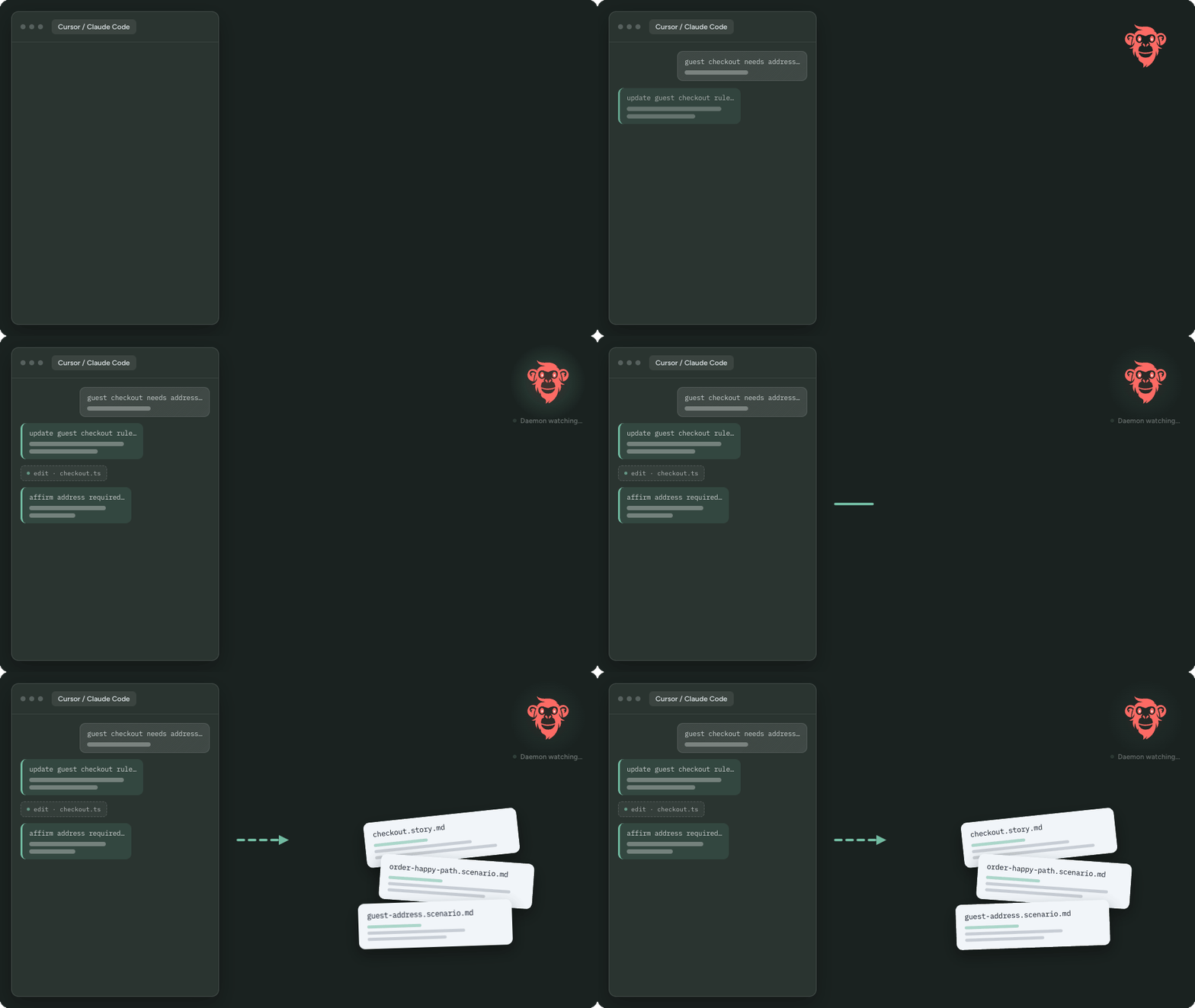
The product description stays current. AgentWatch watches your team's coding agent sessions (Cursor, Claude Code, Codex and others), spots product decisions, and proposes updates to your stories and scenarios. MeetBots do the same for decisions made on Meet, Zoom, Teams or Webex calls. You approve each update, and it lands as Markdown in your repo. That covers steps 3 and 4.

QA runs against that description. Tests link back to scenarios, so every check points at a behaviour someone agreed on.

You see what's actually covered. Semantic coverage shows which parts of the product's scenario space have tests and where duplicates pile up. API contract coverage overlays real request and response payloads from test runs on your OpenAPI spec to show untested operations, fields and status codes. TrueCoverage is a Growth-plan feature that compares what real users do in production with what your tests exercise. Your coding agents get those gaps as work to close, which is step 6 running continuously.

Humans approve agent-written tests and releases. With Verified Tests, a person reviews a test against its scenario and stamps it as verified. If an agent later patches that test, the verification can be marked stale until someone checks it again. Release governance rolls test runs, issues and release checks into one readiness view per version, and CI can gate on the same data. That's step 8 with evidence attached.

You still own the design and the high blast radius code. TestChimp makes sure the behaviour you agreed on is written down, tested and visible every time the agent ships.

FAQ​

Do I need to read every line of AI-generated code before shipping?​

No, but someone needs to read the high blast radius parts: schema and migrations, auth, payments, permissions. For the rest, focus on understanding the design and checking behaviour against written scenarios with tests the coding agent didn't grade for itself.

How do I review code from Claude Code when the diffs are huge?​

Review at the boundaries. Check the diff against your design (did it add a dependency, change an interface, touch a high-risk module?), then check the behaviour against the scenarios it was meant to satisfy. Ask the agent to split large changes into smaller commits and to explain parts you don't follow, then confirm the explanation against the code.

Can I trust tests that the same AI wrote along with the code?​

Only after checking them. The code and tests can share the same blind spot. Have the tests derived from scenarios written before the code, review that each test can fail for the right reason, and add mutation testing or a separate checking agent where the risk is high.

What should a team check before releasing agent-written code?​

Which scenarios changed, which have a reviewed test behind them, which API operations and error paths were exercised, what real-user flows remain uncovered, and whether anything changed in high-risk areas. Then a named person signs off.

How do we keep specs current when decisions happen in agent chats?​

Treat "update the scenario" as part of done, or capture decisions automatically. TestChimp's AgentWatch proposes story and scenario updates from coding agent sessions, and MeetBots do the same from meetings, with a human approving each change.

Is TestChimp a replacement for Claude Code or Playwright?​

No. Claude Code and other coding agents write the code and the tests. TestChimp works alongside them: it keeps the product description current, measures QA coverage against it, feeds the gaps back to the agents, and gives humans approval over tests and releases.
TestChimp weekly changelog: week ending 23 October 2026

· 4 min read
Nuwan Samarasekera
Founder & CEO, TestChimp

Week ending 23 October 2026​

Highlights: TestChimp now installs as a Claude Code plugin with the hosted MCP server built in, ExploreChimp runs on your own machine through your coding agent, and Git sync copes with large pushes and provider rate limits.

Install TestChimp as a Claude Code plugin​

The testchimp-skills repo is now a Claude Code plugin that bundles the skill and the hosted MCP server at https://mcp.testchimp.io/mcp (skill v1.0.64 to v1.0.73, 18 Oct).

/plugin marketplace add testchimphq/testchimp-skills
/plugin install testchimp@testchimp

Restart the session, run /mcp, choose plugin:testchimp:testchimp and sign in. You pick the TestChimp project on the consent screen, so there are no API keys or project IDs in your MCP config. Other changes in the same releases:

  • Setup is split in two: one person runs /testchimp project-init once per project, and everyone else runs /testchimp init.
  • Claude Code's / menu lists the core QA commands as /testchimp:<name> (for example /testchimp:run-qa), trimmed to 16 core commands in v1.0.73.
  • The README documents a permissions rule (mcp__plugin_testchimp_testchimp__*) so TestChimp's MCP tools don't prompt on every call.
  • Non-Claude hosts keep working with the same repo (npx skills add testchimphq/testchimp-skills, or a git clone into your agent's skills folder).

Safer runner credentials and MCP tool annotations (@testchimp/cli 0.1.92 and 0.1.93, 18 Oct)​

  • 0.1.92 adds a title and the standard MCP hints (read-only, destructive, idempotent, open-world) to all 97 tools on tools/list, so agents and MCP clients can tell read-only tools from ones that change data.
  • 0.1.93: agents on the hosted MCP server write the runner key to the gitignored .testchimp/mcp.json with a file-write tool, so the key never appears in a shell command. The local-only save-workspace-creds tool is hidden on the hosted (HTTP) server, and init status values use one consistent format.

ExploreChimp runs on your machine (1.0.15, 14 Oct)​

ExploreChimp UX analysis now runs locally through your coding agent instead of in TestChimp's cloud. The app gives you a ready-to-copy prompt from SmartTests and onboarding. The cloud-hosted exploration wizards and the older UI Test Studio and Test Tree Map screens are retired. Team invitations also got smoother: accepting an email invite keeps its verification, and re-inviting a removed teammate sends a fresh invite.

Git sync for big and busy repos (1.0.16 and 1.0.17, 14 Oct)​

  • Pushes that touch many tests or plans, or create a new branch, sync reliably, with heavy updates processed in the background.
  • When GitHub or GitLab rate limits are hit, sync now pauses and finishes after the limit resets instead of skipping files. A repo connected to several projects downloads each changed file once per push.
  • New users can watch the TestChimp intro video from the dashboard.

Smaller fixes and docs (1.0.18, 17 Oct)​

  • Smart Smoke selection through the agent API no longer fails with HTTP 400 when an agent sends testSuite or folderPath as a string.
  • If a repo is connected but the plans or tests folder isn't mapped, Plans and Sync now say so and link to the mapping screen.
  • With only the demo project, Quick Actions offers Create Project.
  • New comparison pages: Meticulous alternatives, Autosana alternatives, TesterArmy alternatives and TestChimp vs Klarent.

Packages​

  • @testchimp/playwright 0.3.0 (14 Oct) and 0.3.1 (16 Oct): now requires Node.js 20.9 or later. Dependency updates include axios 1.20.0, ai-wright 0.0.13 and Mobilewright 0.0.65.
  • ai-wright 0.0.13 (14 Oct): axios bumped to ^1.20.0 for Dependabot security advisories.

Full product release notes: /changelog.

Claude Writes Your Tests. Who Decides Which Ones Matter?

· 8 min read
Nuwan Samarasekera
Founder & CEO, TestChimp

Last updated: 2026-10-20

TL;DR: If Claude or Cursor already writes your tests, keep it that way. The hard part was never typing the test. It is knowing which tests matter, whether anyone checked them, and whether the release is ready. TestChimp measures your QA posture (requirement coverage, API contract coverage and real user behaviour coverage) so your coding agent knows exactly where the gaps are and can close them. Claude writes tests. TestChimp tells it which ones matter.

"Claude can write tests too, so why bother?"​

It's a fair question, and we hear it often. The answer starts with agreeing: yes, Claude can write tests, and it should. A coding agent with Playwright and a decent CLAUDE.md will produce a working end-to-end test in minutes.

But look at what happens a few months after a team starts doing this at scale. The suite has grown fast. CI is mostly green. And yet nobody on the team can answer a few basic questions:

  • Are our requirements actually tested?
  • How much of our API is exercised?
  • Are the flows our users actually use covered?
  • Which of these tests has a person ever looked at?
  • What should we test next?
  • Are we ready to ship this release?

None of these are test-writing problems. Writing more tests doesn't answer them. They are measurement problems, and what you can't measure, you can't improve.

What the agent can't see on its own​

A coding agent works from its context window: the code it's touching, the prompt, maybe a rules file. That is plenty for writing a test. It isn't enough to decide which tests are worth writing.

The agent knowsThe agent doesn't know
The code it just changedWhat was decided in last week's planning call
The test it was asked to writeWhich requirements have no tests at all
The endpoints in the files it openedWhich API operations and response codes nothing exercises
How the feature should work, per the promptWhich flows real users take most, and where they drop off
That its test passedWhether anyone has checked the test asserts the right thing

So the agent does the reasonable thing: it writes tests near whatever it built most recently. Coverage clusters. Important but unglamorous flows stay untested. And because the agent wrote both the code and the test, a misread requirement shows up in both, and the suite stays green.

Measure first: three questions a dev lead should be able to answer​

TestChimp gives your agent, and your team, three measures of what is actually covered.

1. Requirement coverage: are your requirements tested?​

Stories and scenarios live as markdown files in your repo, in a plans/ folder that syncs with TestChimp. Tests declare the scenario they cover with a Playwright annotation:

test('guest can cancel a booking', {
annotation: [{ type: 'scenario', description: '#TS-214' }],
}, async ({ page }) => {
// ...
});

Coverage rolls up per folder, release and environment, so you can see which scenarios have no tests, no recent runs or a failing latest run.

Requirements also go stale. Decisions now happen in meetings and in coding-agent chats, and rarely make it back into a spec. MeetBots capture what was agreed on calls, and AgentWatch spots product decisions made in Claude Code or Cursor sessions. Both propose story and scenario updates that you approve, so the plans your agent tests against stay current.

2. API contract coverage: how much of your product surface is tested?​

Connect your OpenAPI specs and run your tests with API capture on. TestChimp shows per-operation coverage, plus request field, response field and response code coverage. Traffic that hits undocumented paths or fields is flagged too. Each gap can go straight to your agent as a create-tests task.

3. Real user behaviour coverage: are the flows your users actually use tested?​

TrueCoverage captures the same user events in production and during test runs, on web, iOS and Android. Lay them over each other and you see which real user pathways have no test coverage, ranked by demand, duration and drop-off. That turns "what should we test next?" from a guess into a ranked list.

Then improve: let the agent close the gaps​

Measurement is only useful if it changes what the agent does next. That is where the TestChimp skill comes in. Install it in Claude Code, Cursor or another agent host, and you get workflows that turn the measures into work:

  • /testchimp run QA on a PR: works out what the change affects, updates plans, writes or fixes tests for the scenarios in scope, and runs the related tests.
  • /testchimp upkeep on a cadence: pulls the highest-value requirement and TrueCoverage gaps, fixes recently failing tests, and keeps instrumentation current.
  • Smart-Smoke: impact analysis picks the tests related to a change and an optimal subset of a large suite, so every PR doesn't have to run everything.

Your agent still writes the tests. It just starts from a prioritised list of gaps instead of a blank page. The result is usually fewer, better-aimed tests rather than a bigger suite.

You can run these yourself in your agent, or let them run automatically on events like a failing CI batch or a release moving to ready.

Keep humans on the parts that need judgment​

Agent-written tests need a second pair of eyes, and that person shouldn't have to re-read the whole suite. In TestChimp, a person inspects the run (steps, screen captures and code) and marks a test verified. When an agent later patches a verified test, the test is flagged for human re-verification by default, so a quiet "fix" that loosens an assertion doesn't slip through.

Run evidence such as screenshots, traces and video follows your Playwright config, so you decide how much is captured.

Know whether the release is ready​

All of this comes together per release. Each release gets one clear picture of how ready it is to ship: test runs, requirement coverage, and verification status. Verified tests show a verified badge; unverified tests are visible. The gate can be checked programmatically, so CI can ask "is this release ready?" and get an answer based on evidence, not on a green tick.

What doesn't change​

  • Your tests stay standard. Playwright on web, Mobilewright for native iOS and Android, in your own repo. npx playwright test still runs them.
  • Your plans stay readable. Markdown with frontmatter, reviewed by pull request.
  • Your agent stays your agent. TestChimp supplies the signals and the playbooks. Claude or Cursor does the work.

Who this is for​

If your team only just found out that Claude can write tests, enjoy it. You'll feel the problems above soon enough. If you are already shipping a lot of agent-written code and your suite has grown faster than your confidence in it, that is the point where measurement pays off.

Claude writes tests. TestChimp tells it which ones matter.

Frequently asked questions​

If Claude already writes our tests, what does TestChimp add?​

Measurement and direction. TestChimp shows requirement coverage, API contract coverage and real user behaviour coverage, then feeds the gaps to your agent through workflows like /testchimp run QA and /testchimp upkeep. Your agent writes the tests; TestChimp decides which ones are worth writing.

Do I have to change test frameworks?​

No. Tests are standard Playwright specs on web and Mobilewright specs on native mobile. Optional natural-language steps (ai.act, ai.verify, ai.extract) are available on web.

How do I know an agent-written test checks the right thing?​

Have a person inspect it and mark it verified in TestChimp. If an agent later edits a verified test, it is flagged for re-verification by default.

Does TestChimp support mobile apps?​

Yes. Native iOS and Android are supported through Mobilewright, and TrueCoverage works on web, iOS and Android when instrumented.

How do I get started?​

Connect your Git repo, map a tests folder and a plans folder, install the TestChimp skill in your agent, run /testchimp init, then run /testchimp run QA on your next PR.

How to check that AI-written Playwright tests can actually fail

· 10 min read
Nuwan Samarasekera
Founder & CEO, TestChimp

A green suite only tells you something if the tests could have gone red.

That sounds obvious, but it is the problem I keep hearing from teams that let Claude Code, Cursor or Codex write their end-to-end tests. A recent r/ClaudeCode thread put it well. The author gave the agent every advantage: data-testids in the markup, seed credentials in CLAUDE.md, an architecture doc and Playwright MCP. The suite still had:

  • data-testids that exist nowhere in the app
  • a query parameter the app never reads
  • a test navigating to a route that does not exist
  • test.skip() used every time a test needed data that wasn't already there
  • after a feature was deleted entirely, one test stayed green, because its assertion checked for text anywhere on the page

The last one is the dangerous kind. Broken tests get noticed. Tests that pass while the feature is broken don't.

This post covers the checks we use to catch these, in rough order of cost. The Playwright snippets were run against @playwright/test 1.64.1.

Why agent-written tests pass for the wrong reasons​

These patterns show up whichever model writes the tests:

PatternWhat it looks likeWhy it passes
Assertion too broadexpect(page.getByText('Hotel Aurora')).toBeVisible()The text also appears in a header, sidebar or recent-items list
Assertion on the action, not the outcomeawait expect(saveButton).toBeEnabled() after clicking saveProves the button exists, not that anything was saved
Skipped instead of seededtest.skip(!booking, 'no booking found')Skipped tests are not failures in most CI views
Soft or missing assertionsA test that only clicks and navigatesNo expect at all, so nothing can fail except a timeout
Mocked awaypage.route('**/api/**', ...) returning a fixtureThe real backend is never exercised

Agents tend to do these things because they are rewarded for getting the suite to go green. A comment in the r/Playwright thread on Test Agents describes the same thing as a "fix-run-fail-fix loop". If the only signal is green or red, green wins.

Check 1: Make the agent prove the test goes red first​

The cheapest check is the old TDD rule. A new test should fail before the change and pass after it. For a bug fix, ask the agent to run the test against the unfixed code and paste the failure output into the PR description.

You can enforce part of this in CI by running the new or changed spec files against the base branch:

# In a PR job (checkout with fetch-depth: 0): which spec files changed?
git fetch origin main
CHANGED=$(git diff --name-only origin/main...HEAD -- 'tests/**/*.spec.ts')
[ -z "$CHANGED" ] && exit 0 # no new or changed specs, nothing to check

# Check out the app code from main, keep the new tests
git checkout origin/main -- src/
npx playwright test $CHANGED --reporter=line && {
echo "New tests pass on main. Do they test the change?"
exit 1
}

This only fits tests written for a behaviour change. For tests that cover existing behaviour, you need the next check.

Check 2: Break the app on purpose with page.route​

You don't need a full mutation testing tool to see whether a test is sensitive to the thing it claims to cover. Playwright's network routing lets you corrupt one response and confirm the test fails.

Say the agent wrote this:

// tests/search.spec.ts
import { test, expect } from '@playwright/test';

test('search filters results by destination', async ({ page }) => {
await page.goto('/search?destination=lisbon');
await expect(page.getByText('Hotel Aurora')).toBeVisible();
});

Now write a "should fail" twin that removes the expected hotel from the API response:

// tests/sabotage/search.sabotage.spec.ts
import { test, expect } from '@playwright/test';

test('search test notices when results are wrong', async ({ page }) => {
test.fail(true, 'sabotaged response: the assertion must not pass');

await page.route('**/api/search*', async (route) => {
const response = await route.fetch();
const json = await response.json();
json.results = json.results.filter((h: { name: string }) => h.name !== 'Hotel Aurora');
await route.fulfill({ response, json });
});

const searched = page.waitForResponse('**/api/search*');
await page.goto('/search?destination=lisbon');
await searched; // make sure the sabotaged response actually arrived
// Same assertion as the real test. We EXPECT this to fail.
await expect(page.getByText('Hotel Aurora')).toBeVisible({ timeout: 3000 });
});

Playwright's test.fail() marks the test as expected to fail. It is reported as passed when it fails, and as an error when it unexpectedly passes.

If the sabotage test passes, your real test is too broad. In this example it passes when "Hotel Aurora" also appears in a "recently viewed" sidebar. That is exactly the failure from the Reddit thread.

Two traps we hit while testing this:

  • Wait for the sabotaged response. Without await searched, the assertion can pass on the sidebar before the search results load. The test then ends while the route handler is still running, Playwright reports a "Test ended" error from route.fetch, and test.fail() counts that error as the expected failure. The sabotage twin looks fine while proving nothing.
  • The real test has the same race. getByText('Hotel Aurora') can match the sidebar before results render, so the original test passes even when search is slow or broken. Scoping the assertion (next check) fixes both.

Don't write these for every test. Write them for the flows that make you money (signup, checkout, billing) and for any test that has never once failed in CI.

Check 3: Scope assertions to the part of the page that matters​

The fix for broad assertions is usually scoping. Playwright 1.64 added Locator.within(), which reads naturally:

const results = page.getByRole('region', { name: 'Search results' });
const hotel = page.getByRole('heading', { name: 'Hotel Aurora' });

await expect(hotel.within(results)).toBeVisible();

Chaining (results.getByRole(...)) works the same way on older versions. Either way, the sidebar can no longer make the test pass.

Better still, assert on the outcome instead of on the presence of text:

const cards = page.getByRole('article').within(results);
await expect(cards).toHaveCount(3);
await expect(cards.first()).toContainText('Lisbon');

Check 4: Catch the lazy patterns with lint, not review​

Some patterns should never reach a PR. eslint-plugin-playwright already has rules for most of them:

// eslint.config.mjs
import playwright from 'eslint-plugin-playwright';

export default [
{
...playwright.configs['flat/recommended'],
files: ['tests/**/*.ts'],
rules: {
...playwright.configs['flat/recommended'].rules,
'playwright/no-skipped-test': 'error',
'playwright/expect-expect': 'error',
'playwright/no-wait-for-timeout': 'error',
'playwright/no-networkidle': 'error',
'playwright/no-conditional-in-test': 'error',
'playwright/no-force-option': 'error',
},
},
];

expect-expect catches tests with no assertions. no-skipped-test catches the "skip instead of seed" habit. no-networkidle matters because networkidle is itself a common source of flakiness. The Zenn team found this when their own agent skill recommended it (write-up).

Put the same rules in your CLAUDE.md, AGENTS.md or .cursor/rules so the agent avoids them in the first place. Keep lint as the backstop, because agents don't always follow instructions.

Check 5: Remove random failures so red means something​

Flaky tests teach a team to ignore red, and then the checks above don't matter. Three recent Playwright features help here:

// playwright.config.ts
import { defineConfig } from '@playwright/test';

export default defineConfig({
retries: process.env.CI ? 2 : 0,
retryStrategy: 'isolated', // 1.62: retries run at the end, one at a time
use: { trace: 'retain-on-failure' },
});
# 1.64: random order surfaces tests that depend on each other
npx playwright test --shuffle
# reproduce with the printed seed
npx playwright test --shuffle 271828182
// 1.63: tests sharing a resource never run at the same time
test('update account settings', { lock: 'user-settings' }, async ({ page }) => {
// ...
});

Sources: Playwright release notes for 1.62, 1.63 and 1.64. Treat a test that passes only on retry as a bug to fix.

Check 6: Seed data so there is nothing to skip​

Agents use test.skip() when the state they need isn't there. Give them a fixture that creates it through your API, so skipping is never the easy path:

// tests/fixtures.ts
import { test as base } from '@playwright/test';

type Booking = { id: string; propertyName: string };

export const test = base.extend<{ booking: Booking }>({
booking: async ({ request }, use) => {
const res = await request.post('/api/test/bookings', {
data: { property: 'hotel-aurora', nights: 2 },
});
const booking = (await res.json()) as Booking;
await use(booking);
await request.delete(`/api/test/bookings/${booking.id}`);
},
});
export { expect } from '@playwright/test';

Tell the agent in your rules file: "If a test needs data, use or add a fixture in tests/fixtures.ts. Never skip."

A checklist you can paste into your PR template​

### E2E tests in this PR
- [ ] Each new test was seen failing (output pasted, or the CI base-branch check ran)
- [ ] Assertions are scoped to a region/component, not the whole page
- [ ] Assertions check an outcome (data, count, state), not just that an element exists
- [ ] No test.skip, waitForTimeout, networkidle or force: true (lint passes)
- [ ] Test data comes from fixtures, not from whatever is in the DB
- [ ] Critical flows have a sabotage twin marked test.fail()
- [ ] Ran with --shuffle at least once

Where this leaves you​

None of this is new testing theory. What changed is the author: very fast, very eager to see green, and unaware of which parts of your page matter. The checks that scale best are the ones the agent can't skip: lint rules, the base-branch check and sabotage twins on your money paths.

We hit the same problem building TestChimp. That is why, in TestChimp, a test only gets a "verified" badge after a person on the team has inspected it, and an agent's later fix can flag that badge as stale for another look. You don't need a platform to get most of the value, though. The checklist above is a good start.

FAQ​

How do I know if an AI-generated test is useful?​

Break the behaviour it claims to cover and see if it fails. Corrupt the API response with page.route, remove the feature behind a flag, or run the test against the base branch. If it stays green, it is not testing what its name says.

Should I let an agent auto-fix failing Playwright tests?​

Only with guardrails. Allow fixes to locators and waits. Block any change that removes or loosens assertions, adds retries or adds test.skip, and require a human to review the diff. In the r/Playwright thread above, people found the healer agent useful for selector drift and weak on timing problems.

Is mutation testing practical for end-to-end tests?​

Full mutation testing is usually too slow for E2E suites. A cheaper middle ground is targeted fault injection: a few "sabotage" tests on critical flows that corrupt network responses and are marked test.fail().

Which lint rules catch the most common agent mistakes?​

From eslint-plugin-playwright: expect-expect, no-skipped-test, no-wait-for-timeout, no-networkidle, no-force-option and no-conditional-in-test.

What Playwright version do I need for Locator.within() and --shuffle?​

Playwright 1.64. Test locks need 1.63 and retryStrategy: 'isolated' needs 1.62. On older versions, chain locators and use --repeat-each to look for flakiness.

Bonobi: A QA Counterpart for Every Team Member, Coordinated by TestChimp

· 12 min read
Nuwan Samarasekera
Founder & CEO, TestChimp

Last updated: 2026-10-23

TL;DR: We shipped Bonobi. Every team member (developer, QA engineer, QA lead, PM) gets their own Bonobi, an AI QA bot that handles their share of the QA process in the background: updating requirements from coding-agent chats, writing E2E tests when a feature is done, fixing assigned issues, triaging failing batches, and reporting release health. TestChimp coordinates the swarm: it tracks your QA posture, routes each event to the right person's Bonobi, and keeps an audit trail of what every Bonobi did. Bonobi proposes, people approve. If you want QA to run with agents, mostly in the background while your devs build, this is how we think it should work. Docs: Bonobi · Install and use.


Coding got agents. QA got a longer queue.​

Coding agents changed how fast a team ships. A developer with Cursor or Claude Code can finish in an afternoon what used to take a sprint. QA didn't speed up at the same rate, so the work piles up in the same places it always did, only faster:

Quality responsibilityWhat actually happens
Keep requirements currentDecisions get made in agent chats and meetings; stories and scenarios fall behind
Write tests when the feature is doneThe step most likely to be skipped when the next ticket is waiting
Own the red buildFailures sit until someone notices they're theirs
Run assigned manual checksScenarios wait in a test run nobody opened
Know if the release is healthyFound out in the release meeting, or after it

The common answer is "add an AI testing agent". That helps with one item on the list. It doesn't help with the rest, because these responsibilities aren't one person's job.


QA is a team sport​

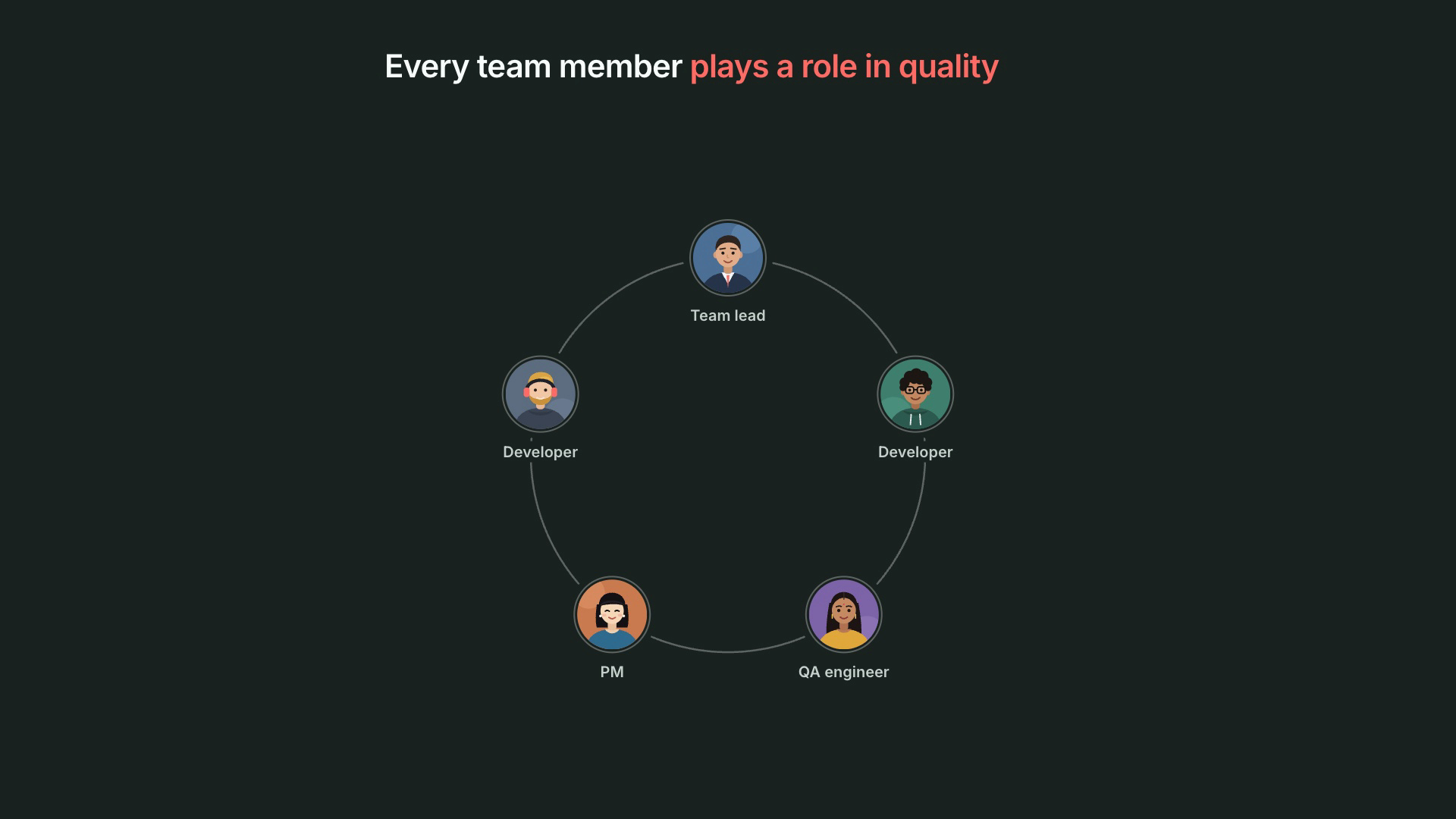
Developers own tests for what they build. QA engineers own test runs and failures. Leads own release health. PMs own requirements and the go / no-go call. Every role holds a piece of quality, and every piece slips when that person is heads-down.

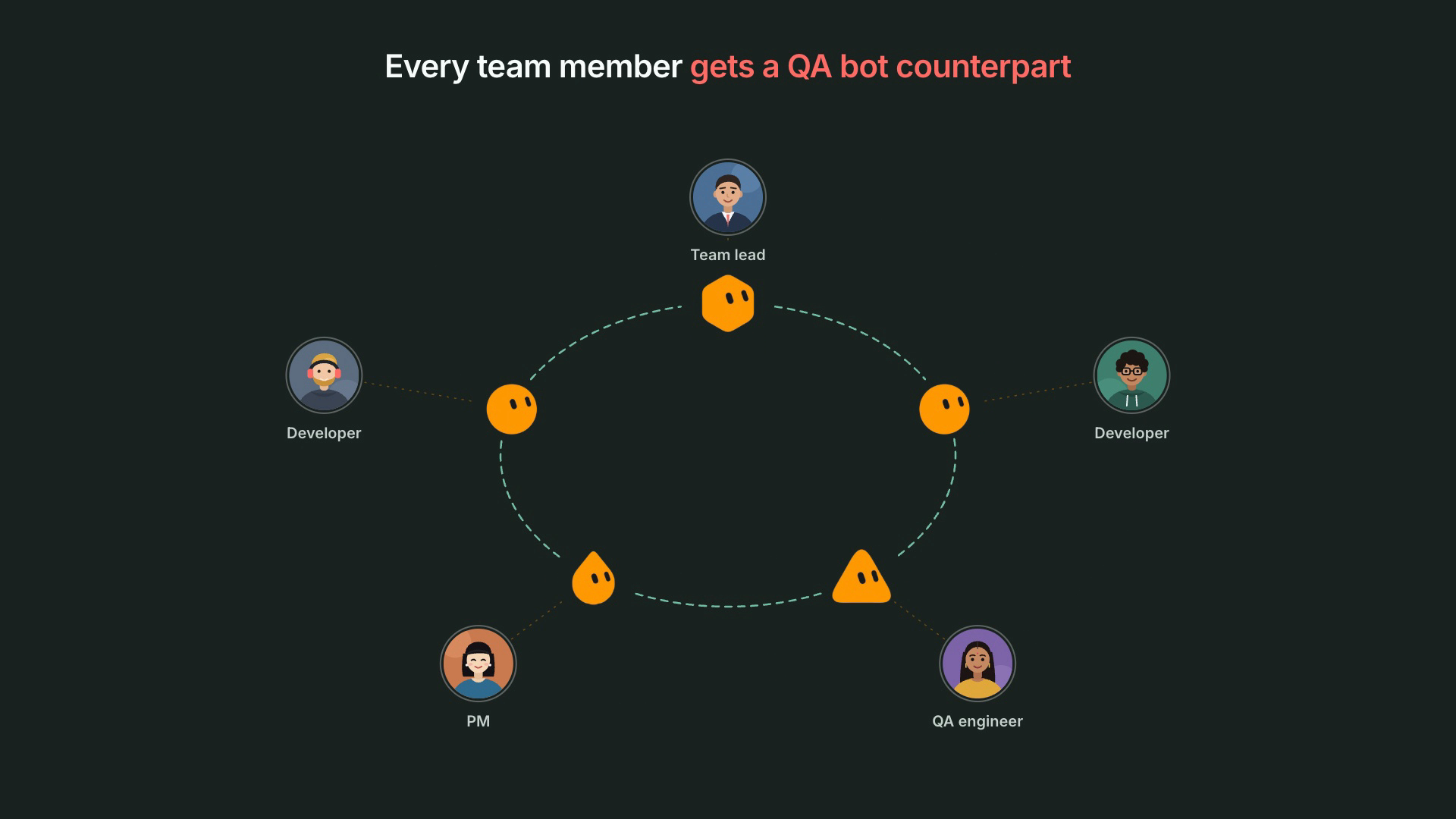
Every team member plays a role in quality: a team lead, two developers, a QA engineer and a PM arranged in a ring

So we stopped asking "what should the QA agent do?" and asked "what would it look like if every role had its own QA agent?"


What is Bonobi?​

Bonobi is TestChimp's QA bot on Grok, one per team member. It acts as that person's QA counterpart on one project. It receives the events that matter to its owner (their git pushes, the issues and scenarios assigned to them, test batches on their branches, releases), proposes the next QA step, and runs it through a TestChimp workflow once the owner approves.

Each person installs their own Bonobi. During onboarding it asks for their role and pre-selects the work that role usually owns. Together, these Bonobis form a QA swarm that covers the whole team's quality responsibilities.

Every team member gets a Bonobi: each person in the ring is paired with their own


How does TestChimp coordinate the swarm?​

A swarm of agents without coordination is just more notifications. TestChimp is the coordination layer.

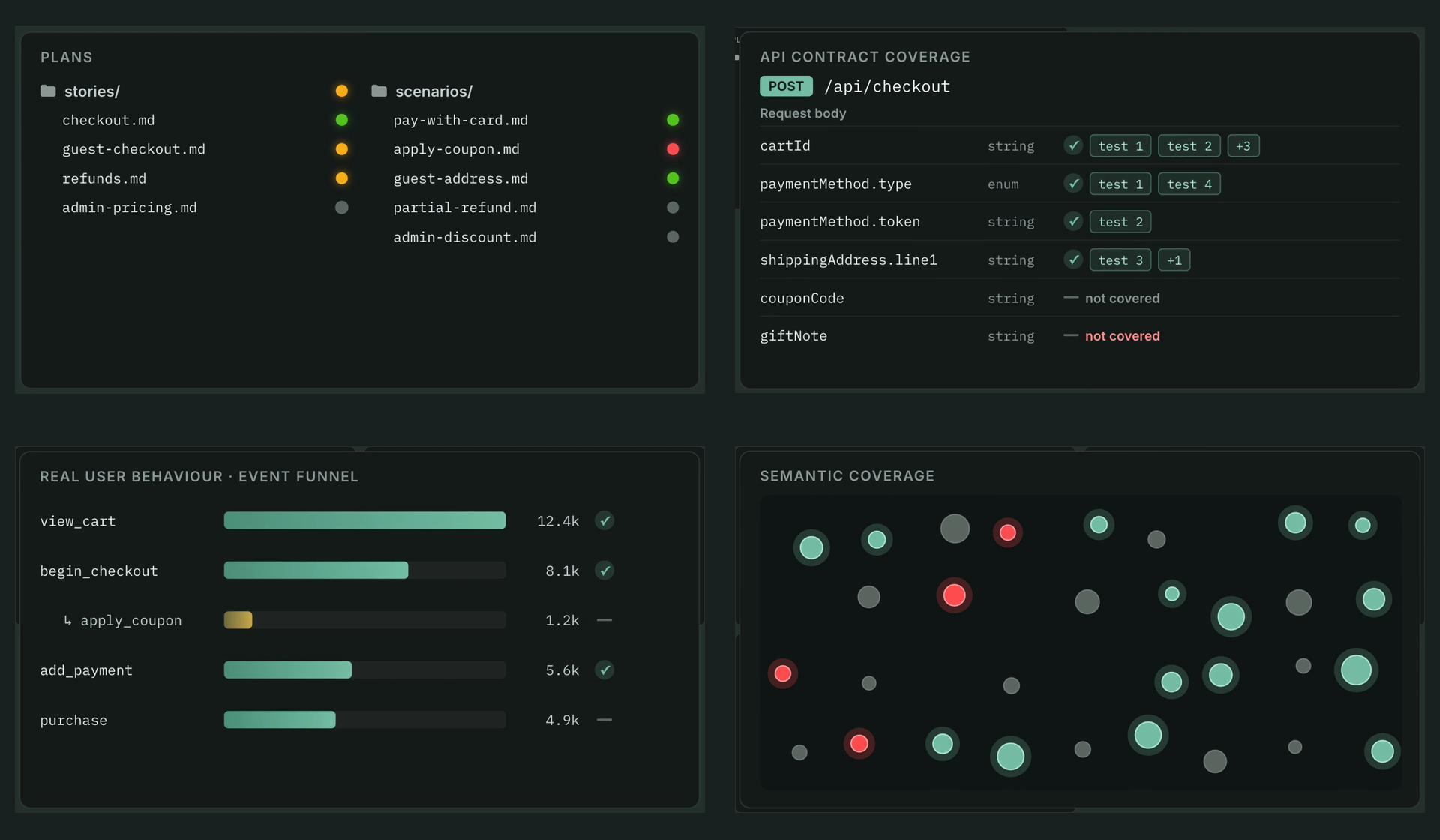
It knows your QA posture. Bonobis aren't guessing from code. They work from what TestChimp already tracks about your product: requirements as code (stories and scenarios in your repo), API contract coverage, real user behaviour from TrueCoverage, semantic coverage, releases, issues, test executions and verified tests.

TestChimp QA posture signals: requirement coverage, API contract coverage per field, a real user behaviour funnel, and semantic coverage

It routes every event to the right Bonobi.

  • Your pushes and your assignments go to your Bonobi. Your teammate's Bonobi never sees them.
  • A failed E2E or k6 batch goes to the Bonobi of the latest author on that branch, so two Bonobis never race to fix the same failure.
  • Release events go to every Bonobi subscribed to release health, each tuned to its owner's role.

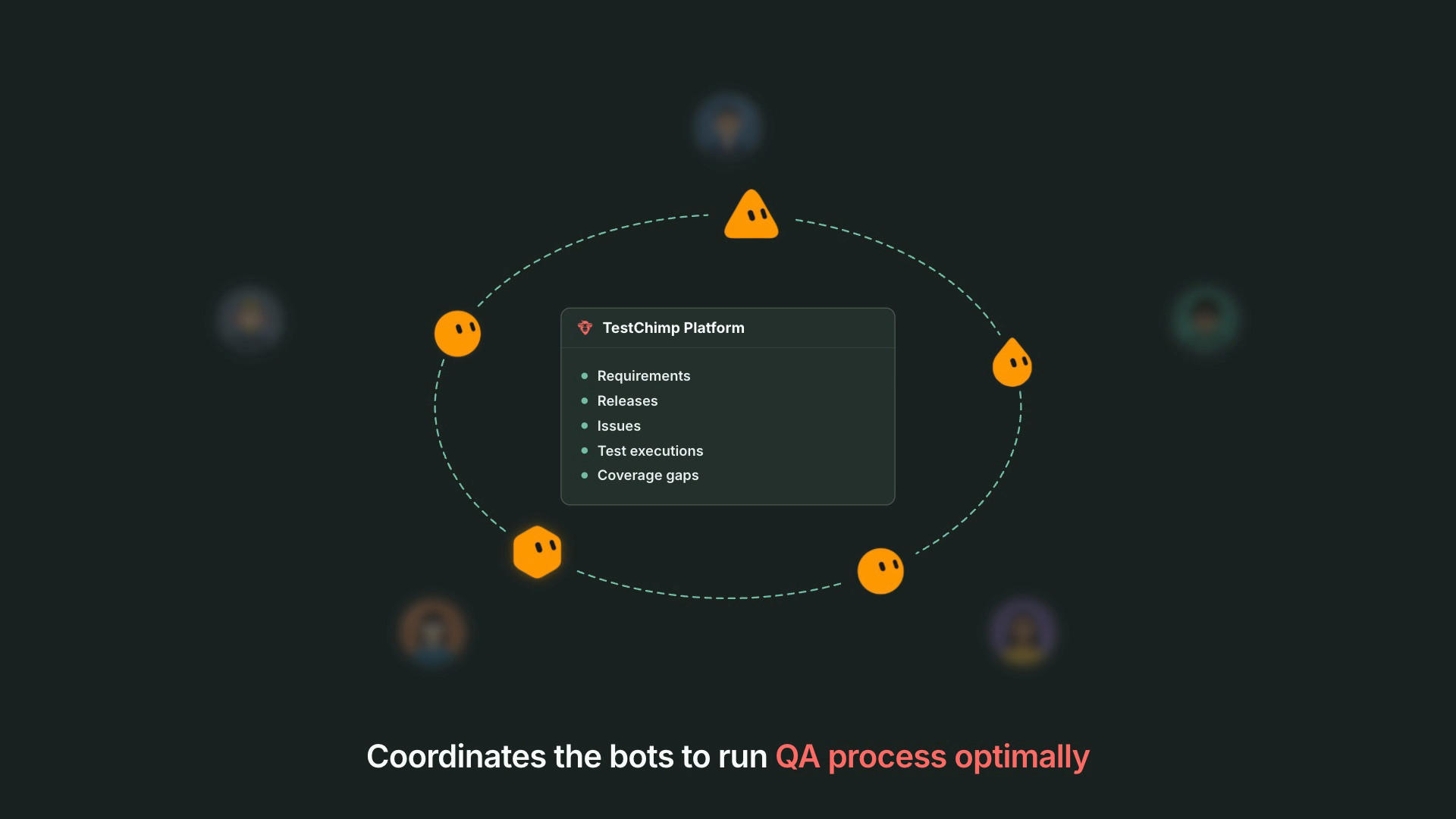
It keeps delivery sane and auditable. Events are paced (grouped per person and type over a few minutes), queued while a Bonobi is offline, and acknowledged by that Bonobi. Every Bonobi has its own id, and TestChimp records what was sent to which Bonobi and which workflows each one ran.

TestChimp coordinates each Bonobi to run the QA process: the ring orbits the TestChimp Platform


What does each role's Bonobi do?​

The developer's Bonobi: tests and specs keep up with the code​

You push. Your Bonobi reads the commits and judges whether the feature looks done (WIP commits and bursts of pushes mean "wait"). When it does, it:

  1. Asks AgentWatch for the requirement changes you decided in your coding-agent chats, and shows you the plan. You approve; the stories and scenarios in your repo update.
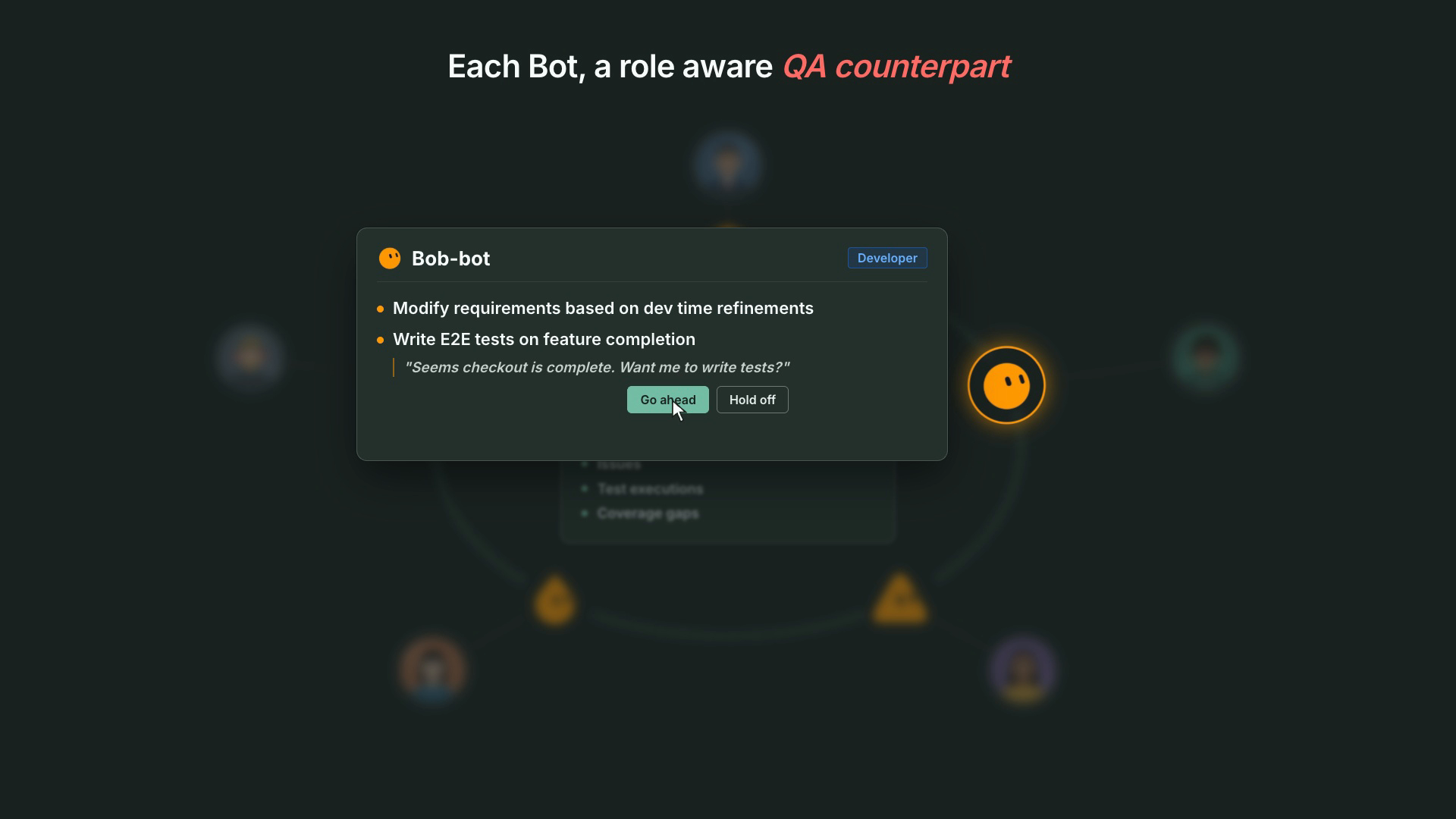
  2. Proposes E2E tests for the changed behaviour, tied to those updated scenarios. You say "Go ahead"; it writes them and asks you to verify the runs.
  3. Picks up issues assigned to you with a fix plan.

Bob-bot, a developer&#39;s QA bot: &quot;Seems checkout is complete. Want me to write tests?&quot; with Go ahead and Hold off

This is the hero flow, and the reason we built Bonobi: requirements updated from how the feature was actually decided, then tests written against them, without the developer stopping to context-switch into QA.

The QA engineer's Bonobi: no more chasing​

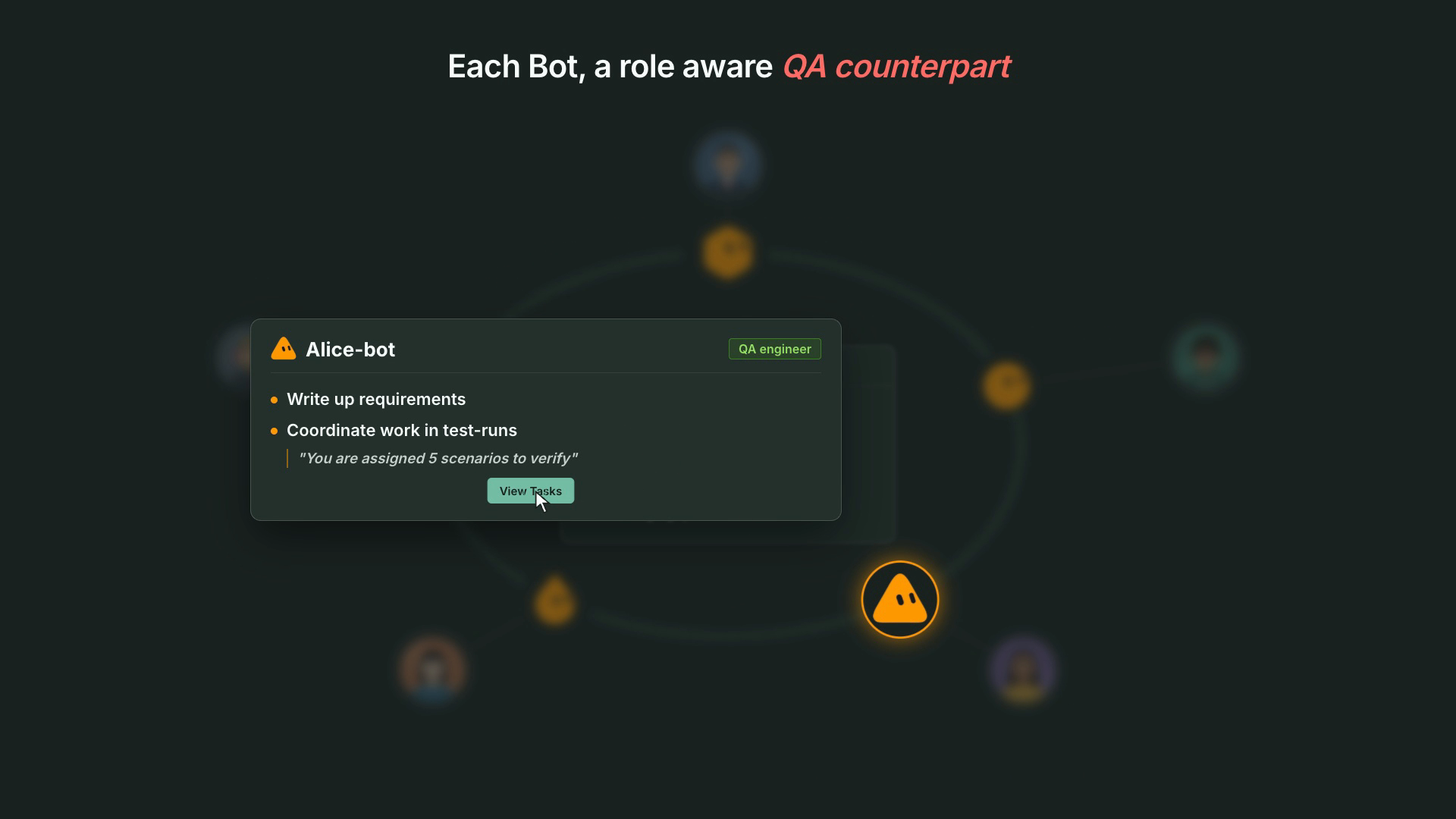
Scenarios assigned to you in a test run show up with a link and an offer to walk through them, record results, or automate them. Failing E2E batches on your branches arrive triaged (test needs an update, product bug, or flaky) with a proposed fix. k6 threshold breaches come with a baseline comparison. Turn on requirement updates and it drafts specs from the meetings you were in.

Alice-bot, a QA engineer&#39;s QA bot: &quot;You are assigned 5 scenarios to verify&quot; with View Tasks

The QA lead's Bonobi: posture without a status meeting​

When a release is created or changes status, Bonobi sends a short heads-up: blockers, failing areas, open test runs, tests nobody has verified. Every week it sends a QA posture digest. When a release heads to done with gaps, it offers a release check.

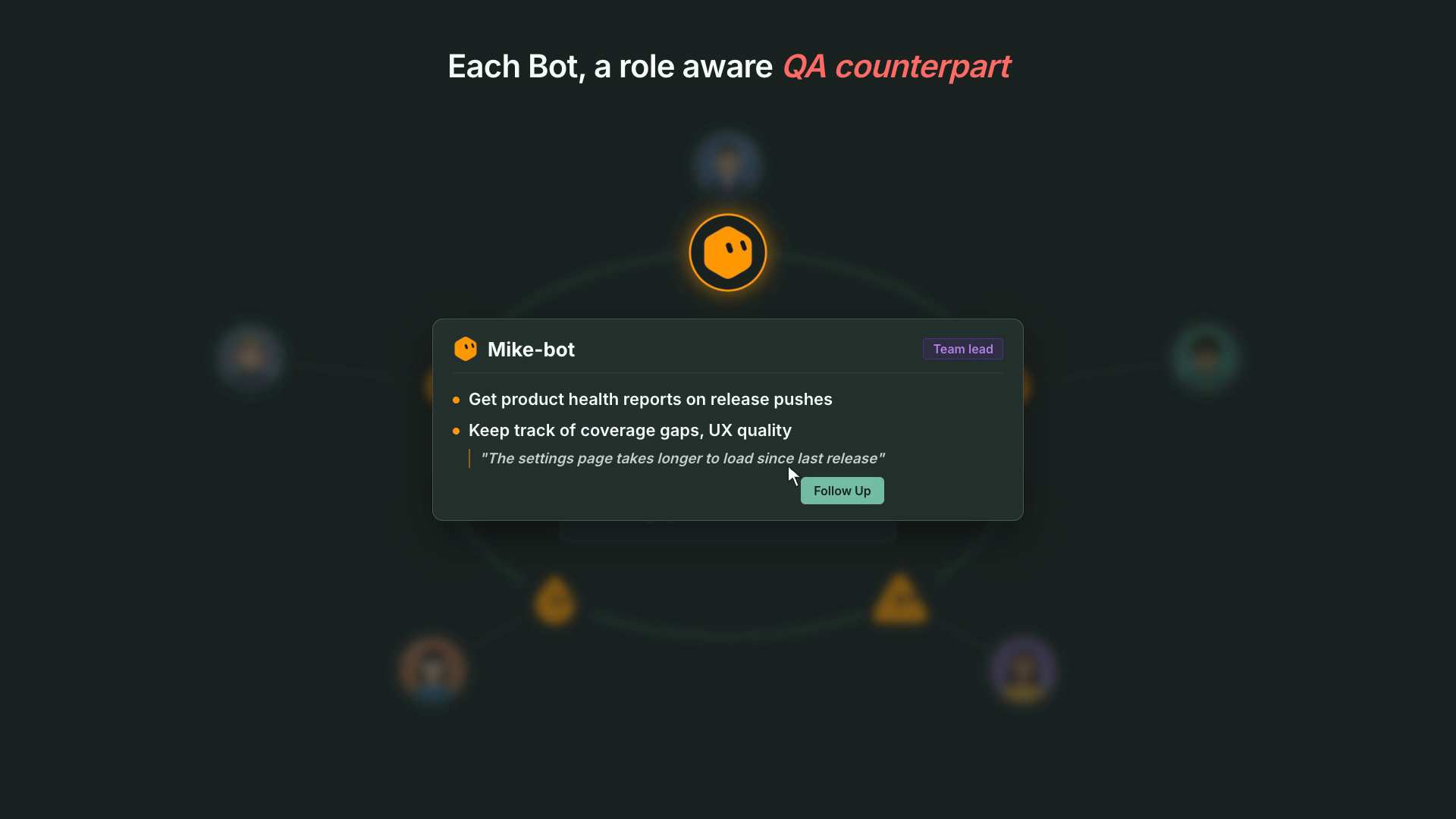
Mike-bot, a team lead&#39;s QA bot: product health reports on release pushes and coverage and UX quality tracking

The PM's Bonobi: go / no-go in three lines​

Release heads-ups written for a decision (blocking issues, failing priority scenarios, due date), a weekly health digest, and requirement updates proposed from meeting summaries, so what was agreed in the room becomes a story.


What is the developer experience like?​

The point is that QA happens next to the work, not after it.

You doYour Bonobi does
Keep building with your coding agentWatches your pushes and waits until the feature looks done
Approve a requirement-update plan in chatUpdates the stories and scenarios in your repo
Say "Go ahead" on the test proposalWrites E2E tests for your branch, then asks you to verify them
Get assigned a bugShows up with severity, repro and a fix plan
Push a branch that breaks CITriages the failures and proposes the fix
Start your dayGets a short reminder of what's on your plate, or nothing if there isn't anything

No new dashboard to check. No QA ticket queue to babysit. You approve or say "hold off", and Bonobi takes it from there.


Does Bonobi act on its own?​

No, and that's deliberate.

  • Propose, then wait. No story, scenario, test, issue, commit or local command happens without the owner's explicit approval in the conversation.
  • Owner's permissions only. A Bonobi acts as its owner and nobody else. TestChimp's existing access controls apply.
  • Existing workflows, not improvisation. Approved work runs through the same TestChimp workflows your coding agents use (author plans, create tests, fix issue, fix test failures, release check), each with its own plan and report.
  • Your machine stays yours. Local steps (repo mapping, AgentWatch, local test runs) run on your computer only after you grant access, with per-command approval.
  • Pause all from your Bonobi's settings page whenever you want quiet.

Agents do the legwork. People keep the judgment.


Why is this the best way to run QA with agents?​

There are a few ways teams try to put agents on QA today. Here's how they compare:

Coding agent writes its own testsStandalone AI testing agentBonobi + TestChimp
Who it servesOne developer, in one sessionThe QA teamEvery role: developer, QA engineer, QA lead, PM
What triggers itYou remember to askA scheduled suite or a manual runReal project events: pushes, assignments, failing batches, releases
Knows the requirementsOnly what's in the promptUsually its own test casesStories and scenarios in your repo, kept current from agent chats and meetings
CoordinationNoneOne agent, one queueEvents routed to the right person's bot; one owner per failing branch
Coverage signalsGreen or redIts own reportsRequirement, API contract, real-user (TrueCoverage) and semantic coverage
Who checked the testsThe agent that wrote the codeThe toolA human verifies; Verified Tests record who
Where the work livesYour repo, untrackedThe vendor's platformYour git repo, with traceability and an audit trail

The first column is how most teams start, and it's why green tests stop meaning much. The second fixes testing for one team and leaves the rest of the responsibilities where they were. Bonobi gives every role its agent, and TestChimp gives the swarm a shared picture of quality and a way to coordinate.


Why this belongs in TestChimp​

We've argued that skills are SaaS distribution, that Meeting Bots should bring product intelligence into the call, and that AgentWatch should capture decisions where they now happen: in coding-agent chats.

Bonobi is what those pieces were for. The skill and CLI are the workflows each Bonobi runs. AgentWatch and Meeting Bots keep requirements current. Plans as code, coverage, releases and verified tests are the shared picture of quality. And the swarm makes sure every person on the team has a Bonobi working on their part of it.

A QA counterpart for every team member.

A QA counterpart for every team member: Bonobi


Get started​

  1. Make sure your project's one-time setup is done (/testchimp project init). Your bot can walk you through it.
  2. Add the Bonobi template in Grok.
  3. Ask it to "set up my QA bot", authorize it for your project, and paste its webhook into User Settings → My Bots.
  4. Pick your role. Let it map your local repo and pair AgentWatch if you want requirement updates.
  5. Keep building. Approve the first proposal when it lands. Then get the rest of your team on it.

Full guide: Install and use Bonobi · Overview: Bonobi.


Frequently asked questions​

What is Bonobi?​

Bonobi is TestChimp's QA bot on Grok: an AI agent that acts as one team member's QA counterpart on one TestChimp project. It receives that person's project events (pushes, assigned issues and scenarios, test batch results, releases), proposes the next QA step, and runs a TestChimp workflow after the person approves.

How is a QA swarm different from a single AI testing agent?​

A single agent covers one role's work, usually test execution. Bonobi gives every team member their own QA counterpart, so requirement updates, test authoring, issue fixes, failure triage, manual test coordination and release health are all covered. TestChimp routes each event to the right person's Bonobi and tracks the shared QA posture.

Does Bonobi make changes without approval?​

No. Bonobi proposes and waits for its owner's explicit approval before any change, test run, commit or local command. Read-only lookups and event acknowledgements are the only things it does without asking.

Which roles get a Bonobi?​

Developers, QA engineers, QA leads and product managers. The role you pick pre-selects capabilities: developers get requirement updates, E2E authoring and issue fixes; QA engineers get E2E authoring, test batch fixes and manual test coordination; QA leads get QA posture, batch fixes and manual coordination; PMs get QA posture and requirement updates. You can change any of them.

How does Bonobi keep requirements current?​

From two sources. AgentWatch reads your local coding-agent chats and drafts story and scenario updates after a push, and Meeting Bots provide meeting summaries Bonobi can turn into requirement updates. You approve the plan and the stories and scenarios in your repo update.

Which platforms does Bonobi run on?​

Grok today, installed from the Bonobi template. Dots support is coming soon.

Will my teammates' Bonobis get my events?​

No. Pushes, issues and scenarios go only to the Bonobi of the person they belong to. Failed batches go to the latest author on the branch. Only release events go to every Bonobi subscribed to release health.

Exit-Safe Test Management: Keep Your Tests and Plans in Your Own Git Repo

· 20 min read
Nuwan Samarasekera
Founder & CEO, TestChimp

Last updated: 2026-09-30

TL;DR: TestChimp has two layers. The platform layer runs the QA loop and governance: it orchestrates agents working through product risks and coverage gaps, and holds verification status, execution history and coverage signals. The repo layer is yours: tests are standard Playwright specs and plans are markdown stories and scenarios, in your own git repo and synced both ways with TestChimp. If you leave, the repo and its full git history stay with you. Verified Tests status is the only thing that lives solely in TestChimp; nothing else is lost when you leave, because everything else is either in git or covered by TestChimp's full download of data not stored in git.

What does vendor lock-in look like in AI testing tools?​

Lock-in in testing tools rarely looks like a contract clause. It looks like one of these:

  • Tests stored as records in a hosted tool. You can read them in the vendor's UI, but leaving means an export you did not test until you needed it.
  • A proprietary test format or runner. The tests only execute inside the vendor's platform.
  • Requirements and test cases in a database. Plans are reachable only through the vendor's UI or API, so your coding agents cannot read them and migration means a data export project.
  • History that does not travel. Teams that have moved between test management tools report that imports keep case titles and steps but flatten the history (a practitioner comment, not a TestChimp claim).

AI test generation adds a new version of the same question: when an agent writes hundreds of tests for you, where do those tests live, and in what format? If the answer is "in the vendor's system", your investment sits on their side of the door.

TestChimp is built the other way around. Tests are standard Playwright (or Mobilewright for native mobile) files in your repo. Plans are markdown files with frontmatter in your repo. The platform adds workflow, verification and coverage intelligence on top of those files. Per the docs, it orchestrates a feedback loop so agents keep seeing product risk and coverage gaps and act on them, while your files stay the source of truth.

What lives in your repo?​

AssetWhere it livesFormat
Automated testsYour repo, in the folder you map as the tests rootStandard Playwright .spec.ts / .spec.js (Mobilewright for native mobile), no proprietary file extension
Requirements: user storiesYour repo, in the plans folder (for example plans/stories/)Markdown with YAML frontmatter
Requirements: test scenariosYour repo, in the plans folder (for example plans/scenarios/)Markdown with YAML frontmatter
Knowledge files and optional event specsYour repo, in the plans folderMarkdown
Traceability linksInside your test codeA Playwright annotation, { type: 'scenario', description: '#TS-<n>' }, so reviewers see links in the PR
Performance testsYour repo, in a reserved k6/ tree under the tests rootk6 scripts
CI and fixturesYour repoYour existing pipeline config, plus the reporter plugin

You choose the folder names. The tests and plans folders are mapped in the project's repository settings, and TestChimp writes small marker files (.testchimp-tests, .testchimp-plans) so agents can find the roots. Sync is two-way (bi-directional). Changes made in TestChimp reach your repo as pull requests or merge requests on branches prefixed testchimp-, so they go through your normal review, and commits to the mapped plans and tests folders come back into TestChimp through the provider webhooks. Plans are kept aligned with your default branch, while SmartTests sync branch by branch.

What lives in the platform instead:

  • Verification status. Verified Tests badges and who verified what are stored in TestChimp, not in source. This is the only thing that exists solely in TestChimp.
  • Data not stored in git. Execution history and coverage roll-ups (test-run results reported from CI, requirement coverage views, and release intelligence), coverage signals (TrueCoverage, which compares production user events with test runs; API contract coverage, which is API schema coverage built from captured API traffic; and semantic coverage, where stories, scenarios, tests and events are mapped by meaning in the Semantic Canvas), and workflow objects (issues, releases, test runs, and cloud meeting transcripts) are platform data rather than files in your repo. TestChimp supports a full download of all data that is not stored in git, so this data is not lost when you leave.
  • Stable IDs. Story and scenario IDs are tracked in the platform and referenced in the markdown frontmatter, which is how status and traceability stay consistent.

This split is deliberate. What a test does and what the product should do are files you own. Who inspected which test is platform state (Verified Tests status), and the remaining platform-side data can be downloaded in full. Meet-Bots and AgentWatch feed the plans side: they propose story and scenario updates from meetings and coding-agent chats, and you approve them into the plans folder, so the files stay current.

Details: SmartTests in your codebase, Code repository overview, GitHub sync for SmartTests, Requirement planning as code, Export plans to Git.

What does leaving TestChimp look like?​

Concretely, in the order a team would do it:

  1. Merge everything pending. Merge or close any open testchimp- pull requests so your default branch has the latest plans and tests. From here the repo is complete on its own.
  2. Keep your files. The plans folder, the tests folder, the k6/ tree, your Playwright config and your CI pipeline are already yours, with full git history. Nothing needs to be exported for these.
  3. Replace optional AI steps. If tests use ai.act, ai.verify or ai.extract, those steps run through the @testchimp/playwright plugin. Replace them with plain Playwright locators and assertions before you remove the plugin. Tests that never used AI steps are already plain Playwright.
  4. Remove the integration wiring. Take the @testchimp/playwright reporter out of playwright.config, delete the TESTCHIMP_API_KEY secret from CI, and remove agent wiring you added (MCP config, the ChimpHands workflow file if you used it, and the TrueCoverage RUM SDK if you instrumented an app).
  5. Disconnect the repository. Remove the GitHub App or the GitLab project access token and webhook. Stop allowing the testchimp- branch prefix if you had added a rule for it.
  6. Download your platform-side data. TestChimp supports a full download of all data that is not stored in git. Verified Tests status is the only thing that lives solely in TestChimp; nothing else is lost when you leave.
  7. Keep or clean up the markers. The marker files and the #TS-<n> annotations are harmless metadata. Plain Playwright ignores the annotations, and you can keep them as a readable link from each test to its scenario, or strip them.

Your tests keep running with npx playwright test, and your plans stay readable in any editor, Git host or agent. What you lose is the platform layer: the Verified Tests status and badges, and the hosted workflows and views. Apart from that status, your data is either in your repo or available through the full download.

Migrating in from TestRail or Jira​

Both imports are documented at Import from External Sources (Linear is supported too). Both start in Test Planning, Import / Export menu, then Import from... and the source you want.

Jira (user stories):

  • What you provide: Jira URL, email, an Atlassian API token, the project key, and optionally a JQL query to narrow what is imported. Credentials are used for the import and are not stored.
  • What you choose: which Jira issue type is treated as a user story (required) and, optionally, which is treated as a test scenario. Leave the scenario type blank if your test cases live in TestRail or another tool, and only stories are imported.
  • What you get: stories become TestChimp user stories, and scenarios (if you chose a type) become TestChimp scenarios linked to their parent story. You choose file naming (external ID, TestChimp ID, or AI deduce) and folder structure (grouped by a Jira field, or AI deduce), and the wizard previews counts first.

TestRail (test cases):

  • What you provide: TestRail URL, your login email, and an API key (API access must be enabled in TestRail under Admin > Site Settings > API). Credentials are used for the import and are not stored.
  • What you get: each TestRail case becomes a TestChimp scenario, a markdown file. The wizard previews the case count first, lets you choose file naming (external ID, TestChimp ID, or AI deduce) and folder structure (TestRail section hierarchy or AI deduce), and runs as an async job with progress.
  • Stories: the TestRail import brings in cases as scenarios only. If your stories are in Jira, import them first, and cases with matching Jira refs are linked to them automatically. Cases whose refs do not match an imported story are still imported, just without the link.

Both:

  • Undo: Import / Export > Revert recent import deletes everything created by the most recent import.
  • Trial limits: the docs list up to 25 imported user stories for Jira and up to 100 imported cases for TestRail on a free trial.

After the import, sync the new markdown to your repo with Sync to Git Repo, which raises a pull request you review and merge. Then link your automated tests to scenarios with the #TS-<n> annotation, and keep running the old system in parallel only until coverage overlaps. If you have an existing Playwright or other E2E suite instead, the /testchimp import workflow brings it in with one approved plan.

How does this compare with hosted test case stores?​

This compares the two models in general terms. It is not a feature-by-feature review of TestRail; check any specific vendor's current documentation.

QuestionHosted test case store (typical)Git-native (TestChimp)
Where do plans live?In the vendor's database, edited in its UIMarkdown files in your repo, reviewed by PR
How do automated tests link to cases?External references or IDs held outside the codeA scenario annotation inside the test code
Can a coding agent read the plans?Through the vendor's API or UIDirectly, as files in the repo
What does a PR reviewer see?Code, with plans in another tabCode, plans and links in one diff
What happens to your assets if you leave?Depends on the vendor's exportTests and plans are already in your repo
What stays vendor-side?EverythingOnly Verified Tests status; TestChimp supports a full download of the data that is not stored in git

Hosted stores have real strengths, especially for manual test case libraries and organisations with existing TMS mandates. If that is your situation, a hybrid is reasonable: import scenarios, sync the markdown to git, and keep the old system for historical audit while new work is git-native.

For plans and pricing, see testchimp.io/pricing. Meet-Bots usage is bundled with the Team plan (20 hours) and the Growth plan (80 hours), and AgentWatch is included in both plans. Team is $420 per month and Growth is $667 per month, billed annually (shown as the effective monthly price). For a side-by-side view, see TestChimp vs TestRail and Best TestRail alternative.

Frequently asked questions​

What is git-native test management?​

It means test plans and automated tests are files in your own Git repository, reviewed by pull request, and not records that exist only inside a vendor database. In TestChimp, plans are markdown stories and scenarios and tests are standard Playwright files.

Do my tests still run if I stop using TestChimp?​

SmartTests are ordinary Playwright spec files with no proprietary format, and npx playwright test runs them without a special runner. Optional AI steps and reporting rely on the @testchimp/playwright plugin, so expect to replace or remove those.

What data stays only in the TestChimp platform?​

Only Verified Tests status lives solely in TestChimp. Everything else is either in your git repo or covered by TestChimp's full download of data not stored in git, so nothing else is lost when you leave.

Can I migrate from TestRail or Jira to TestChimp?​

Yes. The TestRail import wizard turns each test case into a TestChimp scenario, and the Jira import wizard brings in user stories (and scenarios, if you pick a scenario issue type). Both preview the counts first and can be reverted after the import. The TestRail import brings in cases as scenarios only, so import Jira stories first to get the links.

Is there vendor lock-in with AI test generation tools?​

It depends on where the generated tests live and in what format. If they are standard framework files in your repo, you keep them when you leave; if they are stored as records in a hosted tool, check the export options before you commit.

How do plans and tests get into my repo?​

You connect GitHub or GitLab and map a tests folder and a plans folder. Sync is two-way: TestChimp raises pull requests or merge requests on branches prefixed testchimp- for changes made in the platform, which you review and merge like any other change, and commits to the mapped folders are pulled back into TestChimp.

Who Checks the Tests Your AI Agent Wrote? The QA Loop and Verified Tests

· 19 min read
Nuwan Samarasekera
Founder & CEO, TestChimp

Last updated: 2026-09-30

TL;DR: When an AI agent writes the code and the tests, green proves little, because the agent is checking its own work. TestChimp runs the QA process as a feedback loop: it surfaces product risks and coverage gaps, agents work through them, and results flow back in. Governance signals (Verified Tests, TrueCoverage, semantic coverage and API contract coverage) show what is actually covered and who verified it. Meet-Bots and AgentWatch keep requirements current, so tests are written against up-to-date intent.

Why do agent-written green tests prove nothing?​

Because the agent grades its own work. If the model misreads a ticket, its tests misread it the same way, and the suite stays green while the product does the wrong thing. Practitioners describe this as the agent "marking its own homework".

Three failure modes show up once agents write both sides (they are described in the Verified Tests announcement):

Failure modeWhat goes wrong
Linked is not provenThe test is tagged to a scenario but never asserts the expected outcome
Happy-path impersonationA green run for a neighbouring flow is counted as coverage of the hard one
Unowned claimsCoverage says "covered", and nobody can say who looked at the script

Green is an execution fact. A scenario link is a mapping. Neither tells you that anyone checked whether the test verifies the behaviour. Before agents, "who wrote this test?" was a workable stand-in for "who checked it?". With agents writing tests at speed, that stand-in no longer holds.

The answer has three parts: a QA loop that keeps agents working on the real risks, governance signals that show what is covered and who verified it, and requirements that stay current so tests are aimed at the right target.

How does TestChimp run the QA loop?​

TestChimp is a QA workflow layer for agents. Per the docs, it orchestrates a tight feedback loop so coding agents such as Claude continuously understand product risk, coverage gaps and where users actually spend time, and then act on them. Humans stay in control of intent (what the product should do), and agents do the execution and upkeep against that intent.

In practice the loop looks like this:

  1. Plans live in your repo. Stories and scenarios are markdown files in a mapped plans/ folder. Plans and tests sync both ways between TestChimp and your repo, and changes arrive as pull requests or merge requests you review.
  2. Per PR, run QA. The /testchimp run QA workflow chains plan, environment, SmartTest and smoke steps, with optional exploratory and TrueCoverage steps, under one scope.
  3. In CI, results are reported back. The @testchimp/playwright plugin reports runs and traces to TestChimp and tags user events with test identity for TrueCoverage.
  4. On a cadence, upkeep. /testchimp upkeep closes coverage gaps found from requirements and TrueCoverage, explores high-signal paths and cleans up.

The web app (or TestChimp Studio on the desktop) is the control plane where the risk list is visible: uncovered scenarios, coverage gaps, bugs found by exploration and workflow executions. Details: What is TestChimp? and Upkeep.

Green run alone vs green run with governance signals​

Green run on its ownWith governance signals
What it tells youThe tests that exist passedWhich scenarios, API operations and user events are covered, and by which tests
What a coverage report countsTestsScenarios with linked tests, API operations and schema fields exercised, production events seen in test runs
Who looked at the testUnknownA Verified Tests badge shows who inspected it
Near-duplicate testsLook like extra coverageSurfaced by the semantic graph
GapsFound by accidentListed and actionable: uncovered scenarios, uncovered API operations, production events with no test coverage

The next sections cover each signal.

What is a Verified Test?​

A verified test in TestChimp is a SmartTest a project member has inspected and confirmed actually covers a linked scenario, not merely that it ran green or is annotated.

(A SmartTest is a standard Playwright test in your repo with scenario links added.) To verify one, a reviewer opens a test execution, looks at the screen captures and steps from the run, reads the test code with View Test, and then uses the check badge next to the test name. Status is stored in TestChimp, not in the Playwright source, so agents keep authoring tests while humans record that they inspected them.

The badge has three states on a test:

  • Hollow: none of the linked scenarios are verified.
  • Grey: some, but not all, linked scenarios are verified.
  • Blue: every linked scenario for that test is verified.

On coverage views, each scenario shows a filled badge when a covering test has been verified, a hollow badge when tests exist but nobody has inspected them, and no badge when there are no linked tests. Hovering a verified badge shows who verified it. Un-verifying is recorded as "manually unverified", so the audit trail stays.

Two honest details matter for governance:

  • Stale markers. A blue badge with a red "!" means the test was verified, but an agent later patched it. By default, when an agent reports a fix to an existing test, the badge goes stale until someone re-verifies it. This can be changed in project settings.
  • Inspection is deliberate. Clicking the coverage-side badge does not verify anything. It points you to the execution viewer, so verification stays an inspection action and not a bulk paint on a dashboard.

Details: Verified Tests and Link tests to scenarios.

What other signals show what is actually covered?​

Verified Tests answer "did a person check this test?". Three more signals answer "what is covered at all?":

  • API contract coverage (API schema coverage). Connect your OpenAPI specs from git, run SmartTests with API capture enabled, and TestChimp shows per-operation coverage plus request, query and response field and response-code coverage. Traffic that hits paths or fields the spec never declared is marked as undocumented. Each gap can become an issue, a create-tests prompt for your agent, or a deliberate ignore. See API contract governance.
  • TrueCoverage. The same user-event taxonomy is overlaid from production (via RUM SDKs) and from test runs, so you see which real user pathways have no test coverage, with metrics such as demand, duration, drop-off and depth. See TrueCoverage.
  • Semantic coverage. Stories, scenarios, SmartTests, issues and TrueCoverage events are placed in one embedding space in the Semantic Canvas, so you can see what is close in meaning, whether it has a linked test, and which tests are near-duplicates. See Semantic Canvas.

Together with requirement coverage (next sections), these show where coverage is real, where it is thin, and where it is duplicated.

How do requirements stay current? (Meet-Bots, AgentWatch)​

Tests can only be aimed at the right target if the requirements do not rot. Much of what a team knows is decided out loud or in chat, then never written down. Meet-Bots and AgentWatch keep the QA surface current from the two places those decisions now happen, so the tests agents write are written against up-to-date requirements:

  • Meet-Bots join Google Meet, Zoom, Microsoft Teams and Webex calls, transcribe once, and keep the meeting notes as tribal knowledge. After the call, the transcript can be handed to a workflow that drafts user stories and scenarios from what the team agreed. Team members can also @mention the bot for answers grounded in the stories, scenarios and test results. See Meet-Bots and Meetings, PII, and follow-ups.
  • AgentWatch (in TestChimp Studio) watches local coding-agent sessions such as Cursor and Claude Code, spots when business rules or UX expectations were decided in chat, and proposes story and scenario updates. You review and approve the proposed plan, the plans/ folder updates, and you raise a PR. See AgentWatch and Enable and configure AgentWatch.

Both mechanisms propose; people approve. Stories and scenarios are markdown files with frontmatter in your Git repo (see Requirement planning), and plans sync both ways between TestChimp and the repo, so every requirement change is a reviewable diff. The tests are then authored and maintained against those scenarios, for example by the create-tests workflow, which writes tests for requirements or API coverage gaps. See Author plans and Create tests.

How does traceability connect tests to scenarios?​

Traceability is code-native. A test declares which scenario it covers with a Playwright annotation on the test:

test('successful login', {
annotation: [{ type: 'scenario', description: '#TS-101' }],
}, async ({ page }) => {
// ...
});

TestChimp links the test to the scenario by its #TS-<n> ordinal and tracks execution results from CI runs (via the @testchimp/playwright reporter). One test can list several scenarios. In Test Planning, the Insights tab shows requirement coverage for any folder, filterable by environment, release and time range, including scenarios with no linked tests, scenarios with no recent executions, and failing scenarios. Renaming a scenario does not reset verification as long as its ordinal stays the same; linking a different scenario is a new claim and starts unverified.

Put together, the chain is: scenario (kept current) -> linked test -> execution -> human verification. Each link is visible, and the last one has a named person and a time.

Details: Requirement traceability and Traditional traceability vs TestChimp.

What should a team review before release?​

A short checklist that maps to what the platform shows:

  1. Uncovered scenarios. Any high-priority scenario with no linked test (Insights, Requirement Coverage, filtered to the release scope).
  2. Failing or unexecuted scenarios. Scenarios that have tests but no recent execution, or whose latest run is red.
  3. Hollow badges. Scenarios with tests that nobody has inspected. Decide which ones need a human look before this release.
  4. Stale badges. Tests verified earlier that an agent has since patched.
  5. API and user-behaviour gaps. Uncovered API operations or fields, and production events with no test coverage in TrueCoverage.
  6. Requirement drift. Pending AgentWatch plans or meeting follow-ups that have not been reviewed yet, so the scenarios may not reflect what was decided.
  7. Release evidence. The release view brings together test runs, requirement coverage, ExploreChimp findings and release checks; a gate can also be queried programmatically with an API key.

See Release management, Release intelligence and Programmatic release gating.

What does this not solve?​

  • Verification is a human sanity check, not a proof of correctness. A reviewer can still approve a weak test.
  • The loop assumes the scenarios are right. TestChimp helps keep them current and can score their quality (see Requirement quality governance), but a wrong requirement stays wrong until someone notices.
  • Capture depends on the team using the bots and enabling AgentWatch. Decisions made outside meetings and agent sessions are not seen.
  • Coverage signals depend on setup: API capture is off by default, and TrueCoverage needs the RUM SDK instrumented in your app.

Frequently asked questions​

How do I trust tests written by an AI agent?​

Do not rely on a green run alone. Look at what is actually covered (linked scenarios, API contract coverage, TrueCoverage, semantic coverage), and have a person inspect the run and the code and record that the test verifies the scenario.

Who should review AI-generated tests?​

A project member who can judge the requirement, such as a QA lead or the engineer who owns the feature. In TestChimp they open the test execution, inspect the screen captures, steps and code, and mark the test as verified.

Is a passing test the same as a verified test?​

No. A passing test is an execution fact, and a scenario link is a coverage claim, while a verified test has been inspected by a person who confirmed it covers the linked scenario.

What happens to the Verified badge when an agent edits the test later?​

By default the badge shows a stale marker when an agent reports a fix to the test, so someone can re-verify it. Teams can change this in project settings.

What does TestChimp do beyond verifying tests?​

It runs the QA loop: it orchestrates a feedback loop so agents keep seeing product risk and coverage gaps and act on them, while people own intent. Meet-Bots and AgentWatch keep requirements current, so tests are written against up-to-date requirements.

What coverage signals does TestChimp show for AI-written tests?​

Requirement coverage by folder, environment, release and time range; API contract coverage for OpenAPI operations and fields; TrueCoverage for production user events versus test runs; and semantic coverage through the Semantic Canvas. Verified Tests adds who inspected each test.

AgentWatch: Capture Tribal Knowledge from Coding-Agent Chats

· 6 min read
Nuwan Samarasekera
Founder & CEO, TestChimp

TL;DR: We shipped AgentWatch in TestChimp Studio—it watches local coding-agent chats (Cursor, Claude Code, Codex, and 20+ others), spots when business rules, UX expectations, or constraints get decided, and proposes story/scenario updates so your QA surface evolves with development across the whole team. Filtering at scale uses Jev plus our semantic embedding neighbours; you approve a plan and raise a PR. Docs: AgentWatch · How to.

AgentWatch watches coding-agent chats and keeps stories and scenarios current


The tribal knowledge problem did not go away​

Tribal knowledge—the discussion with a colleague over coffee—was often the hardest part of the SDLC to capture. Specs, tickets, and test plans lag behind what the team actually agreed.

Whether you like it or not, with the transition to agents those conversations have been repeated almost verbatim with coding agents: same product rules, same UX expectations, same edge-case constraints—usually a bit better filtered. That makes agent threads a near-perfect capture point for the knowledge that used to evaporate in hallways.

Meeting tools still miss the desk. Meeting Bots capture what is said in the call. AgentWatch captures what is decided while you build.


What AgentWatch does​

AgentWatch watches your agent interactions and identifies when:

  • new business rules are decided
  • UX expectations are finalized
  • finer-grained constraints get defined

…then proposes updates to user stories, and adds or updates scenarios—so your QA surface stays aligned with product reality across all your developers, not only the person who had the chat.

Core loop:

  1. Work normally in your coding agent
  2. Studio’s watch daemon indexes sessions for mapped projects
  3. On cadence, high-signal decisions are filtered and batched
  4. You get a plan → approve → stories/scenarios update → raise a PR
  5. Downstream QA workflows course-correct from the updated surface

Full product walkthrough: AgentWatch docs. Setup: How to enable.


Why this became feasible now: Jev as the filter​

Agent conversations are verbose. Most chunks are tooling noise, not durable product guidance—requirements, expectations, acceptance-worthy constraints.

That is an awkward job for a full LLM on every chunk, for every developer, all day. It is a natural job for Jev—TypeSafe’s System One model built to answer typed decision questions with calibrated scores, not to write essays. Talk about timing: AgentWatch needs high-volume, low-latency “is this product-relevant?” judgments. Jev fits.

One practical limit of Jev is the tighter context window (~32K for state + the longest question). Stuffing all stories and scenarios into every classify call is infeasible. This is where TestChimp’s shared-space semantic embedding canvas earns its keep:

  1. Query the closest story / scenario neighbours to the conversation chunk (Semantic Canvas is how humans explore that same space)
  2. Feed those neighbours—plus chat summary and chunk—to Jev
  3. Jev scores likelihood of impact per related story/scenario, and whether a new story should be authored
  4. Only the filtered hits go to an LLM to suggest updates and draft new stories
  5. You get a PR-shaped plan; you confirm; QA workflows follow

Jev is a means. The product is AgentWatch: tribal knowledge → governed QA surface.


Where AgentWatch sits among agent-history tools​

A wave of local tools now index coding-agent sessions so you can search or recall past threads—useful when you ask “what did we decide about auth last month?” Examples people already search for:

  • AgentsView — multi-agent session browser / index (AgentWatch uses it as the watch layer)
  • aise — ultra-fast local session search + MCP
  • Callimachus — hybrid keyword + semantic recall over agent history
  • Prism — persistent session memory and knowledge graph for agents

Those tools help you find the thread. AgentWatch’s bet is different: when a decision should change what QA monitors, it should land in stories and scenarios—versioned, reviewable, and wired into the same workflows and QA Brain you already run—not stay buried in a searchable chat archive.


The DevX we optimized for​

No new ritual. No “paste this transcript into TestChimp.”

You doAgentWatch does
Enable once in Settings → AgentWatchRuns AgentsView, maps sessions to projects
Keep coding in Cursor / Claude Code / Codex / …Filters on cadence; prefers false negatives over spam
Approve the plan when notifiedUpdates plans/ stories and scenarios
Raise the PRDownstream QA posture stays current

Configure cadence, which agents to watch, and whether add/update is allowed for stories and scenarios—details in the how-to.


Why this belongs in TestChimp​

We already argued that skills are SaaS distribution, that Studio collapses the stitching tax on the desktop, and that Meeting Bots put product intelligence in the call.

Agent chats were the remaining tribal channel: rich decisions, thin structured memory, specs that lag the product.

AgentWatch closes that channel—so the hours your team already spends directing agents become fuel for a living QA surface, not another forgotten scrollback.


Get started​

  1. Install TestChimp Studio and map a local folder to your project.
  2. Open Settings → AgentWatch → enable.
  3. Import or bootstrap a QA baseline if you do not have one yet.
  4. Keep working in your agents. Review the first plan when it lands. Raise the PR.

Docs: AgentWatch · How to configure · Semantic Canvas · Meeting Bots.


Frequently asked questions​

Which agents are supported?
Cursor, Claude Code, Codex, and 20+ others via the pinned AgentsView provider set. Pick which ones to watch in Settings.

Does every chat create a plan?
No. Jev filters for decided, verifiable product guidance. Implementation chatter is ignored by design.

Do I need a baseline first?
Yes for day-to-day sync—roughly ≥ 10 stories or ≥ 20 scenarios—or bootstrap / import first. See baseline.

Is this the same as searching my agent history?
No. Search tools help you recall threads. AgentWatch proposes governed updates to the QA surface your team shares.

Meeting Bots: Bring Product Intelligence Into the Call

· 7 min read
Nuwan Samarasekera
Founder & CEO, TestChimp

TL;DR: We shipped Meeting Bots—TestChimp agents that join your Meet / Zoom / Teams / Webex calls with the complete product context and QA posture already built about your SDLC. One cloud join captures tribal knowledge (organized transcripts you retain and feed into workflows), teammates @testchimp / @BotName for product-aware answers—not a blank LLM—and you can assign work live, then hand the transcript to ChimpHands to turn conversations into QA workflows (stories, scenarios, tests). Use cases go beyond QA—pre-sales, support, FDE—via custom bots with bespoke personalities. Docs: Meeting Bots.

Google MeetZoomMicrosoft TeamsWebex

The note-taker gap​

Meeting tools got good at recording. They did not get good at knowing your product—or at keeping what the team said from evaporating after the call.

What the team needsWhat a generic meeting bot does
“Codify what we just decided so it isn’t tribal forever”Leaves a recording someone may never re-open
“Do we already cover this scenario?”Summarizes the last ten minutes of talk
“File the flaky auth bug we just reproduced”Dumps a bullet list into Slack
“Turn this agreement into stories”Leaves a transcript for someone else to rewrite
“Help on a pre-sales / support / FDE call with product truth”One personality, no product graph

If you already run TestChimp, the expensive part is done: plans as code, coverage, issues, releases, knowledge bases, observability, API schemas, QA Brain. The meeting was the last place that context stayed outside the room—and the last place team knowledge got said once and lost.

Meeting Bots close that gap.


What Meeting Bots are​

A Meeting Bot is not a second product. It is a way for TestChimp Agent to sit in the call with the same control plane your agents and humans already use.

Core loop:

  1. Capture tribal knowledge — detailed notes organized and retained in cloud; optional PII redaction + summarize; knowledge can be fed into later workflows
  2. Ask in-call — @testchimp or @QABot (or just ask for help) answers with product / SDLC context
  3. Assign — capture tasks and issues from the discussion, not from post-hoc archaeology
  4. Follow up — after the call, turn the conversation into workflows (author the stories and scenarios you just agreed, scope tests, file issues)

Concepts (full walkthrough in docs):

ConceptRole
BotsPersonalities (job role + policy)—QABot, SalesBot, or custom
MeetingsJoined calls + transcripts (your retained tribal knowledge)
CalendarsGoogle / Outlook so upcoming joins and @mentions work cleanly

Capture tribal knowledge​

Alignment that lives only in the room dies when the call ends. Meeting Bots treat the conversation as first-class product memory: transcripts are organized, retained, and available for redact / summarize and for agent handoff—so what your team shares can be captured, codified, and reused, not trapped in chat scrollback or someone’s private notes.

That is the foundation for everything else: live answers, task assignment, and post-meeting workflows all consume the same durable meeting context.


One join, many personalities​

Here is the part people get wrong about “AI in meetings”: they assume every personality means another recorder and another bill.

In TestChimp, one visible agent joins and one transcript is produced for the meeting. You can still attach multiple custom bots—FDE assist, PM critique, pre-sales, support—and @mention the right lens. Transcription is per meeting, not per bot. Adding three personalities does not triple the join meter.

Policy files live where the rest of your agent governance lives:

plans/knowledge/policies/meetbots/<BotName>.policy.md

Version them. Review them. Treat brainstorming agents like any other playbook—not a one-off system prompt someone typed into a vendor dashboard.

Billing stays boring on purpose: $1 / hour of join time, plus ChimpHands credits when you actually invoke the LLM (@testchimp / @BotName, or transcript PII / summarize processing). Passive transcription does not burn credits every spoken second. Details: Billing.


Beyond QA​

The use cases go well beyond QA.

TestChimp already has deep product-context awareness across user stories, scenarios, tests, executions, releases, KBs, issues, observability metrics, API schemas, and more. Meeting Bots put an assistant with that context into the conversation—ready when needed.

Imagine that assistant in:

  • Pre-sales calls — product truth without improvising capabilities you do not have
  • Customer support conversations — grounded in real issues, releases, and scenarios
  • FDE interactions — implementation help against plans and APIs, not vibes

Define custom bots with bespoke personalities and objectives, then bring the right assistant(s) into each meeting. Docs: Custom bots.


Post-meeting is where the loop compounds​

Live answers are useful. Governed follow-through is the unlock—especially for QA workflows built from what the team agreed.

From a meeting detail page you hand the transcript to ChimpHands with a draft like:

/testchimp referring the meeting <id> as context, do the following :
author user stories for the behaviour we agreed, with scenarios

Same catalog workflows you already run for author-plans, fix-issue, upkeep—except the meeting is first-class context instead of a forgotten Google Doc.

That is the difference between “we recorded the alignment” and “the alignment became stories, scenarios, and tests in the repo.”


Why this belongs in TestChimp​

We have argued that skills are SaaS distribution, that automations close the routing gap, and that Studio collapses the stitching tax on the desktop.

Meetings were still a parallel universe: rich talk, thin product memory, tribal knowledge that never got written down.

Meeting Bots put product intelligence in the call—so the hour you already spend aligning becomes fuel for delivery, support, and sales loops, not another artifact to reconcile later.

Your meetings—now part of your product intelligence.


Get started​

  1. Open Meeting Bots in the app (capability on eligible plans).
  2. Connect a calendar.
  3. Join with QABot (or create a custom personality for sales, support, or FDE).
  4. @testchimp a product question mid-call.
  5. Afterward, open the meeting → ChimpHands → turn the agreement into work.

Full product docs: Meeting Bots · Custom bots · Meetings & PII · Billing.


Frequently asked questions​

Do I need a calendar?
Strongly recommended. Calendar-linked joins improve upcoming-event pickers and team @mention guards when participant emails are available. You can still paste a Meet / Zoom / Teams / Webex URL for transcription-only joins.

Who can @mention the bot?
Org members only (email preferred). Externals get a denial—your product brain stays inside the team.

Does every spoken minute cost ChimpHands credits?
No. Join time is the $1/hour meter. Credits apply when you @mention for an LLM answer (or when LLM-backed redact / summarize runs).

Will adding more bots double my bill?
No for transcription / join time. Multiple personalities share one meeting session and one transcript.

Telemetry-Driven QA: Use Observability Data to Prioritize API Coverage

· 10 min read
Nuwan Samarasekera
Founder & CEO, TestChimp

TL;DR: We’ve shipped observability ingestion for API contract governance. Connect Datadog, Honeycomb, Amazon CloudWatch, or Google Cloud Monitoring to an OpenAPI service and TestChimp maps runtime routes to API operations, stores hourly and daily aggregate metrics, and brings request volume, error rate, status classes, and latency percentiles into the APIs surface.

The important part is not another dashboard. TestChimp’s QA workflows can now use the same telemetry to decide what to test next:

  • Uncovered, high-volume operations move up the functional coverage queue.
  • Uncovered operations with high error exposure move up faster.
  • High-p95 or high-p99 operations become candidates for performance-test creation and upkeep.

Production telemetry becomes a prioritization signal for QA—not a substitute for tests, and not an excuse to copy production traffic into a load profile.

Product guide: Observability in API Contract Governance.


Most QA backlogs know what is uncovered. They do not know what matters.​

OpenAPI coverage can tell you that 80 operations have weak coverage. Execution history can tell you that a test failed yesterday. A requirements graph can tell you which scenarios the team marked high priority.

All useful. Still incomplete.

If one uncovered endpoint handles 40% of production requests and another is called twice a month, they are not the same risk. If a mapped operation is returning errors on meaningful traffic, “we should test this someday” is no longer an honest prioritization. If p95 latency is already elevated, a green functional check does not answer whether the path stays healthy under concurrency or real tenant volume.

The usual QA process flattens these into one queue:

SignalWhat teams often doWhat a telemetry-driven process does
Missing API coverageSort by endpoint name or whoever complained lastRank by traffic and failure exposure
High error rateTreat it as an operations-only concernStrengthen negative-path and response-code coverage
Elevated p95 / p99Wait for an incident or quarterly performance passPrioritize a relevant k6 journey or upkeep
No telemetryAssume the endpoint is unusedMark it unknown; use business criticality and code evidence

Telemetry-driven QA closes that context gap. It uses production-like runtime evidence to optimize the order in which the QA process spends human attention, agent tokens, test runtime, and performance-environment budget.


What TestChimp now ingests​

TestChimp performs read-only aggregate queries against the configured observability provider. It does not copy raw traces, logs, request bodies, credentials, or customer payloads into the QA context.

The flow is:

  1. Discover observed routes from the previous 24 hours.
  2. Map method + route templates onto operations in the selected OpenAPI service.
  3. Surface unmatched runtime routes as Unmapped contract drift.
  4. Collect aggregate metrics for each completed hour.
  5. Store a complete prior-UTC-day summary with request count, average RPM, error count and rate, HTTP status classes, and p50 / p95 / p99 latency.
  6. Show the latest finalized daily summary in the APIs list, with the latest persisted hourly result as a fallback while daily data is not yet available.

That gives each mapped API operation two distinct evidence sets:

  • Contract coverage — which operations, fields, and response codes SmartTests or API tests actually exercised.
  • Runtime observability — how much traffic reached the operation, how often it failed, and how its latency was distributed.

Observability does not make an endpoint covered. Coverage does not prove the endpoint is important. Put them together and the QA queue gets much smarter.

Setup guides: Observability integrations · Datadog · Honeycomb · CloudWatch · Google Cloud Monitoring.


How should telemetry prioritize functional API coverage?​

Start with the coverage gap. Then use telemetry to order the queue.

1. Missing coverage is the eligibility signal​

Find operations with no covering tests or weak request-field, response-field, and response-code coverage. Intentionally ignored gaps stay out of the active queue.

2. Request volume is the impact signal​

Among uncovered operations, prioritize high request count or RPM. A regression on a hot operation has a larger blast radius than the same bug on a dormant path.

This does not mean “only test popular endpoints.” Authentication, billing, destructive actions, and compliance paths can remain critical at low volume. Telemetry improves ordering; it does not replace product judgment.

3. Error exposure is the urgency signal​

Raise operations with high error rate, high absolute error count, or meaningful 5xx traffic. Then inspect the contract detail:

  • Is the failing response code represented in the OpenAPI spec?
  • Does any SmartTest exercise it?
  • Are error-body fields and recovery behavior asserted?
  • Does the operation have an auth, role, validation, or state-transition branch that the happy path never reaches?

The goal is not to write one API test per metric. Prefer extending an existing UI or API test that already reaches the operation and can exercise the missing branch naturally.

4. Business criticality breaks ties​

Volume and errors are evidence, not governance. Use scenario priority, release scope, semantic coverage, incident history, and backend branch complexity alongside telemetry.

A practical ordering is:

missing coverage
+ request volume / error exposure
+ business criticality
+ distinct branch complexity

That is how /testchimp create tests, /testchimp run QA, and /testchimp upkeep now reason about API coverage when observability is available.


How should latency telemetry prioritize performance testing?​

Functional testing asks whether the operation behaves correctly. Performance testing asks whether the journey remains healthy under an approved workload and dataset.

Use runtime p95 and p99 latency to identify:

  • A slow operation with no corresponding k6 journey.
  • A hot operation whose performance coverage exists but has gone stale.
  • A high-error operation where latency, queueing, timeouts, or dependency behavior may be contributing.
  • A list, search, report, export, or history path that may need a volume test against a large seeded dataset—not merely more concurrent users.

The workflow mapping is deliberate:

  • /testchimp create-perf-tests authors a scenario-linked journey when a high-value operation has no useful performance representation.
  • /testchimp upkeep-perf reviews stale journeys, baselines, datasets, dependency mocks, and composite membership—with slow, high-volume, and high-error operations first.
  • /testchimp run-perf-tests can use the signal to choose among related journeys for a PR or release scope.

This is performance-test prioritization, not automatic capacity planning.

Production request rates do not become k6 VUs. Production p95 does not silently become a threshold. Absolute concurrency, duration, dataset cardinality, SLOs, and pass/fail limits still come from your capacity model and approved policy.

And production p95 is not directly comparable to test p95 unless environment, workload, time window, dataset, code/config, and dependency behavior genuinely match. Otherwise the comparison is directional context—not a regression claim.

Full workflow guide: Performance Testing Workflows.


Agents can consume the same evidence​

The APIs UI is not the end of the data path.

TestChimp’s API-operation list and detail APIs return observability mapping state plus the latest persisted runtime summary. The TestChimp CLI and MCP tools expose those same responses to agents:

list-api-operations
get-api-operation-detail

The summary includes its time window and sync status alongside request volume, errors, status classes, and latency percentiles. That matters because agents need to reason about data quality, not merely sort numbers.

Our skill playbooks now instruct QA workflows to:

  1. Fetch API contract coverage and runtime observations together.
  2. Check the observation window and sync status.
  3. Treat absent, stale, partial, no-data, or query-failed telemetry as unknown, not zero.
  4. Prioritize uncovered high-volume and high-error operations for functional coverage.
  5. Prioritize high-p95 / high-p99 operations for performance creation or upkeep.
  6. Keep production observations separate from test thresholds and baseline comparisons.

This is the useful version of “AI-powered testing”: not a model generating more scripts, but an agent allocating QA effort from evidence.


The optimization target is the QA process​

Observability platforms already help teams operate production. We are using the same aggregate evidence for a different question:

Given limited QA time and runtime, which uncovered behavior should we protect next?

That creates a tighter feedback loop:

OpenAPI contract
+
test coverage
+
runtime volume, errors, and latency
↓
prioritized QA workflow
↓
tests, fixtures, performance journeys, or accountable issues
↓
new execution evidence

The point is not to maximize test count. It is to optimize the QA process around expected impact.

This sits alongside TrueCoverage:

  • TrueCoverage uses semantic product events to show which user journeys, transitions, and world-state slices deserve protection.
  • API observability uses route-level volume, errors, and latency to show which contract operations deserve functional and performance attention.

Requirements say what should matter. Tests say what was proven. Telemetry says where the product is carrying real load and risk. Agentic QA gets better when it can reason across all three.


Frequently asked questions​

What is telemetry-driven QA?​

Telemetry-driven QA uses runtime signals such as request volume, error rate, and latency percentiles to prioritize test creation, maintenance, and execution. It optimizes which QA work happens first; it does not replace requirements, tests, or human risk policy.

Does TestChimp ingest raw traces or request payloads?​

No. TestChimp runs read-only aggregate queries and stores route mappings plus hourly and daily metric summaries. Raw provider events, logs, traces, and request bodies are not copied into TestChimp.

How does observability improve API test coverage?​

Among uncovered API operations, TestChimp workflows prioritize fresh high-volume and high-error operations, then inspect field and response-code gaps to extend an existing test or author focused coverage.

How does observability improve performance testing?​

p95 and p99 latency identify operations that need a k6 journey or performance upkeep. Request volume and error exposure strengthen that priority. Telemetry selects what to test; your policy still defines VUs, duration, datasets, and thresholds.

What happens when an operation has no observability data?​

It is unknown, not zero traffic. The workflow falls back to business criticality, scenario priority, code/release impact, semantic coverage, and execution history.

Can production latency be used as a k6 threshold?​

Not automatically. Production and test measurements usually differ in environment, workload, data, dependencies, and time window. Set k6 thresholds from explicit SLOs or an approved capacity policy, and compare runs only across compatible dimensions.


Try it​

  1. Configure API Contract Governance with your OpenAPI root.
  2. Connect an observability provider.
  3. Map its service/resource to the matching OpenAPI service and run Sync now.
  4. Open APIs and sort/filter coverage alongside RPM, error rate, and p95 latency.
  5. Use Create test, /testchimp create tests, or /testchimp upkeep for high-impact coverage gaps.
  6. Use /testchimp create-perf-tests or /testchimp upkeep-perf for slow, hot, or error-prone operations that lack current performance evidence.

Start here:

Do not let the test backlog decide its own order. Let evidence tell the QA process where risk is concentrated—then make the work accountable.