8 posts tagged with "AI"

AI-assisted testing and experimentation

View All Tags

How to ship AI-written code you don't fully understand

· 10 min read
Nuwan Samarasekera
Founder & CEO, TestChimp

You can ship AI-written code you haven't read line by line, as long as you understand and can check the product behaviour it's supposed to deliver. Read the parts with a big blast radius yourself, own the design, write down the intended behaviour before the agent codes, check it with tests the coding agent didn't grade for itself, and keep a named human signing off on each release. Moving your understanding up from lines of code to product behaviour is how you stay accountable for code you didn't type.

Why this question blew up on Hacker News​

On 19 October an Ask HN thread quoted a Meta engineer saying the code he ships now "feels like a black box" and asking how much he needs to understand before he's comfortable moving on. It passed 600 points and 700 comments, so plenty of people feel the same.

The replies split into roughly two camps. One says you must read the code before shipping it, because "this is less a matter of quality and more a matter of responsibility." The other says engineers have always shipped code they didn't fully read: principal engineers and engineering managers have relied on testing, design docs and release management for years.

Both camps are right about something. Responsibility doesn't move to the agent. And reading every line of a 1,000-line agent diff every day doesn't scale. Here's the middle path the most useful replies point to.

1. Decide where you still read every line​

Blast radius should decide how much you read. One commenter vibe codes the UI freely but still writes the SQL schema entirely by hand, because getting that wrong "tends to be far more catastrophic." Another puts it plainly: a stateless frontend needs little more than a visual check, while payments or client-server security deserve a real audit.

Make that list explicit for your codebase. Data migrations, auth, money movement, permissions and anything irreversible go on the "a human reads it" list. Copy changes and layout tweaks don't.

2. Own the design and let the agent fill it in​

The most upvoted reply in the thread comes from someone who doesn't let the LLM design the code at all. They lay out the abstractions and how they interact, and the agent implements the gaps. They might not know how each unit is written, but they know each unit's job and how the units connect.

That's enough understanding to debug, to review a diff at the boundary level, and to notice when the agent is quietly reshaping your architecture.

3. Write down what the product should do before the agent writes code​

If you can't read all the code, you need something else you can read. One commenter's workflow starts with interview-based design and spec: the agent asks about whatever it finds ambiguous before writing anything. Someone else boiled it down to "get really good at defining acceptance criterion."

Keep these as short user stories and scenarios in the repo, next to the code. A scenario like "a guest can't check out without a delivery address" is something a reviewer can understand in five seconds, and it gives tests something to point at.

4. Keep that description current as decisions happen​

The same commenter cites Peter Naur's idea that programming is building a theory of the system in your head. Writing code by hand was how we built that theory. With agents, a lot of the real product decisions now happen in agent chats and meetings instead: "guests must enter an address", "retry the webhook twice, then alert".

If those decisions never make it back into your stories and scenarios, the written description goes stale within weeks, and so does every check built on it. Make "update the scenario" part of finishing a change, or use tooling that picks those decisions up for you.

5. Don't let the agent grade its own work​

This is the sharpest worry in the thread. One commenter is uneasy when the AI writes both the code and the tests: "They might agree with each other and still miss the same thing." The replies have practical fixes:

  • Split the roles: "The agent writing the code never writes the checks it's judged by", and those separate checks caught far more.
  • Test the tests with mutation testing. One team added Stryker to CI and its first run surfaced hundreds of mutations the suite didn't catch.
  • Ask for a failing test first. One reply argues that seeing a test fail before the fix goes in gives you a lot of confidence.

For a deeper checklist, see our guide on how to trust AI-written tests.

6. Measure coverage against intent, not test count​

An agent can write 400 tests that all hit the happy path. What you need to know is which of your scenarios have a test that would fail if the behaviour broke, which API operations and error responses were exercised at all, and whether the flows real users depend on are covered. A test count answers none of that. Track coverage against the scenarios from step 3, and against your API spec, and review the gaps rather than the totals.

7. Turn every escaped bug into a guardrail​

One of the most practical replies treats agents the way engineering management treats teams. Every time the agent ships a bug, ask how to rule out that whole class of bug. Their example: agents kept writing broken database migrations, so they added a migration testing framework that runs each migration over data in the old schema and checks the result. Do that repeatedly and trust is something you earn one bug class at a time.

8. Keep a named human on every release​

Someone still has to say "this is ready." As one commenter put it, you can't fire the agent when things go wrong. Before each release, a person should look at which scenarios changed, which have reviewed tests behind them, what's still uncovered, and what changed in the high blast radius areas from step 1. Then they sign off by name.

The catch: doing all of this by hand every week​

Each of those steps works. The trouble is keeping them going when an agent ships ten changes a day. Specs drift, nobody updates the scenarios, the suite fills with tests nobody reviewed, and "are we covered?" turns into a gut call again. Claude Code can write the tests. It won't tell you on its own whether the right things are tested or whether the description it tested against is still true.

How TestChimp makes this ongoing​

TestChimp runs the loop around your coding agents so the steps above happen on every change instead of when someone remembers.

The product description stays current. AgentWatch watches your team's coding agent sessions (Cursor, Claude Code, Codex and others), spots product decisions, and proposes updates to your stories and scenarios. MeetBots do the same for decisions made on Meet, Zoom, Teams or Webex calls. You approve each update, and it lands as Markdown in your repo. That covers steps 3 and 4.

QA runs against that description. Tests link back to scenarios, so every check points at a behaviour someone agreed on.

You see what's actually covered. Semantic coverage shows which parts of the product's scenario space have tests and where duplicates pile up. API contract coverage overlays real request and response payloads from test runs on your OpenAPI spec to show untested operations, fields and status codes. TrueCoverage is a Growth-plan feature that compares what real users do in production with what your tests exercise. Your coding agents get those gaps as work to close, which is step 6 running continuously.

Humans approve agent-written tests and releases. With Verified Tests, a person reviews a test against its scenario and stamps it as verified. If an agent later patches that test, the verification can be marked stale until someone checks it again. Release governance rolls test runs, issues and release checks into one readiness view per version, and CI can gate on the same data. That's step 8 with evidence attached.

You still own the design and the high blast radius code. TestChimp makes sure the behaviour you agreed on is written down, tested and visible every time the agent ships.

FAQ​

Do I need to read every line of AI-generated code before shipping?​

No, but someone needs to read the high blast radius parts: schema and migrations, auth, payments, permissions. For the rest, focus on understanding the design and checking behaviour against written scenarios with tests the coding agent didn't grade for itself.

How do I review code from Claude Code when the diffs are huge?​

Review at the boundaries. Check the diff against your design (did it add a dependency, change an interface, touch a high-risk module?), then check the behaviour against the scenarios it was meant to satisfy. Ask the agent to split large changes into smaller commits and to explain parts you don't follow, then confirm the explanation against the code.

Can I trust tests that the same AI wrote along with the code?​

Only after checking them. The code and tests can share the same blind spot. Have the tests derived from scenarios written before the code, review that each test can fail for the right reason, and add mutation testing or a separate checking agent where the risk is high.

What should a team check before releasing agent-written code?​

Which scenarios changed, which have a reviewed test behind them, which API operations and error paths were exercised, what real-user flows remain uncovered, and whether anything changed in high-risk areas. Then a named person signs off.

How do we keep specs current when decisions happen in agent chats?​

Treat "update the scenario" as part of done, or capture decisions automatically. TestChimp's AgentWatch proposes story and scenario updates from coding agent sessions, and MeetBots do the same from meetings, with a human approving each change.

Is TestChimp a replacement for Claude Code or Playwright?​

No. Claude Code and other coding agents write the code and the tests. TestChimp works alongside them: it keeps the product description current, measures QA coverage against it, feeds the gaps back to the agents, and gives humans approval over tests and releases.

Claude Writes Your Tests. Who Decides Which Ones Matter?

· 8 min read
Nuwan Samarasekera
Founder & CEO, TestChimp

Last updated: 2026-10-20

TL;DR: If Claude or Cursor already writes your tests, keep it that way. The hard part was never typing the test. It is knowing which tests matter, whether anyone checked them, and whether the release is ready. TestChimp measures your QA posture (requirement coverage, API contract coverage and real user behaviour coverage) so your coding agent knows exactly where the gaps are and can close them. Claude writes tests. TestChimp tells it which ones matter.

"Claude can write tests too, so why bother?"​

It's a fair question, and we hear it often. The answer starts with agreeing: yes, Claude can write tests, and it should. A coding agent with Playwright and a decent CLAUDE.md will produce a working end-to-end test in minutes.

But look at what happens a few months after a team starts doing this at scale. The suite has grown fast. CI is mostly green. And yet nobody on the team can answer a few basic questions:

  • Are our requirements actually tested?
  • How much of our API is exercised?
  • Are the flows our users actually use covered?
  • Which of these tests has a person ever looked at?
  • What should we test next?
  • Are we ready to ship this release?

None of these are test-writing problems. Writing more tests doesn't answer them. They are measurement problems, and what you can't measure, you can't improve.

What the agent can't see on its own​

A coding agent works from its context window: the code it's touching, the prompt, maybe a rules file. That is plenty for writing a test. It isn't enough to decide which tests are worth writing.

The agent knowsThe agent doesn't know
The code it just changedWhat was decided in last week's planning call
The test it was asked to writeWhich requirements have no tests at all
The endpoints in the files it openedWhich API operations and response codes nothing exercises
How the feature should work, per the promptWhich flows real users take most, and where they drop off
That its test passedWhether anyone has checked the test asserts the right thing

So the agent does the reasonable thing: it writes tests near whatever it built most recently. Coverage clusters. Important but unglamorous flows stay untested. And because the agent wrote both the code and the test, a misread requirement shows up in both, and the suite stays green.

Measure first: three questions a dev lead should be able to answer​

TestChimp gives your agent, and your team, three measures of what is actually covered.

1. Requirement coverage: are your requirements tested?​

Stories and scenarios live as markdown files in your repo, in a plans/ folder that syncs with TestChimp. Tests declare the scenario they cover with a Playwright annotation:

test('guest can cancel a booking', {
annotation: [{ type: 'scenario', description: '#TS-214' }],
}, async ({ page }) => {
// ...
});

Coverage rolls up per folder, release and environment, so you can see which scenarios have no tests, no recent runs or a failing latest run.

Requirements also go stale. Decisions now happen in meetings and in coding-agent chats, and rarely make it back into a spec. MeetBots capture what was agreed on calls, and AgentWatch spots product decisions made in Claude Code or Cursor sessions. Both propose story and scenario updates that you approve, so the plans your agent tests against stay current.

2. API contract coverage: how much of your product surface is tested?​

Connect your OpenAPI specs and run your tests with API capture on. TestChimp shows per-operation coverage, plus request field, response field and response code coverage. Traffic that hits undocumented paths or fields is flagged too. Each gap can go straight to your agent as a create-tests task.

3. Real user behaviour coverage: are the flows your users actually use tested?​

TrueCoverage captures the same user events in production and during test runs, on web, iOS and Android. Lay them over each other and you see which real user pathways have no test coverage, ranked by demand, duration and drop-off. That turns "what should we test next?" from a guess into a ranked list.

Then improve: let the agent close the gaps​

Measurement is only useful if it changes what the agent does next. That is where the TestChimp skill comes in. Install it in Claude Code, Cursor or another agent host, and you get workflows that turn the measures into work:

  • /testchimp run QA on a PR: works out what the change affects, updates plans, writes or fixes tests for the scenarios in scope, and runs the related tests.
  • /testchimp upkeep on a cadence: pulls the highest-value requirement and TrueCoverage gaps, fixes recently failing tests, and keeps instrumentation current.
  • Smart-Smoke: impact analysis picks the tests related to a change and an optimal subset of a large suite, so every PR doesn't have to run everything.

Your agent still writes the tests. It just starts from a prioritised list of gaps instead of a blank page. The result is usually fewer, better-aimed tests rather than a bigger suite.

You can run these yourself in your agent, or let them run automatically on events like a failing CI batch or a release moving to ready.

Keep humans on the parts that need judgment​

Agent-written tests need a second pair of eyes, and that person shouldn't have to re-read the whole suite. In TestChimp, a person inspects the run (steps, screen captures and code) and marks a test verified. When an agent later patches a verified test, the test is flagged for human re-verification by default, so a quiet "fix" that loosens an assertion doesn't slip through.

Run evidence such as screenshots, traces and video follows your Playwright config, so you decide how much is captured.

Know whether the release is ready​

All of this comes together per release. Each release gets one clear picture of how ready it is to ship: test runs, requirement coverage, and verification status. Verified tests show a verified badge; unverified tests are visible. The gate can be checked programmatically, so CI can ask "is this release ready?" and get an answer based on evidence, not on a green tick.

What doesn't change​

  • Your tests stay standard. Playwright on web, Mobilewright for native iOS and Android, in your own repo. npx playwright test still runs them.
  • Your plans stay readable. Markdown with frontmatter, reviewed by pull request.
  • Your agent stays your agent. TestChimp supplies the signals and the playbooks. Claude or Cursor does the work.

Who this is for​

If your team only just found out that Claude can write tests, enjoy it. You'll feel the problems above soon enough. If you are already shipping a lot of agent-written code and your suite has grown faster than your confidence in it, that is the point where measurement pays off.

Claude writes tests. TestChimp tells it which ones matter.

Frequently asked questions​

If Claude already writes our tests, what does TestChimp add?​

Measurement and direction. TestChimp shows requirement coverage, API contract coverage and real user behaviour coverage, then feeds the gaps to your agent through workflows like /testchimp run QA and /testchimp upkeep. Your agent writes the tests; TestChimp decides which ones are worth writing.

Do I have to change test frameworks?​

No. Tests are standard Playwright specs on web and Mobilewright specs on native mobile. Optional natural-language steps (ai.act, ai.verify, ai.extract) are available on web.

How do I know an agent-written test checks the right thing?​

Have a person inspect it and mark it verified in TestChimp. If an agent later edits a verified test, it is flagged for re-verification by default.

Does TestChimp support mobile apps?​

Yes. Native iOS and Android are supported through Mobilewright, and TrueCoverage works on web, iOS and Android when instrumented.

How do I get started?​

Connect your Git repo, map a tests folder and a plans folder, install the TestChimp skill in your agent, run /testchimp init, then run /testchimp run QA on your next PR.

How to check that AI-written Playwright tests can actually fail

· 10 min read
Nuwan Samarasekera
Founder & CEO, TestChimp

A green suite only tells you something if the tests could have gone red.

That sounds obvious, but it is the problem I keep hearing from teams that let Claude Code, Cursor or Codex write their end-to-end tests. A recent r/ClaudeCode thread put it well. The author gave the agent every advantage: data-testids in the markup, seed credentials in CLAUDE.md, an architecture doc and Playwright MCP. The suite still had:

  • data-testids that exist nowhere in the app
  • a query parameter the app never reads
  • a test navigating to a route that does not exist
  • test.skip() used every time a test needed data that wasn't already there
  • after a feature was deleted entirely, one test stayed green, because its assertion checked for text anywhere on the page

The last one is the dangerous kind. Broken tests get noticed. Tests that pass while the feature is broken don't.

This post covers the checks we use to catch these, in rough order of cost. The Playwright snippets were run against @playwright/test 1.64.1.

Why agent-written tests pass for the wrong reasons​

These patterns show up whichever model writes the tests:

PatternWhat it looks likeWhy it passes
Assertion too broadexpect(page.getByText('Hotel Aurora')).toBeVisible()The text also appears in a header, sidebar or recent-items list
Assertion on the action, not the outcomeawait expect(saveButton).toBeEnabled() after clicking saveProves the button exists, not that anything was saved
Skipped instead of seededtest.skip(!booking, 'no booking found')Skipped tests are not failures in most CI views
Soft or missing assertionsA test that only clicks and navigatesNo expect at all, so nothing can fail except a timeout
Mocked awaypage.route('**/api/**', ...) returning a fixtureThe real backend is never exercised

Agents tend to do these things because they are rewarded for getting the suite to go green. A comment in the r/Playwright thread on Test Agents describes the same thing as a "fix-run-fail-fix loop". If the only signal is green or red, green wins.

Check 1: Make the agent prove the test goes red first​

The cheapest check is the old TDD rule. A new test should fail before the change and pass after it. For a bug fix, ask the agent to run the test against the unfixed code and paste the failure output into the PR description.

You can enforce part of this in CI by running the new or changed spec files against the base branch:

# In a PR job (checkout with fetch-depth: 0): which spec files changed?
git fetch origin main
CHANGED=$(git diff --name-only origin/main...HEAD -- 'tests/**/*.spec.ts')
[ -z "$CHANGED" ] && exit 0 # no new or changed specs, nothing to check

# Check out the app code from main, keep the new tests
git checkout origin/main -- src/
npx playwright test $CHANGED --reporter=line && {
echo "New tests pass on main. Do they test the change?"
exit 1
}

This only fits tests written for a behaviour change. For tests that cover existing behaviour, you need the next check.

Check 2: Break the app on purpose with page.route​

You don't need a full mutation testing tool to see whether a test is sensitive to the thing it claims to cover. Playwright's network routing lets you corrupt one response and confirm the test fails.

Say the agent wrote this:

// tests/search.spec.ts
import { test, expect } from '@playwright/test';

test('search filters results by destination', async ({ page }) => {
await page.goto('/search?destination=lisbon');
await expect(page.getByText('Hotel Aurora')).toBeVisible();
});

Now write a "should fail" twin that removes the expected hotel from the API response:

// tests/sabotage/search.sabotage.spec.ts
import { test, expect } from '@playwright/test';

test('search test notices when results are wrong', async ({ page }) => {
test.fail(true, 'sabotaged response: the assertion must not pass');

await page.route('**/api/search*', async (route) => {
const response = await route.fetch();
const json = await response.json();
json.results = json.results.filter((h: { name: string }) => h.name !== 'Hotel Aurora');
await route.fulfill({ response, json });
});

const searched = page.waitForResponse('**/api/search*');
await page.goto('/search?destination=lisbon');
await searched; // make sure the sabotaged response actually arrived
// Same assertion as the real test. We EXPECT this to fail.
await expect(page.getByText('Hotel Aurora')).toBeVisible({ timeout: 3000 });
});

Playwright's test.fail() marks the test as expected to fail. It is reported as passed when it fails, and as an error when it unexpectedly passes.

If the sabotage test passes, your real test is too broad. In this example it passes when "Hotel Aurora" also appears in a "recently viewed" sidebar. That is exactly the failure from the Reddit thread.

Two traps we hit while testing this:

  • Wait for the sabotaged response. Without await searched, the assertion can pass on the sidebar before the search results load. The test then ends while the route handler is still running, Playwright reports a "Test ended" error from route.fetch, and test.fail() counts that error as the expected failure. The sabotage twin looks fine while proving nothing.
  • The real test has the same race. getByText('Hotel Aurora') can match the sidebar before results render, so the original test passes even when search is slow or broken. Scoping the assertion (next check) fixes both.

Don't write these for every test. Write them for the flows that make you money (signup, checkout, billing) and for any test that has never once failed in CI.

Check 3: Scope assertions to the part of the page that matters​

The fix for broad assertions is usually scoping. Playwright 1.64 added Locator.within(), which reads naturally:

const results = page.getByRole('region', { name: 'Search results' });
const hotel = page.getByRole('heading', { name: 'Hotel Aurora' });

await expect(hotel.within(results)).toBeVisible();

Chaining (results.getByRole(...)) works the same way on older versions. Either way, the sidebar can no longer make the test pass.

Better still, assert on the outcome instead of on the presence of text:

const cards = page.getByRole('article').within(results);
await expect(cards).toHaveCount(3);
await expect(cards.first()).toContainText('Lisbon');

Check 4: Catch the lazy patterns with lint, not review​

Some patterns should never reach a PR. eslint-plugin-playwright already has rules for most of them:

// eslint.config.mjs
import playwright from 'eslint-plugin-playwright';

export default [
{
...playwright.configs['flat/recommended'],
files: ['tests/**/*.ts'],
rules: {
...playwright.configs['flat/recommended'].rules,
'playwright/no-skipped-test': 'error',
'playwright/expect-expect': 'error',
'playwright/no-wait-for-timeout': 'error',
'playwright/no-networkidle': 'error',
'playwright/no-conditional-in-test': 'error',
'playwright/no-force-option': 'error',
},
},
];

expect-expect catches tests with no assertions. no-skipped-test catches the "skip instead of seed" habit. no-networkidle matters because networkidle is itself a common source of flakiness. The Zenn team found this when their own agent skill recommended it (write-up).

Put the same rules in your CLAUDE.md, AGENTS.md or .cursor/rules so the agent avoids them in the first place. Keep lint as the backstop, because agents don't always follow instructions.

Check 5: Remove random failures so red means something​

Flaky tests teach a team to ignore red, and then the checks above don't matter. Three recent Playwright features help here:

// playwright.config.ts
import { defineConfig } from '@playwright/test';

export default defineConfig({
retries: process.env.CI ? 2 : 0,
retryStrategy: 'isolated', // 1.62: retries run at the end, one at a time
use: { trace: 'retain-on-failure' },
});
# 1.64: random order surfaces tests that depend on each other
npx playwright test --shuffle
# reproduce with the printed seed
npx playwright test --shuffle 271828182
// 1.63: tests sharing a resource never run at the same time
test('update account settings', { lock: 'user-settings' }, async ({ page }) => {
// ...
});

Sources: Playwright release notes for 1.62, 1.63 and 1.64. Treat a test that passes only on retry as a bug to fix.

Check 6: Seed data so there is nothing to skip​

Agents use test.skip() when the state they need isn't there. Give them a fixture that creates it through your API, so skipping is never the easy path:

// tests/fixtures.ts
import { test as base } from '@playwright/test';

type Booking = { id: string; propertyName: string };

export const test = base.extend<{ booking: Booking }>({
booking: async ({ request }, use) => {
const res = await request.post('/api/test/bookings', {
data: { property: 'hotel-aurora', nights: 2 },
});
const booking = (await res.json()) as Booking;
await use(booking);
await request.delete(`/api/test/bookings/${booking.id}`);
},
});
export { expect } from '@playwright/test';

Tell the agent in your rules file: "If a test needs data, use or add a fixture in tests/fixtures.ts. Never skip."

A checklist you can paste into your PR template​

### E2E tests in this PR
- [ ] Each new test was seen failing (output pasted, or the CI base-branch check ran)
- [ ] Assertions are scoped to a region/component, not the whole page
- [ ] Assertions check an outcome (data, count, state), not just that an element exists
- [ ] No test.skip, waitForTimeout, networkidle or force: true (lint passes)
- [ ] Test data comes from fixtures, not from whatever is in the DB
- [ ] Critical flows have a sabotage twin marked test.fail()
- [ ] Ran with --shuffle at least once

Where this leaves you​

None of this is new testing theory. What changed is the author: very fast, very eager to see green, and unaware of which parts of your page matter. The checks that scale best are the ones the agent can't skip: lint rules, the base-branch check and sabotage twins on your money paths.

We hit the same problem building TestChimp. That is why, in TestChimp, a test only gets a "verified" badge after a person on the team has inspected it, and an agent's later fix can flag that badge as stale for another look. You don't need a platform to get most of the value, though. The checklist above is a good start.

FAQ​

How do I know if an AI-generated test is useful?​

Break the behaviour it claims to cover and see if it fails. Corrupt the API response with page.route, remove the feature behind a flag, or run the test against the base branch. If it stays green, it is not testing what its name says.

Should I let an agent auto-fix failing Playwright tests?​

Only with guardrails. Allow fixes to locators and waits. Block any change that removes or loosens assertions, adds retries or adds test.skip, and require a human to review the diff. In the r/Playwright thread above, people found the healer agent useful for selector drift and weak on timing problems.

Is mutation testing practical for end-to-end tests?​

Full mutation testing is usually too slow for E2E suites. A cheaper middle ground is targeted fault injection: a few "sabotage" tests on critical flows that corrupt network responses and are marked test.fail().

Which lint rules catch the most common agent mistakes?​

From eslint-plugin-playwright: expect-expect, no-skipped-test, no-wait-for-timeout, no-networkidle, no-force-option and no-conditional-in-test.

What Playwright version do I need for Locator.within() and --shuffle?​

Playwright 1.64. Test locks need 1.63 and retryStrategy: 'isolated' needs 1.62. On older versions, chain locators and use --repeat-each to look for flakiness.

Who Checks the Tests Your AI Agent Wrote? The QA Loop and Verified Tests

· 19 min read
Nuwan Samarasekera
Founder & CEO, TestChimp

Last updated: 2026-09-30

TL;DR: When an AI agent writes the code and the tests, green proves little, because the agent is checking its own work. TestChimp runs the QA process as a feedback loop: it surfaces product risks and coverage gaps, agents work through them, and results flow back in. Governance signals (Verified Tests, TrueCoverage, semantic coverage and API contract coverage) show what is actually covered and who verified it. Meet-Bots and AgentWatch keep requirements current, so tests are written against up-to-date intent.

Why do agent-written green tests prove nothing?​

Because the agent grades its own work. If the model misreads a ticket, its tests misread it the same way, and the suite stays green while the product does the wrong thing. Practitioners describe this as the agent "marking its own homework".

Three failure modes show up once agents write both sides (they are described in the Verified Tests announcement):

Failure modeWhat goes wrong
Linked is not provenThe test is tagged to a scenario but never asserts the expected outcome
Happy-path impersonationA green run for a neighbouring flow is counted as coverage of the hard one
Unowned claimsCoverage says "covered", and nobody can say who looked at the script

Green is an execution fact. A scenario link is a mapping. Neither tells you that anyone checked whether the test verifies the behaviour. Before agents, "who wrote this test?" was a workable stand-in for "who checked it?". With agents writing tests at speed, that stand-in no longer holds.

The answer has three parts: a QA loop that keeps agents working on the real risks, governance signals that show what is covered and who verified it, and requirements that stay current so tests are aimed at the right target.

How does TestChimp run the QA loop?​

TestChimp is a QA workflow layer for agents. Per the docs, it orchestrates a tight feedback loop so coding agents such as Claude continuously understand product risk, coverage gaps and where users actually spend time, and then act on them. Humans stay in control of intent (what the product should do), and agents do the execution and upkeep against that intent.

In practice the loop looks like this:

  1. Plans live in your repo. Stories and scenarios are markdown files in a mapped plans/ folder. Plans and tests sync both ways between TestChimp and your repo, and changes arrive as pull requests or merge requests you review.
  2. Per PR, run QA. The /testchimp run QA workflow chains plan, environment, SmartTest and smoke steps, with optional exploratory and TrueCoverage steps, under one scope.
  3. In CI, results are reported back. The @testchimp/playwright plugin reports runs and traces to TestChimp and tags user events with test identity for TrueCoverage.
  4. On a cadence, upkeep. /testchimp upkeep closes coverage gaps found from requirements and TrueCoverage, explores high-signal paths and cleans up.

The web app (or TestChimp Studio on the desktop) is the control plane where the risk list is visible: uncovered scenarios, coverage gaps, bugs found by exploration and workflow executions. Details: What is TestChimp? and Upkeep.

Green run alone vs green run with governance signals​

Green run on its ownWith governance signals
What it tells youThe tests that exist passedWhich scenarios, API operations and user events are covered, and by which tests
What a coverage report countsTestsScenarios with linked tests, API operations and schema fields exercised, production events seen in test runs
Who looked at the testUnknownA Verified Tests badge shows who inspected it
Near-duplicate testsLook like extra coverageSurfaced by the semantic graph
GapsFound by accidentListed and actionable: uncovered scenarios, uncovered API operations, production events with no test coverage

The next sections cover each signal.

What is a Verified Test?​

A verified test in TestChimp is a SmartTest a project member has inspected and confirmed actually covers a linked scenario, not merely that it ran green or is annotated.

(A SmartTest is a standard Playwright test in your repo with scenario links added.) To verify one, a reviewer opens a test execution, looks at the screen captures and steps from the run, reads the test code with View Test, and then uses the check badge next to the test name. Status is stored in TestChimp, not in the Playwright source, so agents keep authoring tests while humans record that they inspected them.

The badge has three states on a test:

  • Hollow: none of the linked scenarios are verified.
  • Grey: some, but not all, linked scenarios are verified.
  • Blue: every linked scenario for that test is verified.

On coverage views, each scenario shows a filled badge when a covering test has been verified, a hollow badge when tests exist but nobody has inspected them, and no badge when there are no linked tests. Hovering a verified badge shows who verified it. Un-verifying is recorded as "manually unverified", so the audit trail stays.

Two honest details matter for governance:

  • Stale markers. A blue badge with a red "!" means the test was verified, but an agent later patched it. By default, when an agent reports a fix to an existing test, the badge goes stale until someone re-verifies it. This can be changed in project settings.
  • Inspection is deliberate. Clicking the coverage-side badge does not verify anything. It points you to the execution viewer, so verification stays an inspection action and not a bulk paint on a dashboard.

Details: Verified Tests and Link tests to scenarios.

What other signals show what is actually covered?​

Verified Tests answer "did a person check this test?". Three more signals answer "what is covered at all?":

  • API contract coverage (API schema coverage). Connect your OpenAPI specs from git, run SmartTests with API capture enabled, and TestChimp shows per-operation coverage plus request, query and response field and response-code coverage. Traffic that hits paths or fields the spec never declared is marked as undocumented. Each gap can become an issue, a create-tests prompt for your agent, or a deliberate ignore. See API contract governance.
  • TrueCoverage. The same user-event taxonomy is overlaid from production (via RUM SDKs) and from test runs, so you see which real user pathways have no test coverage, with metrics such as demand, duration, drop-off and depth. See TrueCoverage.
  • Semantic coverage. Stories, scenarios, SmartTests, issues and TrueCoverage events are placed in one embedding space in the Semantic Canvas, so you can see what is close in meaning, whether it has a linked test, and which tests are near-duplicates. See Semantic Canvas.

Together with requirement coverage (next sections), these show where coverage is real, where it is thin, and where it is duplicated.

How do requirements stay current? (Meet-Bots, AgentWatch)​

Tests can only be aimed at the right target if the requirements do not rot. Much of what a team knows is decided out loud or in chat, then never written down. Meet-Bots and AgentWatch keep the QA surface current from the two places those decisions now happen, so the tests agents write are written against up-to-date requirements:

  • Meet-Bots join Google Meet, Zoom, Microsoft Teams and Webex calls, transcribe once, and keep the meeting notes as tribal knowledge. After the call, the transcript can be handed to a workflow that drafts user stories and scenarios from what the team agreed. Team members can also @mention the bot for answers grounded in the stories, scenarios and test results. See Meet-Bots and Meetings, PII, and follow-ups.
  • AgentWatch (in TestChimp Studio) watches local coding-agent sessions such as Cursor and Claude Code, spots when business rules or UX expectations were decided in chat, and proposes story and scenario updates. You review and approve the proposed plan, the plans/ folder updates, and you raise a PR. See AgentWatch and Enable and configure AgentWatch.

Both mechanisms propose; people approve. Stories and scenarios are markdown files with frontmatter in your Git repo (see Requirement planning), and plans sync both ways between TestChimp and the repo, so every requirement change is a reviewable diff. The tests are then authored and maintained against those scenarios, for example by the create-tests workflow, which writes tests for requirements or API coverage gaps. See Author plans and Create tests.

How does traceability connect tests to scenarios?​

Traceability is code-native. A test declares which scenario it covers with a Playwright annotation on the test:

test('successful login', {
annotation: [{ type: 'scenario', description: '#TS-101' }],
}, async ({ page }) => {
// ...
});

TestChimp links the test to the scenario by its #TS-<n> ordinal and tracks execution results from CI runs (via the @testchimp/playwright reporter). One test can list several scenarios. In Test Planning, the Insights tab shows requirement coverage for any folder, filterable by environment, release and time range, including scenarios with no linked tests, scenarios with no recent executions, and failing scenarios. Renaming a scenario does not reset verification as long as its ordinal stays the same; linking a different scenario is a new claim and starts unverified.

Put together, the chain is: scenario (kept current) -> linked test -> execution -> human verification. Each link is visible, and the last one has a named person and a time.

Details: Requirement traceability and Traditional traceability vs TestChimp.

What should a team review before release?​

A short checklist that maps to what the platform shows:

  1. Uncovered scenarios. Any high-priority scenario with no linked test (Insights, Requirement Coverage, filtered to the release scope).
  2. Failing or unexecuted scenarios. Scenarios that have tests but no recent execution, or whose latest run is red.
  3. Hollow badges. Scenarios with tests that nobody has inspected. Decide which ones need a human look before this release.
  4. Stale badges. Tests verified earlier that an agent has since patched.
  5. API and user-behaviour gaps. Uncovered API operations or fields, and production events with no test coverage in TrueCoverage.
  6. Requirement drift. Pending AgentWatch plans or meeting follow-ups that have not been reviewed yet, so the scenarios may not reflect what was decided.
  7. Release evidence. The release view brings together test runs, requirement coverage, ExploreChimp findings and release checks; a gate can also be queried programmatically with an API key.

See Release management, Release intelligence and Programmatic release gating.

What does this not solve?​

  • Verification is a human sanity check, not a proof of correctness. A reviewer can still approve a weak test.
  • The loop assumes the scenarios are right. TestChimp helps keep them current and can score their quality (see Requirement quality governance), but a wrong requirement stays wrong until someone notices.
  • Capture depends on the team using the bots and enabling AgentWatch. Decisions made outside meetings and agent sessions are not seen.
  • Coverage signals depend on setup: API capture is off by default, and TrueCoverage needs the RUM SDK instrumented in your app.

Frequently asked questions​

How do I trust tests written by an AI agent?​

Do not rely on a green run alone. Look at what is actually covered (linked scenarios, API contract coverage, TrueCoverage, semantic coverage), and have a person inspect the run and the code and record that the test verifies the scenario.

Who should review AI-generated tests?​

A project member who can judge the requirement, such as a QA lead or the engineer who owns the feature. In TestChimp they open the test execution, inspect the screen captures, steps and code, and mark the test as verified.

Is a passing test the same as a verified test?​

No. A passing test is an execution fact, and a scenario link is a coverage claim, while a verified test has been inspected by a person who confirmed it covers the linked scenario.

What happens to the Verified badge when an agent edits the test later?​

By default the badge shows a stale marker when an agent reports a fix to the test, so someone can re-verify it. Teams can change this in project settings.

What does TestChimp do beyond verifying tests?​

It runs the QA loop: it orchestrates a feedback loop so agents keep seeing product risk and coverage gaps and act on them, while people own intent. Meet-Bots and AgentWatch keep requirements current, so tests are written against up-to-date requirements.

What coverage signals does TestChimp show for AI-written tests?​

Requirement coverage by folder, environment, release and time range; API contract coverage for OpenAPI operations and fields; TrueCoverage for production user events versus test runs; and semantic coverage through the Semantic Canvas. Verified Tests adds who inspected each test.

How to Find Duplicate Tests in a Playwright Suite (Semantic Graph for Agentic QA)

· 10 min read
Nuwan Samarasekera
Founder & CEO, TestChimp

TL;DR: When coding agents can write dozens of Playwright tests in a single session, the bottleneck shifts from authoring to governance: are the new tests distinct and useful, or just near-duplicates of what you already have? Semantic Graph is a free, open-source CLI that scans your suite, embeds each test semantically, clusters related tests, and renders an interactive graph so you—and your agent—can spot redundancy before it compounds.

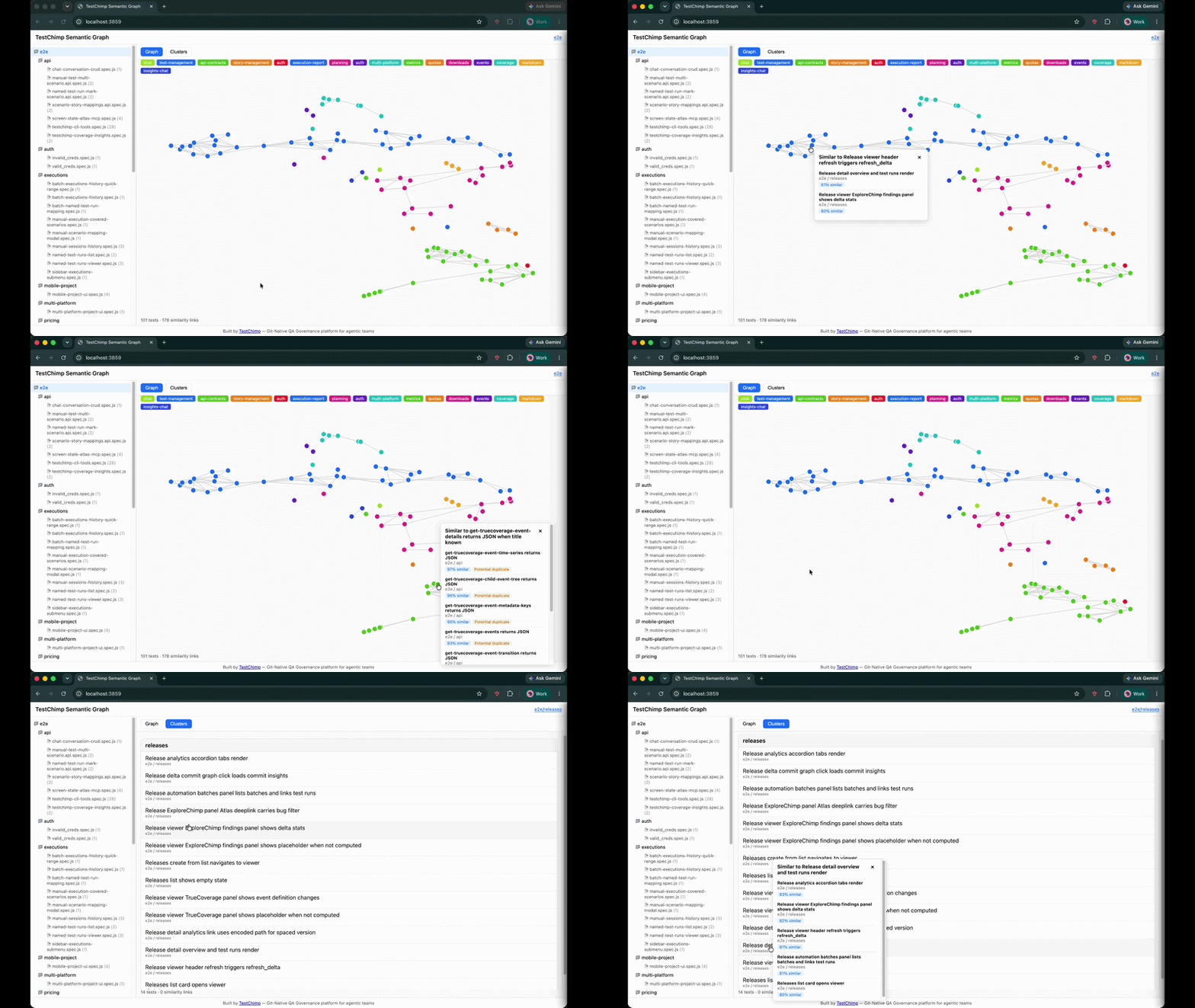
Semantic Graph visualization — folder tree, 2D similarity graph, and cluster list view


The new problem: agents author tests en masse​

For most of the last decade, the hard part of E2E testing was throughput: humans could not write and maintain enough tests to keep up with product velocity.

That constraint is collapsing. With Claude Code, Cursor, and agent skills like the TestChimp skill, a single prompt can produce a folder of well-formed Playwright specs in minutes. Coverage gaps that used to take a sprint to close can shrink to an afternoon.

The bottleneck has moved.

EraPrimary constraintWhat "good" looked like
Manual QAAuthoring speedEnough tests to cover the happy path
Human + low-code toolsUI-layer setup frictionStable POMs, fewer flakes
Agentic QASuite quality at scaleDistinct, high-signal tests—not copies

When an agent is rewarded for adding tests—closing coverage gaps, responding to PR feedback, or filling in scenarios from a test plan—it has no innate sense of "this already exists, slightly reworded." Left unchecked, suites balloon with:

  • Duplicate tests that assert the same behaviour under different titles
  • Near-duplicates that differ only in fixture data or selector phrasing
  • Clustered redundancy where five tests all exercise the same checkout edge case
  • Invisible overlap across folders, because no human (and no agent) holds the entire suite in working memory

This is the QA equivalent of boiling the lake in the wrong direction: lots of heat, little new coverage. Worse, duplicate tests inflate CI time, confuse failure triage, and give a false sense of depth—your line count grows while your behavioural breadth stalls.

The question is no longer "Can we write more tests?" It is:

"Are we writing useful, distinct tests—or just duplicative ones?"

That question needs a semantic answer, not a filename diff.


What is Semantic Graph?​

Semantic Graph is an open-source tool from TestChimp that maps your Playwright test suite by meaning, not syntax.

It is published as @testchimp/semantic-graph on npm and lives in the TestChimp/semantic-graph repository. Run one command against your tests directory; the CLI:

  1. Scans *.spec.ts, *.test.ts, and related Playwright files
  2. Parses each test's suite path, title, intent comments, scenario annotations, and body
  3. Embeds the canonical test text with an embedding model (OpenAI or Voyage AI)
  4. Clusters tests by semantic similarity using DBSCAN
  5. Lays out a 2D graph with UMAP so similar tests appear close together
  6. Names clusters with a lightweight LLM pass (e.g. "auth", "checkout", "api-contracts")
  7. Serves a local interactive UI at http://localhost:3859

No database. No TestChimp account required. Embeddings are computed in memory each run—ideal for local audits, pre-merge reviews, or giving an agent a structural view of the suite before it authors more tests.


How it works (the pipeline)​

Understanding the pipeline helps you interpret the graph—and tune how agents use it.

1. Parse tests into embedding-ready text​

The core library (@testchimp/semantic-graph-core) includes a vendored Playwright-aware parser. For each test it builds canonical text:

Suite: checkout > guest flow
Test: rejects expired coupon at payment step
Body:
Scenario: Guest checkout with invalid coupon
// intent: verify error copy and no charge created
await page.goto('/checkout');
...

Parsing captures intent comments and scenario annotations—the same metadata agents should be authoring anyway when following requirement traceability conventions. Two tests with different selectors but the same intent will land close together in embedding space.

2. Embed with cosine similarity​

Each test's text is sent to an embedding API in batches (default model: text-embedding-3-small for OpenAI, voyage-4 for Voyage). The tool computes cosine similarity between vectors and applies configurable thresholds:

SignalDefault thresholdMeaning
Graph edge≥ 0.75Tests are semantically related
Similar≥ 0.80Worth reviewing together
Potential duplicate≥ 0.92Strong dedup candidate

These thresholds mirror how humans judge redundancy: not byte-identical, but "would a failure in one make the other pointless?"

3. Cluster with DBSCAN​

Similar embeddings are grouped with DBSCAN density clustering—no need to pick k clusters upfront. Each cluster gets an LLM-generated label (e.g. "settings-page", "admin-tasks") so the legend is readable at a glance.

4. Visualize with UMAP + D3​

A seeded UMAP projection maps high-dimensional embeddings to 2D coordinates. The bundled UI (built with D3.js) renders:

  • Graph view — nodes as tests, edges as similarity links; click a node to see nearest neighbours and duplicate flags
  • Clusters view — grouped list with colour-coded legend
  • Folder tree — scope the graph to a directory or single file

Zoom into tests/checkout/ before a refactor. Scan the whole suite before a release. Hand the URL to an agent and ask it to propose merges.


Why this matters for agentic QA workflows​

Semantic Graph is not a replacement for TrueCoverage—production-informed prioritization—or requirement traceability. It solves a orthogonal problem: intra-suite redundancy.

Here is where it fits in a modern agent loop:

Before the agent writes​

Run Semantic Graph and attach the cluster summary to the agent's context. Instructions become concrete:

"We already have four tests in the checkout cluster covering coupon validation. Do not add another unless you are testing a different failure mode."

This is cheaper and more reliable than asking the agent to grep test titles.

After the agent writes​

Re-run the graph on the PR branch. New nodes that snap onto existing clusters—or spike duplicate scores above 0.92—are review flags. Pair with CI the same way you gate on lint or coverage deltas.

During suite health reviews​

Quarterly "suite diet" sessions used to mean spreadsheets and gut feel. Now: filter to clusters with high internal similarity, merge or delete, and measure CI time recovered.

Complement to production signals​

TrueCoverage tells you what behaviours users need tested. Semantic Graph tells you whether your existing tests are saying the same thing twice. Both are necessary for a suite that is broad and lean.


What you see in the UI​

The demo above shows the full workflow:

  1. Left panel — folder tree mirroring your repo layout; click a folder or file to scope the view
  2. Graph mode — force-directed layout; proximate nodes are semantically alike
  3. Clusters mode — tests bucketed with named themes
  4. Popover — click any test to see top similar neighbours, similarity scores, and potential duplicate badges

The UI ships inside the npm package—no separate install. It is the same "freebie" static app published as @testchimp/semantic-graph-viz in the monorepo for anyone who wants to embed or fork it.


Try it yourself​

Prerequisites​

  • Node.js 18+
  • An API key for embeddings (and cluster naming):
    • OpenAI — one key covers embeddings + LLM, or
    • Anthropic + Voyage — Claude for cluster labels, Voyage for embeddings (Anthropic does not ship an embedding API)

Quick start (OpenAI)​

export PROVIDER=openai
export API_KEY=sk-...

npx @testchimp/semantic-graph visualize --tests-dir ./tests

Open the printed URL (default port 3859). Add --verbose for embedding progress and diagnostics.

Claude + Voyage​

export PROVIDER=anthropic
export API_KEY=sk-ant-...
export VOYAGE_API_KEY=pa-...

npx @testchimp/semantic-graph visualize --tests-dir ./tests

All options​

FlagDescription
--tests-dir <path>Root folder to scan (required)
--port <n>Listen port (default 3859)
--verbose / -vDiagnostics to stderr

See the README for environment variables, monorepo build instructions, and npm publish details.


Continuous governance with TestChimp​

Semantic Graph is deliberately local and standalone—a flashlight you can shine on any Playwright repo, TestChimp customer or not.

For continuous duplicate detection, requirement traceability, release confidence, and keeping suites healthy as agents keep authoring, see TestChimp—the git-native QA governance platform built for agentic teams. Install the TestChimp Agent Skill and run /testchimp test after each PR to orchestrate coverage, exploration, and plan alignment in one loop.


FAQ​

What test file types are supported?​

The scanner picks up *.spec.ts, *.spec.js, *.test.ts, *.test.js, and .mjs / .cjs variants under your chosen root—standard Playwright test layouts.

Does it require a TestChimp account?​

No. Semantic Graph runs entirely locally. You only need embedding (and optionally LLM) API keys.

How is this different from code coverage?​

Code coverage measures which lines executed. Semantic Graph measures whether test intentions overlap. A suite can have high line coverage and still be full of redundant scenarios.

How is this different from duplicate detection by test name?​

Titles lie. Agents especially love paraphrasing: "should reject invalid coupon" vs "guest user sees error for expired promo code." Embeddings capture the full body and intent, not the string on line one.

Can I use it in CI?​

Today the primary interface is the local visualize command and JSON APIs (/api/graph, /api/similar). For CI gates, parse the API responses or run before review and archive the graph output. Continuous server-side governance is on the TestChimp platform roadmap.

What embedding models are supported?​

Defaults: text-embedding-3-small (OpenAI) and voyage-4 (Voyage). Override with EMBEDDING_MODEL. LLM cluster naming defaults to gpt-5-nano or claude-3-5-haiku-latest.

Is the source code open?​

Yes. MIT-licensed monorepo: github.com/TestChimp/semantic-graph. Packages: @testchimp/semantic-graph-core, @testchimp/semantic-graph, @testchimp/semantic-graph-viz.


Summary​

Agentic QA solved test authoring at scale. The next discipline is test distinctness at scale—ensuring every new spec adds behavioural breadth, not noise.

Semantic Graph gives you a semantic map of your Playwright suite: embeddings for meaning, DBSCAN for clusters, UMAP for intuition, and a local UI for humans and agents alike. Run it before you merge agent-authored tests. Run it when CI gets slow. Run it when you suspect the lake is boiling but not reducing risk.

Get started: github.com/TestChimp/semantic-graph · npx @testchimp/semantic-graph visualize


References and further reading​

SKILLs are becoming SaaS’s best distribution hack (here’s why)

· 3 min read
Nuwan Samarasekera
Founder & CEO, TestChimp

For years, the hardest part of selling a complex technical product was not the demo—it was the learning curve. Buyers had to internalize workflows, edge cases, and “the right way” to use each feature before they could reliably get value.

That is changing fast. Agent Skills—portable folders of instructions, checklists, and resources that teach an AI agent how to work with your product—are starting to look like one of the most attractive distribution mechanisms for technical SaaS. Instead of hoping every customer reads the docs in the right order, you ship a repeatable operating procedure the agent can follow on demand.

A skill turns every “new user” into a “power user”​

A well-designed Agent Skill effectively turns every user into a power user: one that knows which workflows to follow, how to use the product correctly, and how to extract maximum value from every feature.

That compresses time-to-value—the path to the “aha moment”—because the agent is not improvising from vague prompts; it is executing your intended playbook.

What we are seeing at TestChimp​

We have been seeing this firsthand since launching the TestChimp Agent Skill.

For teams, the workflow is intentionally simple:

  1. Author a few user stories (or import from Jira).
  2. Install the TestChimp skill on your coding agent.
  3. After each PR, simply say /testchimp test.

The skill teaches Claude how to coordinate with TestChimp to:

  • instrument the app for TrueCoverage,
  • fetch and interpret coverage gaps,
  • write tests that addresses the gaps and link them to scenarios correctly,
  • run targeted exploratory testing to catch UX issues,
  • and use AI-native test steps in tests where they help.

The upgrade loop: your perfect user ships with your product​

The best part is what happens when you ship new features.

With a properly designed, self-updating TestChimp Agent Skill, your "user" continuously learns your latest workflows, capabilities, and best practices—and applies them the way you intended. Your agent-side “instruction manual” can move as fast as your product, without requiring every human user to re-read release notes and learn every new capability you ship.

If you are building technical SaaS in the agent era, the product surface area is no longer only your UI and APIs. It is also the skill: the packaged expertise that turns your users in to power users.


References and further reading​

Authoritative guides and registries for Agent Skills (format, discovery, and ecosystem):

Boiling the lake - QA style

· 3 min read
Nuwan Samarasekera
Founder & CEO, TestChimp

Boil the lake - credits: https://garryslist.org/posts/boil-the-ocean

Garry Tan recently introduced a simple but powerful idea: The old adage “don’t boil the ocean” is bad advice in the AI agent era. Well - at the very least, “lakes” are now very much “boilable”.

The core insight is: AI compresses certain work by orders of magnitude. That doesn’t just make things faster - it fundamentally changes what’s feasible.

Most people ask the wrong question:

“What existing human workflows can we speed up with AI?”

That’s incremental thinking. The real leverage comes from asking:

“What powerful workflows did we avoid entirely because they were too expensive to do with humans?”

Those are your “lakes”. And with AI, many of them go from infeasible → trivial.


The QA lake​

In QA - making “test authoring faster” is akin to the former. The bigger ROI lies in the granular workflows that get unlocked now that agents can take autonomy in your test automation.

The Big Idea:

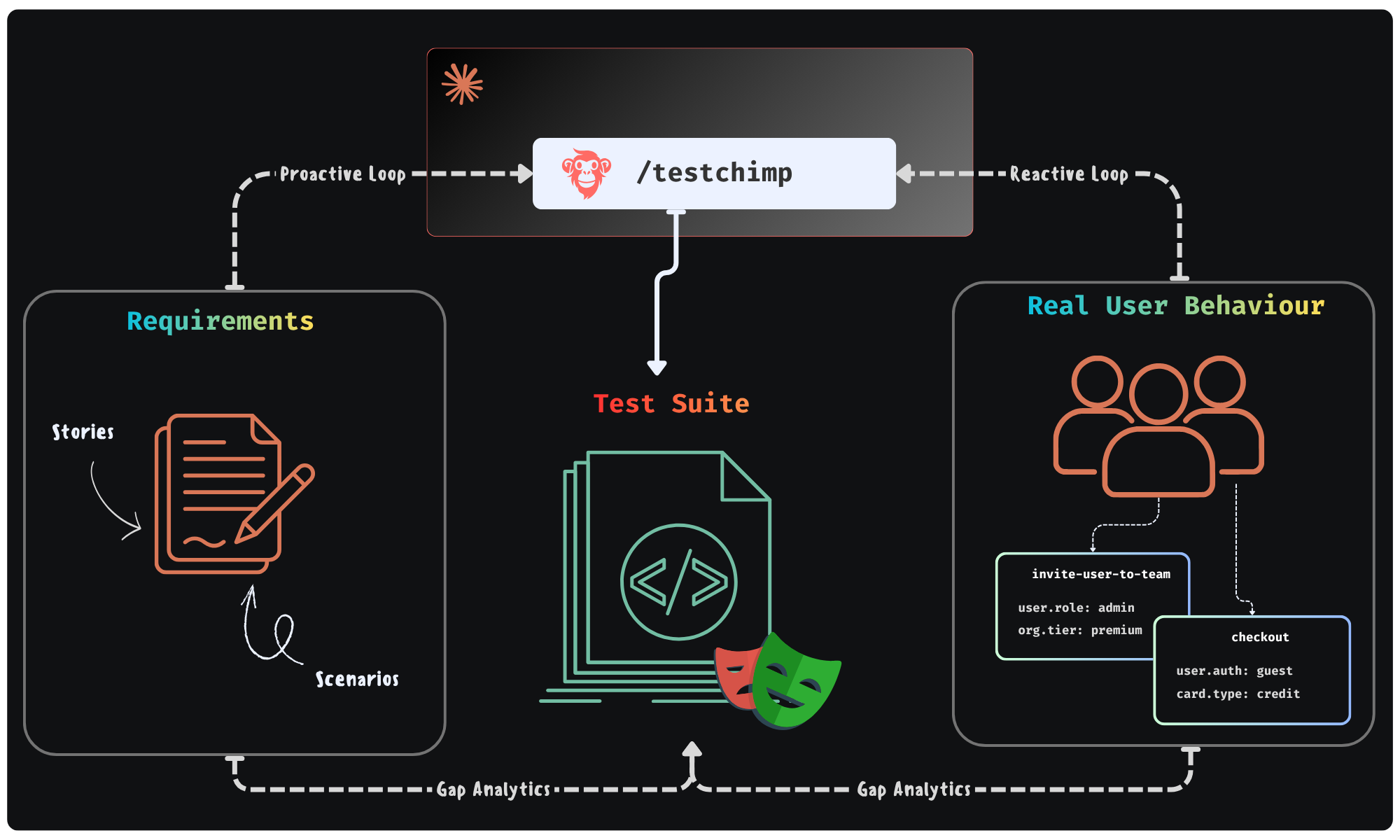
Could agents execute a workflow - where they continuously monitor “planned reality” (user stories / scenarios) and “production reality” (real user behaviour patterns) to improve the “tested reality” (test suite + test infra) - in a continuous feedback loop. All of it done in the background - looping you in for approval of plans it makes.

Feedback Loop enabled by TestChimp

This is exactly the future we were building TestChimp for - where agents participate in each phase of QA; where agents access real world insights / plan artifacts to self-direct its work strategically.


Claude + TestChimp​

Today, we are adding the final piece of the puzzle: A SKILL that you can install on Claude / Cursor that enables just that.

  • In TestChimp, test plans are already maintained as Markdowns in repo - directly accessible to agents.
  • Requirements are linked to tests via in-code comments - that Agents can author.
  • Test executions are auto-tracked by our Playwright plugin
  • Event ingests are tracked across prod and test - to generate TrueCoverage insights.

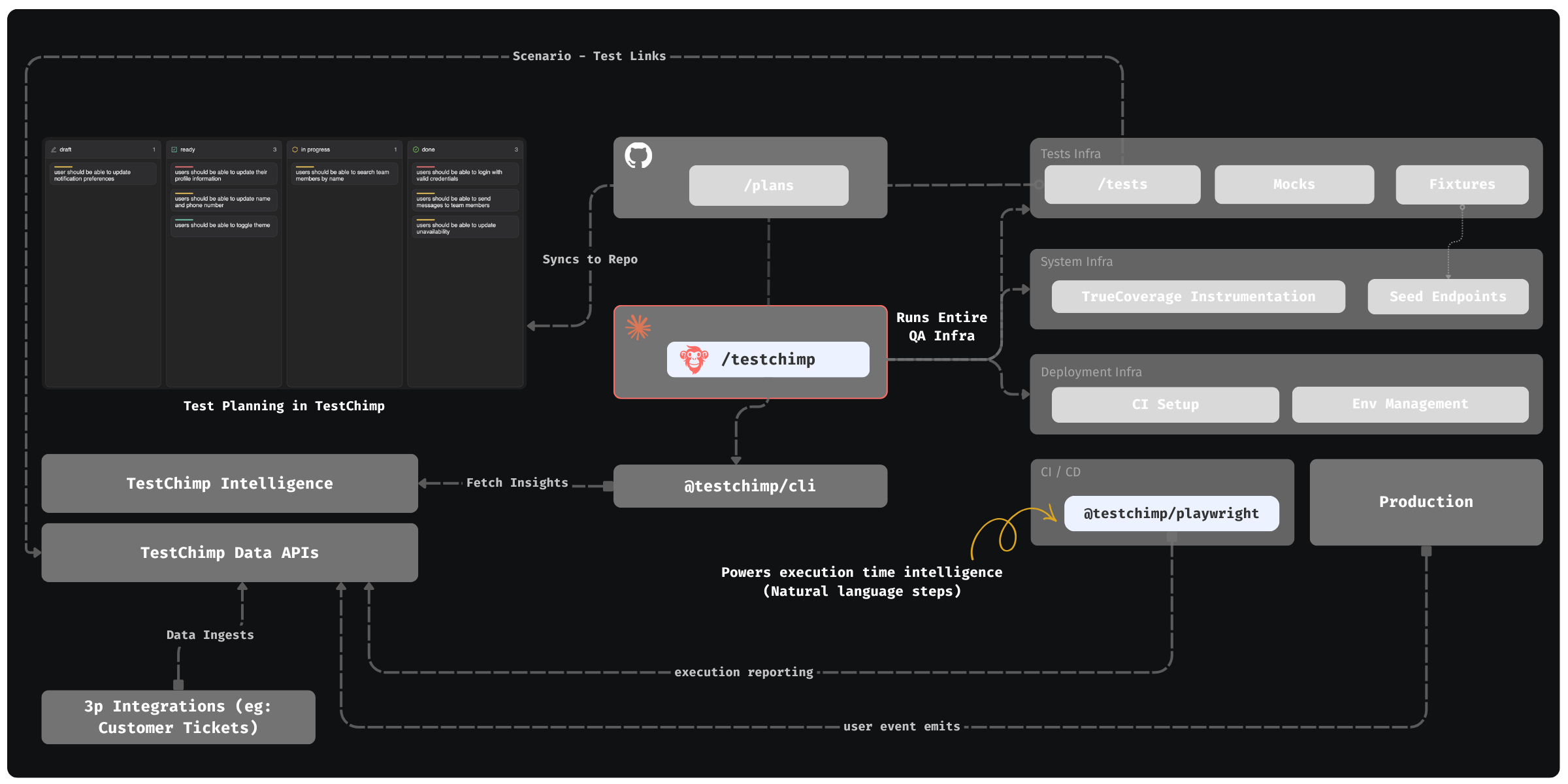
The Skill “upskills” Claude to read those insights via our CLI / MCP, to plan and execute the entire QA workflow:

  • Understand coverage gaps, prioritize (using signals exposed by TestChimp) and plan
  • Author fixtures that emulate real-world situations observed
  • Update test infrastructure (seed / probe endpoints) as needed
  • Author tests - (provisioning PR-local envs to test in and validating tests work)
  • Update instrumentations to learn about real user behaviour (for future cycles - covering new user journeys introduced)

QA workflow orchestrated by TestChimp - Overview


The best part: All of this is condensed to just 2 commands - enabling a frictionless DevX:

  • /testchimp test -> (Run after each PR) Updates plans, authors seeds / fixtures, author tests, validate them in PR scoped isolated environments, instrument code for TrueCoverage

  • /testchimp evolve -> (Run periodically / on deploy) Audits test coverage aligned with requirements and real-user insights, to “evolve” your QA infra & test suite to cover critical under-tested areas and do corrective actions & run targeted exploratory runs.


Claude can write tests. With the right feedback loop, it can fully manage an effective, self-evolving QA posture that de-risks your product continuously. This is what TestChimp enables, by making each phase of QA agent-native, informed by requirements and real user behaviour insights, in a tight feedback loop.

ai-wright: AI Steps in Playwright Scripts

· 3 min read
Nuwan Samarasekera
Founder & CEO, TestChimp

Bring AI-native actions and verifications into your Playwright tests – open source, vision-enabled, and BYOL.

The Problem​

Most “AI testing” frameworks make you throw away what already works.

They replace your entire test suite with “agentic” systems — where an LLM drives every click, assertion, and navigation step.

Sounds cool… until you hit:

  • Slow, flaky, or non-deterministic runs
  • Proprietary test formats
  • Complete vendor lock-in

For most teams, that’s a non-starter.

What if you could keep your existing Playwright scripts, and just inject AI where it’s actually needed – the ambiguous, messy, or dynamic parts of your app?

The Idea​

ai-wright brings AI steps to Playwright.

You still write regular Playwright tests – deterministic, fast, inspectable – but when you hit a fuzzy point, you can drop in a step like:

await ai.act('Click on a top rated campaign', { page, test });

Or

await ai.verify('The campaign description should not contain offensive words"', { page, test });

That’s it. AI only handles that step.

Everything else stays Playwright-native.

Why It’s Different​

  1. Vision-Enabled Existing libraries (like ZeroStep and auto-playwright) use sanitized HTML – which misses what’s actually on screen.

This causes many issues:

  1. HTML ≠ UI reality – static DOM can’t reveal if elements are disabled, visible, obscured, or off-screen – resulting in LLMs attempting interaction with non-interactive elements.
  2. Loss of semantics – sanitized HTML strips ARIA roles, computed text, layout cues, and shadow DOM content, which are critical for accurate reasoning.
  3. Unbounded prompt size – large DOMs can often get too verbose, requiring truncation (resulting in loss of context).
  4. Fragile selectors – HTML-based approaches force LLMs to guess selectors; ai-wright uses precise SoM IDs bound to live DOM nodes, enabling accurate one-shot execution.
  5. ai-wright is vision-enabled: it blends SOM (Set-Of-Marks) annotated screenshots + structured DOM context for grounded, visual reasoning.

The result: AI that operates just like a normal user would – based on what it sees on the screen.

  1. Better Reasoning

Instead of one-shot “guess the next click”, ai-wright uses a multi-step reasoning loop.

It plans ahead, performs coarse-grained objective handling (e.g., “fill out login form,” not just “click button”), and adapts to UI state changes – minimizing retries and random flailing.

It can identify blockers (such as Modals etc.), and execute pre-steps before actioning on the objective.

  1. BYOL (Bring Your Own License)

ai-wright is LLM-agnostic – unlike existing solutions which require either proprietary licenses or supports specific providers only.

You can use your own OpenAI, Claude, Gemini key, or your self-hosted model – avoiding vendor lock-in.

You can choose to use your TestChimp license as well – which will proxy the LLM calls, removing separate token costs for you.

  1. Fully Open Source

Unlike agentic SaaS offerings which are closed source, proprietary solutions, ai-wright is fully open source, giving you complete transparency and community support.

ai-wright lets you inject AI where it matters — the tricky, ambiguous, or dynamic parts of your app — without giving up the speed, determinism, and maintainability of Playwright.

With vision-enabled reasoning, resilient multi-step planning, LLM flexibility, and a fully open source foundation, ai-wright bridges the best of both worlds: reliable, scriptable tests and AI-powered intelligence where you need it most – without any vendor lock-in.

AI where it helps, plain Playwright everywhere else.