31 posts tagged with "Announcement"

Announcement tag description

View All Tags

Multi-platform test automation: one test codebase for web and mobile

· 11 min read
Nuwan Samarasekera
Founder & CEO, TestChimp

TL;DR: If your product ships both a web app and native mobile apps, you are probably maintaining two automation codebases that repeat the same Arrange logic—users, listings, payments, feature flags—before any UI step runs. TestChimp Multi-Platform Projects put Playwright (web), Mobilewright (iOS/Android), and API tests in one Git-connected scaffold, with shared business logic for world-state setup and platform-specific UI tests, coverage, and UX analytics. UI interactions stay platform-specific; test infrastructure does not have to—and neither does your requirements, TrueCoverage, or Atlas view of quality.
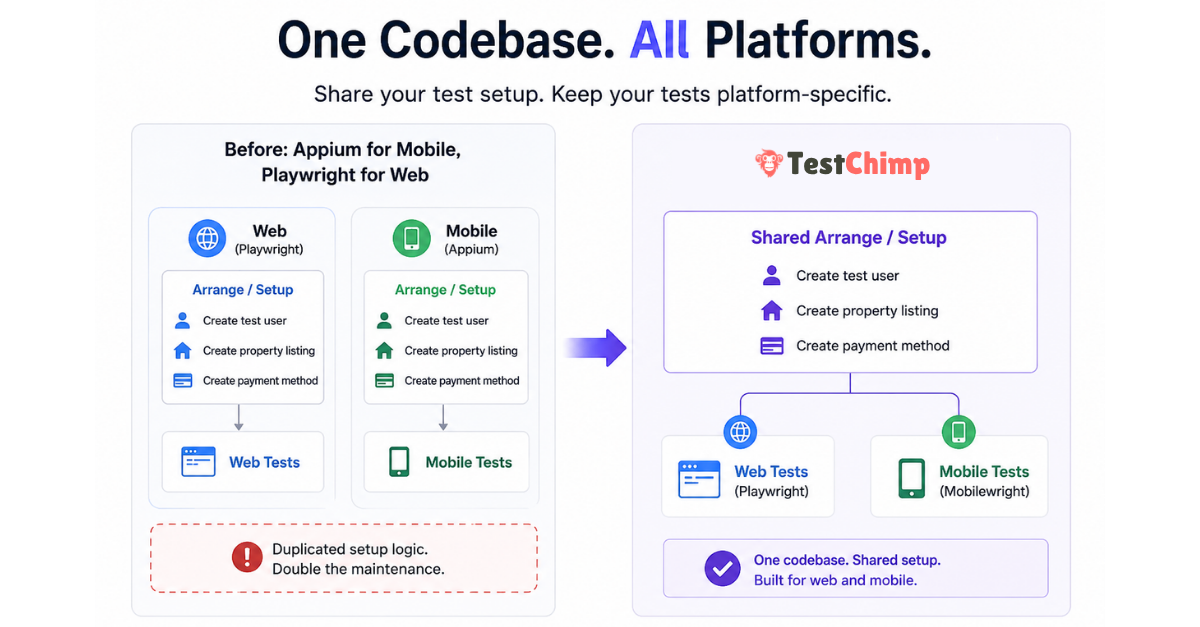
TestChimp Multi-Platform project: shared test codebase with Web, iOS, and Android coverage


The hidden cost of “Appium for mobile, Playwright for web”​

Cross-platform products rarely differ at the data layer. A booking marketplace needs the same primitives whether the customer taps Book in Safari or in your iOS app:

  • A test user with a known identity
  • Inventory (for example, a few property listings)
  • A valid payment method linked to that user
  • Whatever else your domain requires before the flow under test is meaningful

None of that is inherently web or mobile. It is application state—the Arrange phase in the classic Arrange → Act → Assert model (Martin Fowler on Given-When-Then).

Yet the dominant split for years has been:

LayerTypical tooling
Web UIPlaywright
Native mobile UIAppium (often with WebDriver-style clients)
Shared setupDuplicated across two repos or two top-level trees

Teams end up with parallel helper libraries, duplicate seed scripts, and drift—web tests create users one way, mobile tests another, and failures become “which stack is wrong?” instead of “did we break the product?”

The Act and Assert steps should differ by surface: selectors, gestures, and viewport behaviour are platform-specific. The Arrange layer often should not.


Why Mobilewright changes the consolidation story​

Mobilewright brings native iOS and Android automation closer to the Playwright mental model: async tests, auto-waiting, project matrices in config, and fixtures that feel familiar if you already run npx playwright test.

That alignment matters for multi-platform engineering, not only for “mobile testing” as an isolated workstream:

  • Same language and patterns (commonly TypeScript/JavaScript in one repo)
  • Same CI habits (config projects, parallel workers, artifact uploads)
  • Same opportunity to share code for factories, API clients, and database seeding

TestChimp already extended the plan → repo → agent → CI loop to native mobile (native mobile testing announcement). Multi-Platform Projects are the next step: one TestChimp project type and one tests tree for teams that ship web and mobile together.


What TestChimp Multi-Platform Projects provide​

When you create a TestChimp project with type Multi-Platform, the platform scaffolds a single tests/ directory that includes:

  • web/ — browser SmartTests via Playwright (playwright.config.js, web/e2e/, web/pages/, web/fixtures/)
  • mobile/ — native UI tests via Mobilewright (mobilewright.config.ts, mobile/e2e/common|ios|android/, mobile/pages/, mobile/fixtures/)
  • api/ — platform-agnostic HTTP specs (often the fastest way to Arrange and to assert backend state)
  • shared/ — cross-suite helpers and fixture factories (seed users, auth builders)—excluded from test discovery, intended for reuse
  • setup/ — global setup run once before suites in both configs

Platform-specific UI code lives in platform-specific folders. Business logic that creates entities and prepares situations can live in shared/, api/fixtures/, or factories imported by both web and mobile specs.

tests/
setup/
shared/ ← shared Arrange logic (users, listings, payments, flags)
api/
fixtures/
mobile/
fixtures/
pages/
e2e/
common/
ios/
android/
web/
fixtures/
pages/
e2e/
playwright.config.js
mobilewright.config.ts

Result for QA and platform teams:

  • Less duplicated infrastructure — one place to update “premium user with saved card”
  • Less maintenance — fix seeding once; web and mobile suites consume the same factories
  • More consistency — the same world-state definitions drive cross-platform regression

Smart Steps (ai.act, ai.verify) remain web-only today; native mobile continues to use standard Mobilewright APIs for UI Act steps. For platform capabilities and CI notes, see Mobile testing.


One project, platform-specific coverage and UX intelligence​

Consolidating tests in one repo does not mean blending web and mobile into one misleading coverage number. Multi-Platform Projects keep one TestChimp project and one plans/tests Git mapping, while treating Web, iOS, and Android as first-class execution platforms everywhere insights matter.

Think of it as: shared requirements and shared Arrange code, sliced execution and analytics per surface.

AreaWhat stays unifiedWhat is platform-specific
Test plansMarkdown scenarios and user stories in plans/Coverage and execution history per platform
TrueCoverageSame project, env/release/branch scopeProduction RUM + test attribution per platform
AtlasSame product vocabulary (screens/states)SiteMap tree, bugs, and baselines per platform

Requirement traceability (Test Planning)​

Requirement traceability links scenarios in Git to SmartTest runs. On a Multi-Platform project, the Insights tab and scenario execution history respect an execution scope that includes platform alongside environment, release, branch, and time range.

  • Choose Web, iOS, or Android to see which scenarios passed or failed on that surface.
  • Drill into a user story to view execution history filtered to the platform you care about—useful when mobile lags web or when a shared scenario is covered by both web/e2e/ and mobile/e2e/ specs.
  • Folder roll-ups in Test Planning still work; the platform dimension answers questions like “Is checkout covered on iOS in QA this week?” without spinning up a second project.

Agents and CI should report runs with the correct platform identity (via @testchimp/playwright / Mobilewright reporter wiring) so linked scenario-annotated tests attribute to the right slice. Your plans can describe behaviour once; coverage status reflects where that behaviour is actually exercised.

TrueCoverage (production-informed gaps)​

TrueCoverage compares real user journeys (RUM) with automation coverage (test-tagged events). Each surface has its own instrumentation path—@testchimp/rum-js on web, testchimp-rum-ios and testchimp-rum-android on native—with TESTCHIMP_PROJECT_TYPE set to web, ios, or android as described in Instrumenting your app.

On Multi-Platform projects, the TrueCoverage execution scope offers the same Web / iOS / Android selector. That keeps comparisons honest:

  • Production events from the iOS app are not mixed with web test runs when you evaluate gaps.
  • Agents prioritizing fixtures and tests can target the platform where users actually hit the gap—for example high drop-off on Android checkout vs healthy web funnel.

Instrument every surface you ship; scope analytics one platform at a time when deciding what to automate next.

Atlas (UX bugs on the right surface)​

Atlas is TestChimp’s app-structure map: screens and states, with UX and non-functional bugs tagged where ExploreChimp or SmartTests observed them. For multi-platform products, the SiteMap is not a single blurred tree—you browse and triage per platform.

  • A platform selector (Web, iOS, Android) loads the screen-state tree for that execution platform.
  • Bugs discovered during exploration or annotated runs are associated with screen-state context on that platform, so a layout regression on mobile does not drown in unrelated web noise.
  • markScreenState checkpoints in web Playwright tests and mobile Mobilewright tests feed the vocabulary ExploreChimp and Atlas use; platform-specific folders keep Act steps separate while structure stays comparable across surfaces.

That matters for engineering leads reviewing quality: you open Atlas, pick iOS, and see UX issues on the iOS SiteMap—assign owners per screen, run targeted ExploreChimp from a node, and track fix status without conflating desktop-only flows.


Arrange vs Act: what to share (and what not to)​

PhaseWebMobileShare?
ArrangeAPI/fixtures/DB seedSame backendsYes — prefer api/, shared/, or backend fixtures
ActPlaywright locators & navigationMobilewright gestures & native selectorsNo — keep under web/ and mobile/
AssertDOM + optional API probesNative UI + optional API probesOften partial — API assertions can be shared; UI assertions stay local

This is the same insight as fixtures and Object Mother patterns in xUnit-style testing (xUnit Test Patterns — test fixture, Object Mother): push incidental complexity of setup out of the test body and into reusable, composable building blocks. Agents authoring tests benefit even more when Arrange is API-backed rather than repeated through slow UI clicks (fixtures in agentic automation).


How to get started​

  1. Sign in to TestChimp and open Add project.
  2. Choose project type Multi-Platform (web + native mobile in one codebase).
  3. Connect Git and map your plans/ and tests/ folders (same workflow as web-only projects).
  4. Run your usual agent workflow—for example /testchimp test after a PR—using the TestChimp skill on Claude or Cursor.

Docs to read next:

If your team already runs separate web and mobile automation repos, migrating Arrange into shared/ and api/ first—before moving UI specs—is usually the lowest-risk path. You keep platform runners; you stop duplicating the world behind them.


Frequently asked questions​

Is Multi-Platform the same as creating separate web and mobile TestChimp projects?​

No. Multi-Platform is one project and one scaffold where both Playwright and Mobilewright configs and folder layouts coexist. Separate Web and Mobile project types still exist when you only need one surface.

Do I have to abandon Appium to use this?​

TestChimp’s native path is Mobilewright, not Appium. Teams often adopt it when they want Playwright-like authoring and shared TypeScript with web suites. If you are standardized on Appium, compare effort to maintain duplicate Arrange code versus migrating Act layers over time while centralizing setup in API tests first.

Can API tests really replace UI for Arrange?​

For many domains, yes—and Playwright’s request context (and direct HTTP clients in api/*.spec.js) are the fastest, least flaky way to reach a given situation. UI Act remains necessary to validate what users see and tap; UI Arrange is usually optional once APIs or admin seeds exist (QA in production).

What’s the biggest win if we already have Playwright on web?​

The win is often consolidation of test infrastructure, not “another mobile runner.” Mobilewright lets mobile join the same repo conventions as web so agents and engineers maintain one mental model for fixtures, plans, and CI.

If plans and tests are in one repo, is coverage merged across web and mobile?​

No—not by default. Requirement coverage, TrueCoverage comparisons, and Atlas navigation use an explicit platform dimension on Multi-Platform projects (Web, iOS, Android). Shared scenarios in plans/ can be linked from both web/ and mobile/ tests; the platform scope shows where those links actually ran and passed.


Further reading​

TestChimp

Playwright & Mobilewright

Patterns & quality engineering

Try it

  • TestChimp — create a Multi-Platform project and connect your repository. Feedback welcome via your usual support channel or community touchpoints linked from the product.

Shipping both web and mobile? The duplication you feel in test automation is often in the Arrange layer—not in the product. Multi-Platform Projects let you maintain that layer once, run Playwright and Mobilewright where users actually interact, and still read requirements, TrueCoverage, and Atlas with clear per-platform signal.

TestChimp now supports native mobile testing

· 4 min read
Nuwan Samarasekera
Founder & CEO, TestChimp

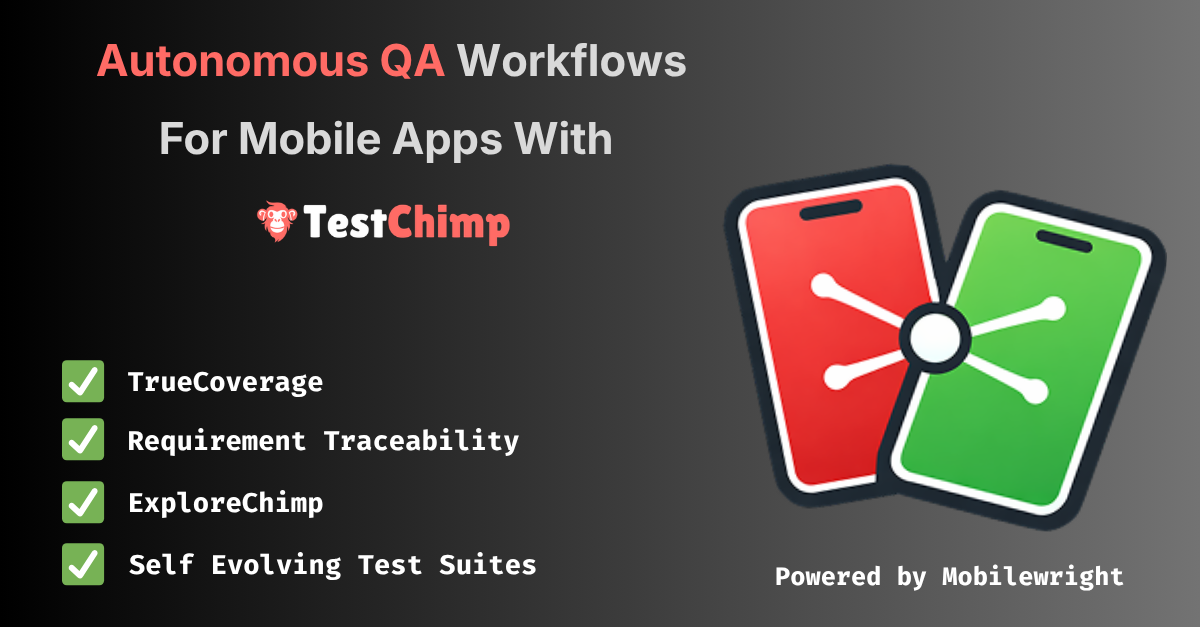
TL;DR: TestChimp now supports native mobile app testing on both iOS and Android. This brings the same seamless workflow we unlock for your web testing - just say "/testchimp test".

TestChimp native mobile testing support


What shipped​

Mobile is not a separate product bolted on the side. It is the same plan → repo → agent → CI loop you use for web SmartTests, extended to native apps via Mobilewright—a Playwright-style API and toolchain for iOS and Android.

Create a TestChimp project with project type iOS or Android, connect Git for your plans and tests folders, install the TestChimp skill on Claude or Cursor, and after each PR say /testchimp test. The platform keeps doing what you expect: wiring RUM, reading scenarios, closing coverage gaps, and surfacing analytics—now on screens that live inside your app, not only in the browser.

For setup details and parity tables, see Mobile testing (iOS and Android).


Five value props for Claude-based test authoring—four are live on mobile​

TestChimp’s agentic QA model rests on five pillars. On native mobile, four are fully supported today:

Value propWhat it gives youMobile status
Requirement traceabilityPlans ↔ tests feedback loop; scenarios stay linked to coverageSupported
TrueCoverageReal user behaviour ↔ tests feedback loop; production informs what to automateSupported
QA workflow executionSeed/probe endpoints, fixtures for reusable world-states, test authoring, scenario linkingSupported
ExploreChimpAnalytics on screenshots, logs, and network from exploratory runsSupported
Smart StepsIntent-based steps in test scripts (ai.act, ai.verify, …)Not yet

Smart Steps remain web-only for now. Native mobile tests use standard Mobilewright APIs for UI interaction—the same deterministic, async execution model you know from Playwright, without the intent-comment layer on top.

Everything else—the closed loops between requirements, production behaviour, fixtures, and tests—carries over.


The same seamless workflow as web​

You do not need a new playbook. The habit stays the same:

  1. Install the TestChimp skill on Claude or Cursor.
  2. After each PR, run /testchimp test (or your team’s equivalent in the agent host).

TestChimp then orchestrates the work you would otherwise stitch together manually:

  • RUM libraries — Wire up testchimp-rum-ios and testchimp-rum-android so production and test runs speak the same event vocabulary.
  • Instrumentation — Understand real user behaviour: segments, interaction flows, and scenarios—not just “the app launched.”
  • Plans and stories — Read markdown scenarios, pull requirement traceability insights, and see what is still untested.
  • Test authoring — Author Mobilewright tests to cover gaps, with traceability annotations where your plan expects them.
  • Spot analytics — Run ExploreChimp-style analysis on new screens: visuals, logs, network.

You still get continuous transparency of QA posture in one platform—requirements, coverage, failures, and exploration—whether the surface is a browser tab or a native view controller.


Familiar tests, less flakiness​

Mobile tests are authored in a Playwright-familiar style via Mobilewright: auto-waits, async execution, and fixtures that behave like the ecosystem you already trust on web. That consistency matters when agents (and humans) move between repos that ship both web and mobile.

Fair credit where it is due: the reliability characteristics of that execution model come from Mobilewright—and we are grateful they exist. Mobilewright moved our timeline for serious native support forward by at least a year. If you need cloud-hosted real devices in CI, Mobile Use integrates with the same stack.


What to do next​

If you are already on TestChimp for web, create an iOS or Android project, point Git at your plans and tests folders, and run /testchimp test on your next mobile PR. Smart Steps will follow; the feedback loops you care about for shipping quality are already there.

SKILLs are becoming SaaS’s best distribution hack (here’s why)

· 3 min read
Nuwan Samarasekera
Founder & CEO, TestChimp

For years, the hardest part of selling a complex technical product was not the demo—it was the learning curve. Buyers had to internalize workflows, edge cases, and “the right way” to use each feature before they could reliably get value.

That is changing fast. Agent Skills—portable folders of instructions, checklists, and resources that teach an AI agent how to work with your product—are starting to look like one of the most attractive distribution mechanisms for technical SaaS. Instead of hoping every customer reads the docs in the right order, you ship a repeatable operating procedure the agent can follow on demand.

A skill turns every “new user” into a “power user”​

A well-designed Agent Skill effectively turns every user into a power user: one that knows which workflows to follow, how to use the product correctly, and how to extract maximum value from every feature.

That compresses time-to-value—the path to the “aha moment”—because the agent is not improvising from vague prompts; it is executing your intended playbook.

What we are seeing at TestChimp​

We have been seeing this firsthand since launching the TestChimp Agent Skill.

For teams, the workflow is intentionally simple:

  1. Author a few user stories (or import from Jira).
  2. Install the TestChimp skill on your coding agent.
  3. After each PR, simply say /testchimp test.

The skill teaches Claude how to coordinate with TestChimp to:

  • instrument the app for TrueCoverage,
  • fetch and interpret coverage gaps,
  • write tests that addresses the gaps and link them to scenarios correctly,
  • run targeted exploratory testing to catch UX issues,
  • and use AI-native test steps in tests where they help.

The upgrade loop: your perfect user ships with your product​

The best part is what happens when you ship new features.

With a properly designed, self-updating TestChimp Agent Skill, your "user" continuously learns your latest workflows, capabilities, and best practices—and applies them the way you intended. Your agent-side “instruction manual” can move as fast as your product, without requiring every human user to re-read release notes and learn every new capability you ship.

If you are building technical SaaS in the agent era, the product surface area is no longer only your UI and APIs. It is also the skill: the packaged expertise that turns your users in to power users.


References and further reading​

Authoritative guides and registries for Agent Skills (format, discovery, and ecosystem):

Boiling the lake - QA style

· 3 min read
Nuwan Samarasekera
Founder & CEO, TestChimp

Boil the lake - credits: https://garryslist.org/posts/boil-the-ocean

Garry Tan recently introduced a simple but powerful idea: The old adage “don’t boil the ocean” is bad advice in the AI agent era. Well - at the very least, “lakes” are now very much “boilable”.

The core insight is: AI compresses certain work by orders of magnitude. That doesn’t just make things faster - it fundamentally changes what’s feasible.

Most people ask the wrong question:

“What existing human workflows can we speed up with AI?”

That’s incremental thinking. The real leverage comes from asking:

“What powerful workflows did we avoid entirely because they were too expensive to do with humans?”

Those are your “lakes”. And with AI, many of them go from infeasible → trivial.


The QA lake​

In QA - making “test authoring faster” is akin to the former. The bigger ROI lies in the granular workflows that get unlocked now that agents can take autonomy in your test automation.

The Big Idea:

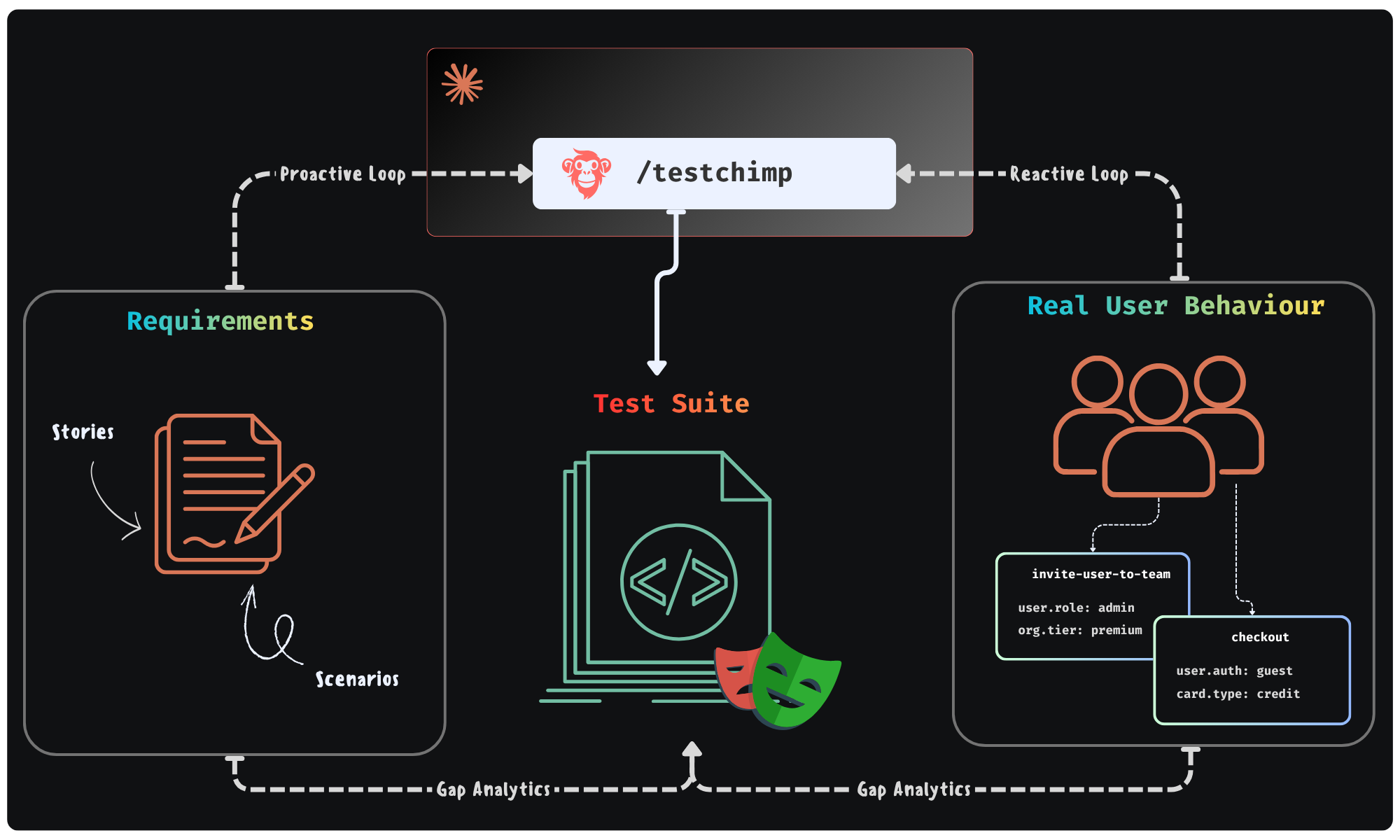
Could agents execute a workflow - where they continuously monitor “planned reality” (user stories / scenarios) and “production reality” (real user behaviour patterns) to improve the “tested reality” (test suite + test infra) - in a continuous feedback loop. All of it done in the background - looping you in for approval of plans it makes.

Feedback Loop enabled by TestChimp

This is exactly the future we were building TestChimp for - where agents participate in each phase of QA; where agents access real world insights / plan artifacts to self-direct its work strategically.


Claude + TestChimp​

Today, we are adding the final piece of the puzzle: A SKILL that you can install on Claude / Cursor that enables just that.

  • In TestChimp, test plans are already maintained as Markdowns in repo - directly accessible to agents.
  • Requirements are linked to tests via in-code comments - that Agents can author.
  • Test executions are auto-tracked by our Playwright plugin
  • Event ingests are tracked across prod and test - to generate TrueCoverage insights.

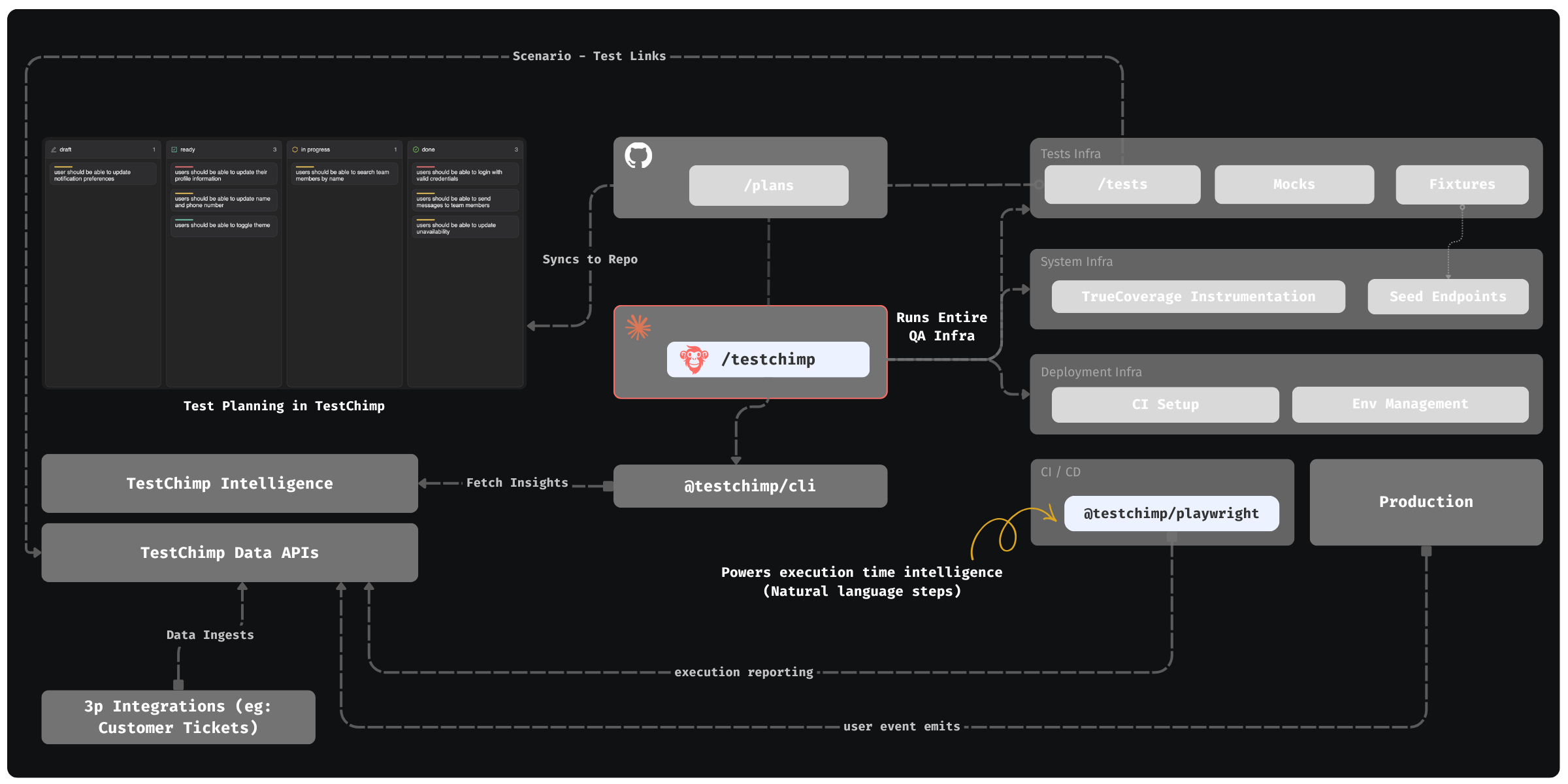
The Skill “upskills” Claude to read those insights via our CLI / MCP, to plan and execute the entire QA workflow:

  • Understand coverage gaps, prioritize (using signals exposed by TestChimp) and plan
  • Author fixtures that emulate real-world situations observed
  • Update test infrastructure (seed / probe endpoints) as needed
  • Author tests - (provisioning PR-local envs to test in and validating tests work)
  • Update instrumentations to learn about real user behaviour (for future cycles - covering new user journeys introduced)

QA workflow orchestrated by TestChimp - Overview


The best part: All of this is condensed to just 2 commands - enabling a frictionless DevX:

  • /testchimp test -> (Run after each PR) Updates plans, authors seeds / fixtures, author tests, validate them in PR scoped isolated environments, instrument code for TrueCoverage

  • /testchimp evolve -> (Run periodically / on deploy) Audits test coverage aligned with requirements and real-user insights, to “evolve” your QA infra & test suite to cover critical under-tested areas and do corrective actions & run targeted exploratory runs.


Claude can write tests. With the right feedback loop, it can fully manage an effective, self-evolving QA posture that de-risks your product continuously. This is what TestChimp enables, by making each phase of QA agent-native, informed by requirements and real user behaviour insights, in a tight feedback loop.

Shift-Left with Git Branch-Aware Testing

· 4 min read
Nuwan Samarasekera
Founder & CEO, TestChimp

The traditional QA bottleneck is a well-known pain point for modern development teams. For years, the industry has pushed to "shift-left" – to move testing earlier in the development lifecycle. However, a major technical hurdle has always remained: the environment gap.

When QA happens on a global "staging" environment or only after code merges to the main branch, the feedback loop is too slow. Bugs found post-merge cause expensive context-switching for developers and delay releases.

Today, we’re bridging that gap. We’ve added full branch awareness to the TestChimp platform, enabling true shift-left testing at the PR level.

Shift-Left Git Testing

Why Branch-Aware Testing?​

Branch-aware testing means your QA process mirrors your Git workflow. Instead of testing "the app," you test the "feature-in-progress."

1. Test Authoring at the Feature Level​

You can now switch between repository feature branches directly within TestChimp. File versions are maintained per branch, allowing QAs to sync with branch-specific remote content.

Most importantly, QAs can author tests and raise Pull Requests from TestChimp that merge directly into the feature branch. This ensures that by the time a developer is ready to merge their code, the corresponding tests are already part of the PR.

[!TIP] Security & Outsourcing: Our new GitHub App-based approach means you don't need to give external QA resources full repository access. They can work exclusively on the tests and plans folders (with PRs raised via TestChimp platform), maintaining a tight security posture.

2. Branch-Specific Test Execution​

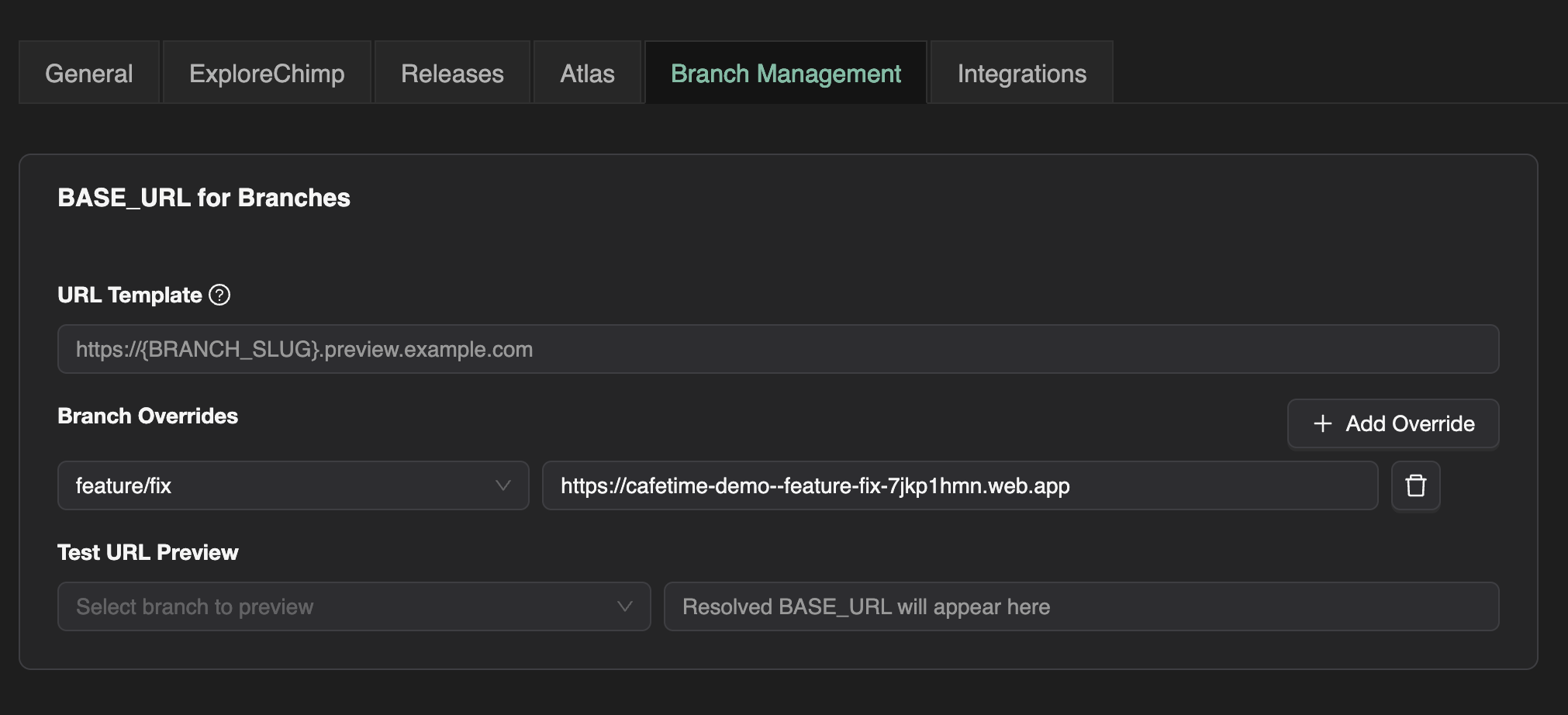
Gone are the days of manually pointing tests at different URLs. In your project settings, you can now configure a template string for branch-specific deployment URLs (e.g., Vercel or Netlify preview URLs).

When you run tests on a branch, TestChimp resolves the correct URL and injects it as a BASE_URL environment variable. Your scripts simply consume process.env.BASE_URL, ensuring they always target the correct preview deployment.

Branch Management UI

3. Exploratory Testing & Smart Bug Diffing​

Exploratory testing is no longer a "post-release" activity. All exploratory runs can now be executed against the branch-specific deployment.

Our agents are now smart enough to report only new bugs found on the feature branch compared to the default branch. This allows you to instantly see what UX, performance, accessibility, or internationalization issues were introduced by a specific PR – before they ever touch production.

4. QA Intelligence: Sliced by Branch​

In the Atlas page, you can now filter results by branch to see exactly how a specific screen or flow was affected by a PR. This level of granularity allows teams to answer the questions that actually matter during code review:

  • "What user stories are breaking in this PR?"
  • "Are unrelated scenarios being affected by these changes?"

Seamless CI Integration​

If you already have a CI pipeline that generates preview URLs, TestChimp fits right in. Simply pass that preview URL as the BASE_URL environment variable in your CI action, and your tests will execute against the live branch deployment with zero extra configuration.

Strategic Planning, Tactical Execution​

While test authoring and execution are now branch-aware, we’ve intentionally kept Test Planning artifacts product-scoped.

Strategy should be stable. Planning artifacts continue to sync with the repo's default branch, ensuring your high-level test coverage goals remain consistent even as individual features are developed and tested in parallel branches.

The Future is Shift-Left​

By moving QA participation closer to the development phase, you’re not just catching bugs – you’re preventing them from ever reaching the main branch. Branch-aware testing turns QA from a gatekeeper into a core part of the feature development engine.

Special Purpose Testing Agents

· 3 min read
Nuwan Samarasekera
Founder & CEO, TestChimp

If you’re already familiar with ExploreChimp, you know it’s like having a driver navigate your web app for you. Guided by SmartTests, ExploreChimp scans the DOM, screenshots, network calls, and browser metrics to spot bugs that traditional automation scripts can't see.

While ExploreChimp gives you broad coverage, some problems only show up when you deliberately push specific edges.

That’s why we’re launching our "Troop of Special Purpose Testing Agents".

They’re all guided by the same SmartTests, but each agent is purpose-built to tackle a specific class of bugs.

Here is the starting line up that we are launching today:


Form Validation Tester: Meet “Deadpool”​

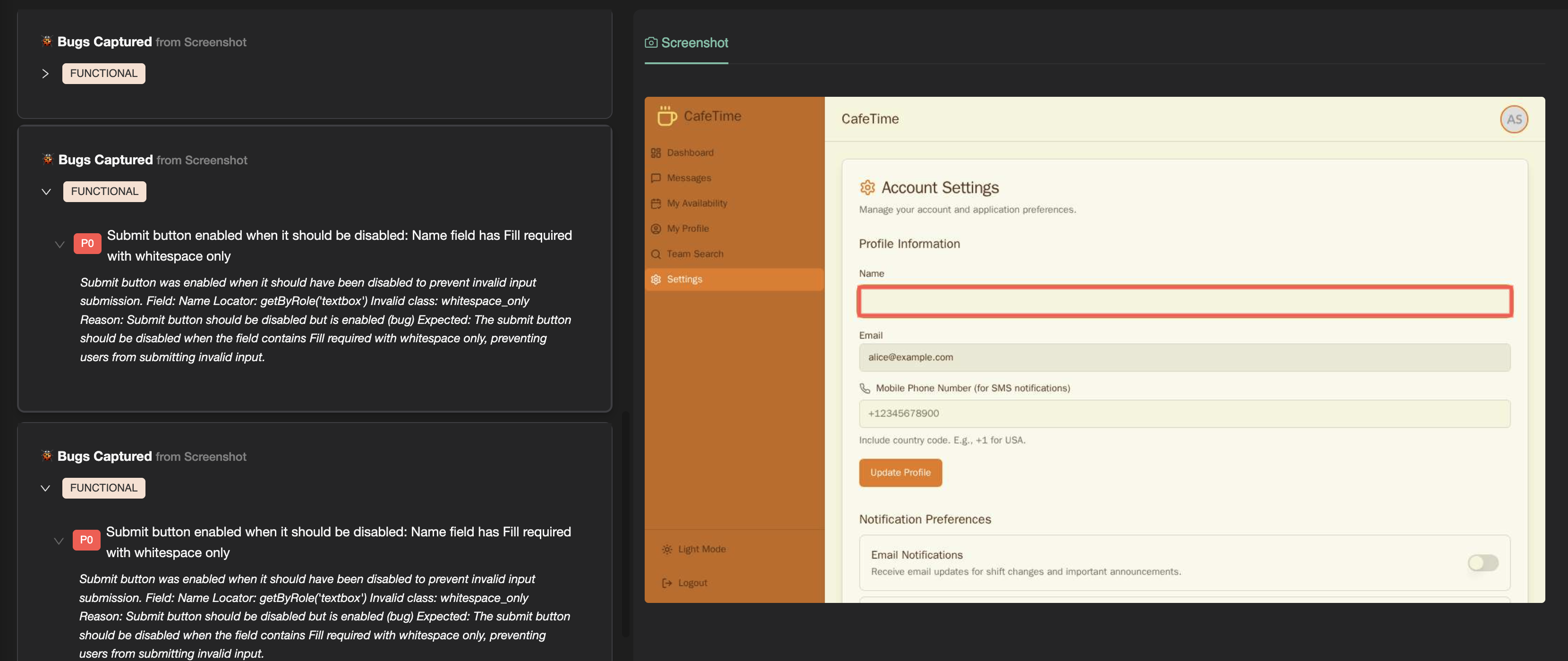
Writing negative test cases for forms is soul-crushing work. You have to think of every wrong input a user could throw at your app, then write tests to catch it.

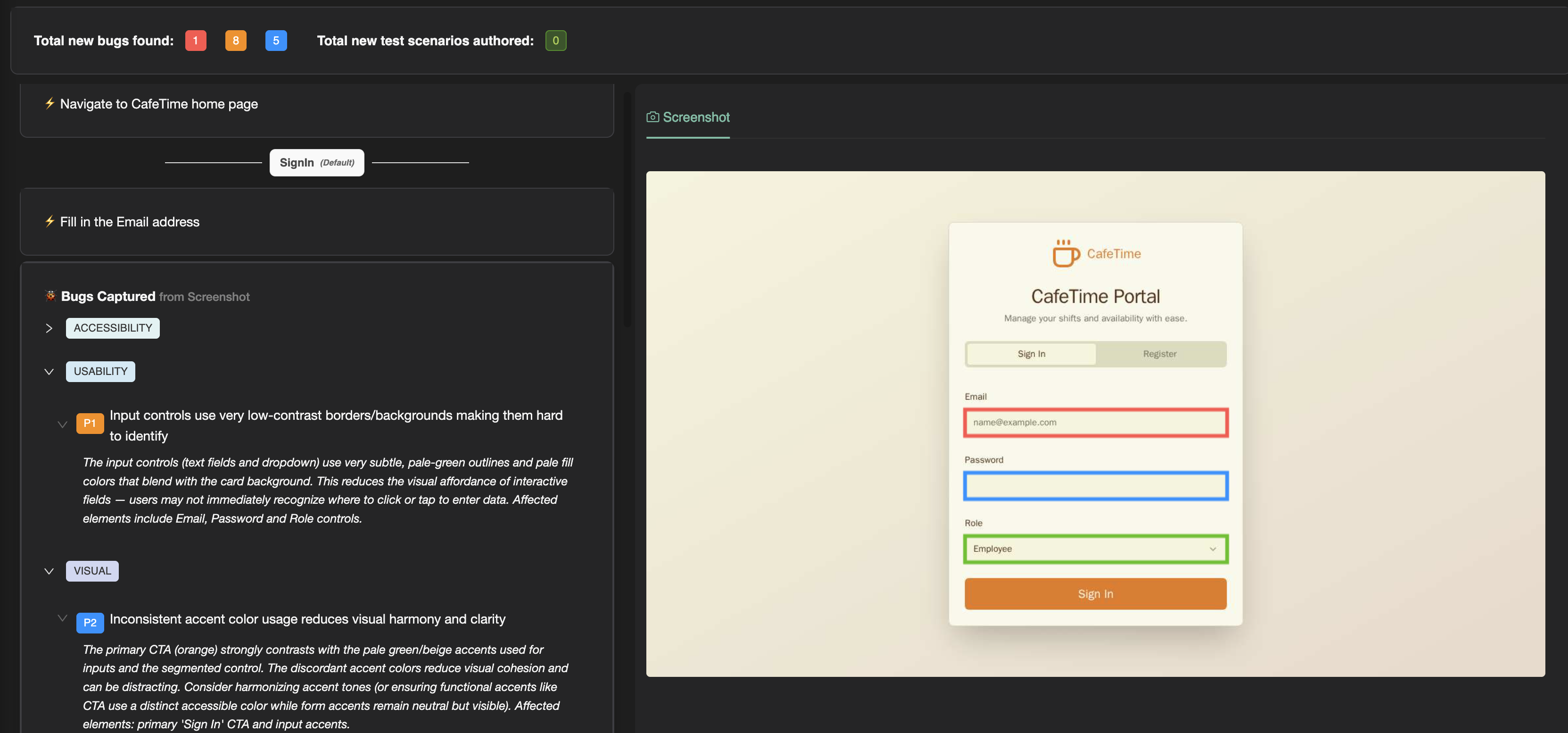
Form Validation Agent In Action

Our Form Validation Tester, affectionately nicknamed Deadpool, does all the heavy lifting for you. You only need to define the “Happy Path” - the correct way to fill a form. From there, Deadpool goes rogue:

  • Past and future dates
  • Negative numbers
  • Random strings
  • Whitespace-only inputs
  • Invalid data formats, like numbers in text fields

It pushes your forms to the limits to ensure your validation logic holds up - all without writing a single line of negative test code.


Theme Tester: Spot Invisible Problems​

Themes are more than just aesthetic. Switching between dark mode, high contrast, or custom color palettes can break visual harmony that users expect to "just work".

Theme Agent In Action

The Theme Tester loops through all the themes your app supports, hunting for:

  • Contrast issues
  • Text visibility problems
  • Ugly color combinations

It can toggle themes via cookies, local storage, or by interacting with your app’s UI - whatever works best for your setup.


Localization Tester: No More "Lost in Translation"​

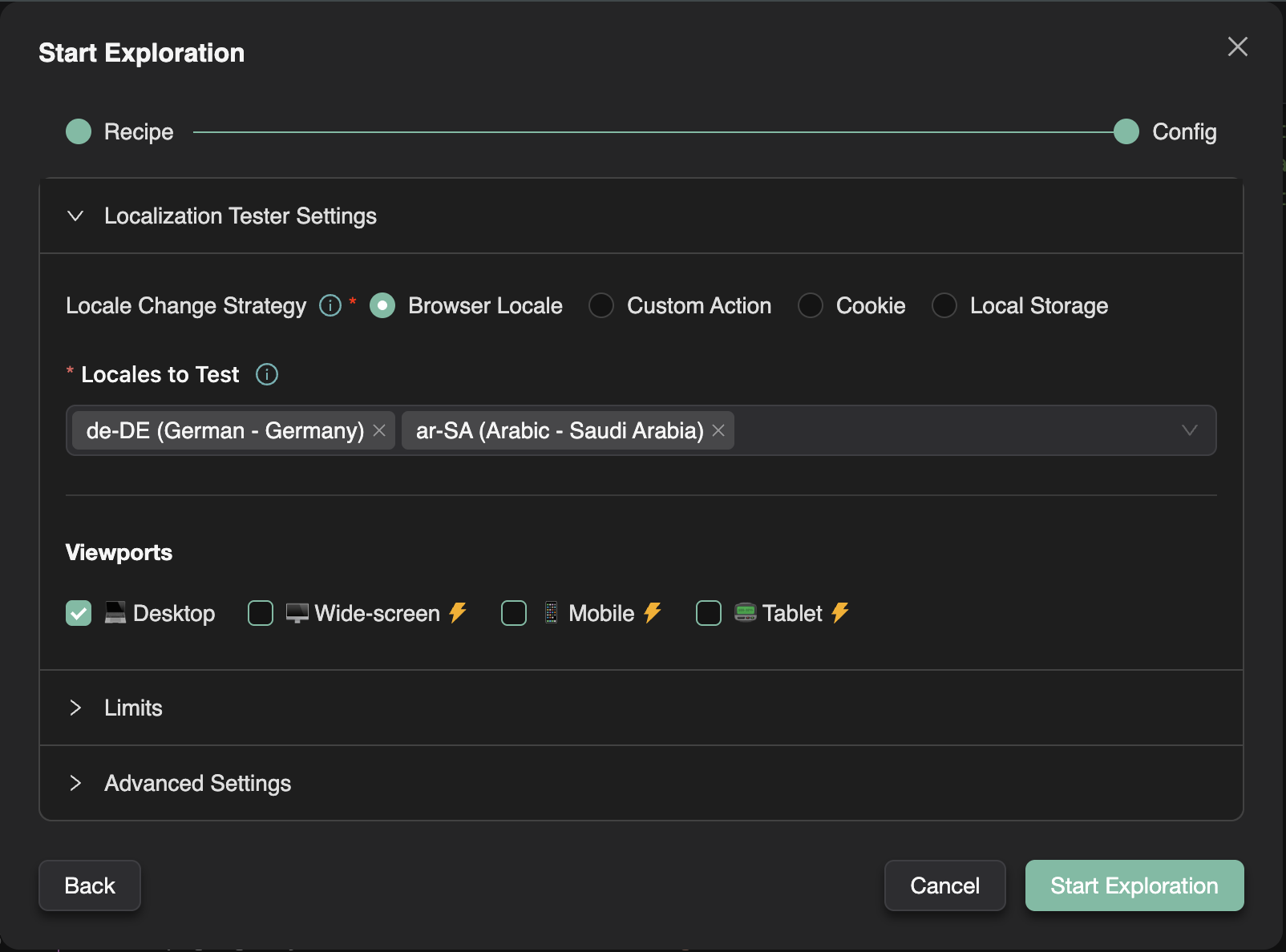
Supporting multiple locales introduces a whole new set of bugs. Dates, currencies, text overflow, RTL layouts, and even cultural appropriateness can break your user experience.

Localization Agent Configuration

Our Localization Tester handles it all:

  • Detects broken translations or dangling template strings
  • Checks date and currency formatting across locales
  • Verifies layout integrity in RTL languages
  • Flags potential cultural missteps

With this agent on your team, you can support global audiences with confidence.


Screen Discovery Agent: Building Your App’s GPS​

No test scripts yet? No problem.

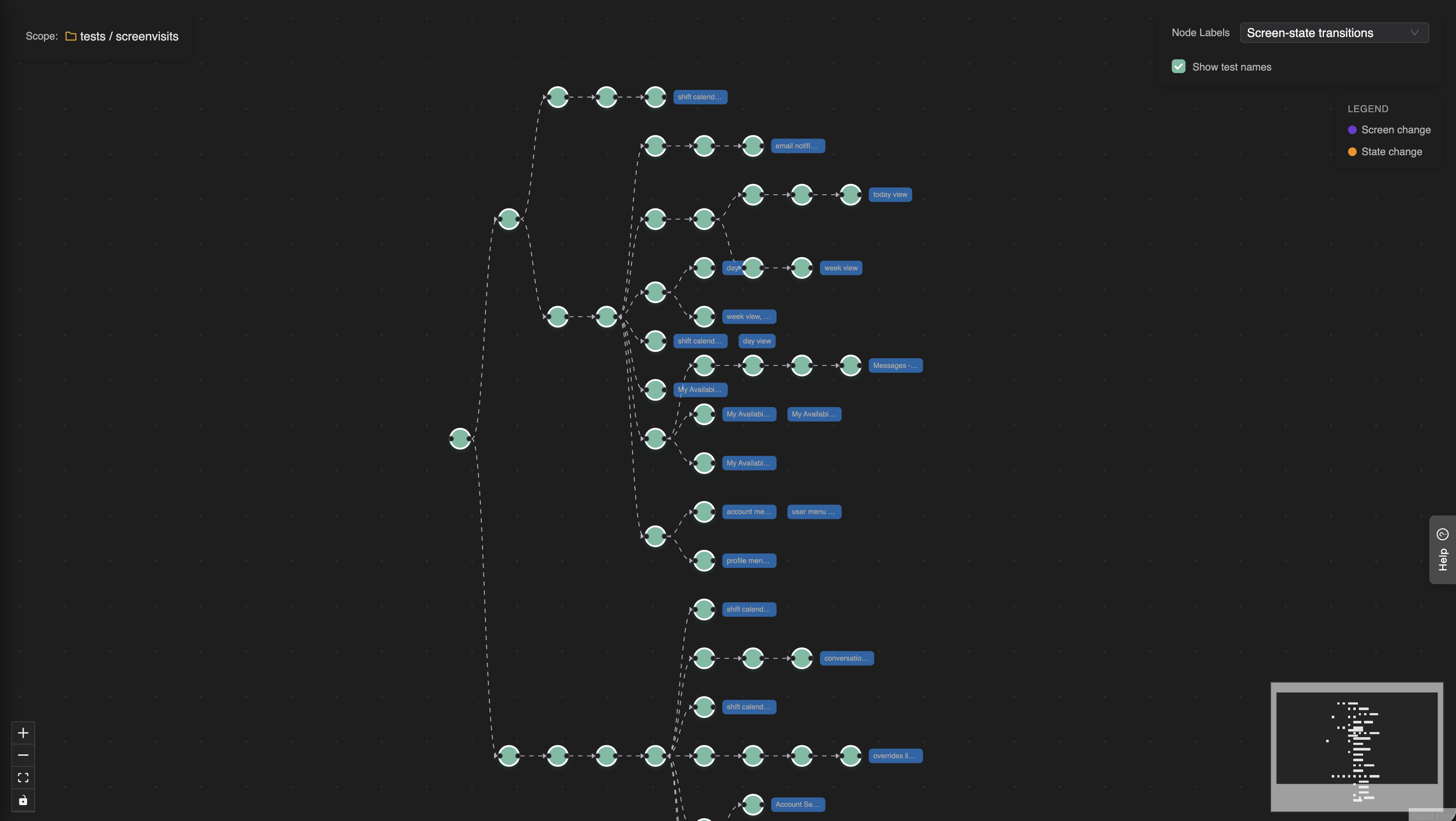
The Screen Discovery Agent methodically crawls your app, visiting key screens. It automatically generates your initial SmartTest suite, so the rest of the troop can get to work.

Expanded Behaviour Map

tip

Note: You can easily add more user journeys with our Chrome Extension.


More Agents Coming Soon​

This is just the beginning. We’re already working on more powerful agents, including: • RBAC Tester – to verify role-based authorizations work as intended • Network Resilience Checker – to see how your app behaves when connectivity gets fuzzy, backend breaks...

And we’re always looking for more ideas. If you’ve got a pain point in testing, we want to hear about it!


Ready to Try the Troop?

Stop stressing over the worst parts of testing. Let our agents handle the tedious tasks so you can focus on what really matters: building amazing experiences.

SmartTests Now Support The Full Playwright Ecosystem

· 4 min read
Nuwan Samarasekera
Founder & CEO, TestChimp

We’re excited to announce that SmartTests now fully support the core Playwright testing patterns and constructs you know and love. This means you can write maintainable, well-structured test suites that leverage Playwright’s powerful features while still getting all the AI-powered adaptability that makes TestChimp SmartTests special.

What Are SmartTests?​

For those new to SmartTests, you can think of a SmartTest as a Playwright scripts with couple of twists:

Intent Comments:​

SmartTest Steps include intent comments that describe what you’re trying to accomplish. When a test runs, it executes as a standard Playwright script for speed and determinism. But when a step fails, our AI agent steps in to fix the issue on the fly and raises a PR with the changes – giving you the best of both worlds: fast script execution and intelligent adaptability.

Screen-state annotations:​

Markers that specify the screen and state the UI is at a given step in the script. These annotations are authored and used by ExploreChimp to tag the bugs to the correct screen-state in the SiteMap.

What's New: Full Playwright Compatibility​

SmartTests now support all the essential Playwright patterns that help you build professional, maintainable test suites:

1. Hooks for Setup and Teardown​

SmartTests now support all four Playwright hooks at both file and suite levels:

– beforeAll– Run once before all tests in a suite – afterAll – Run once after all tests in a suite – beforeEach – Run before each test – afterEach – Run after each test

This means you can set up test data, initialize page objects, authenticate users, and clean up resources exactly as you would in standard Playwright tests.

2. Page Object Models (POMs)​

SmartTests fully support the Page Object Model pattern, allowing you to encapsulate page interactions in reusable classes. This keeps your tests clean, maintainable, and aligned with best practices.

Example:

import { Page } from '@playwright/test';

class SignInPage {
constructor(private page: Page) {}

async navigate() {
await this.page.goto('/signin');
}

async login(email: string, password: string) {
await this.page.fill('#email', email);
await this.page.fill('#password', password);
await this.page.click('#sign-in-button');
}
}

test('user can sign in', async ({ page }) => {
const signInPage = new SignInPage(page);
await signInPage.navigate();
await signInPage.login('user@example.com', 'password123');
});

3. Fixtures for File Uploads​

SmartTests support Playwright fixtures, making it easy to handle file uploads and other test artifacts. Upload your fixture files (like test data, images, or documents) under the fixtures folder in the SmartTests tab, and they will be available during test execution.

4. Playwright Configuration​

SmartTests folder contains a playwright.config.js file in your project to configure the Playwright execution environment. This is essential for:

  • Browser Authentication: Set up HTTP basic auth for staging environments
  • Custom Headers: Add authorization tokens, API keys, or custom headers
  • Base URLs: Configure default URLs for your test environment
  • Viewport Settings: Set default browser viewport sizes And more: All standard Playwright configuration options

Example playwright.config.js:

const { defineConfig } = require(‘@playwright/test’);

module.exports = defineConfig({
use: {
baseURL: ‘https://staging.example.com’,
httpCredentials: {
username: ‘staging-user’,
password: ‘staging-password’
},
extraHTTPHeaders: {
‘Authorization’: ‘Bearer your-token’,
‘X-Environment’: ‘staging’
}
}
});
“

5. Test Suites with Multiple Tests​

SmartTests support organizing multiple tests in a single file using Playwright’s test.describe() blocks. You can create nested suites, group related tests together, and apply suite-level hooks – just like in standard Playwright.

Why This Matters​

These additions mean SmartTests are now fully compatible with Playwright’s ecosystem. You can:

✅ Write maintainable tests using industry-standard patterns like POMs and hooks

✅ Organize your test suite with proper grouping and structure

✅ Handle complex setups with configuration files and fixtures

✅ Reuse existing Playwright knowledge without learning new patterns

✅ Still get AI-powered fixes when tests fail – the best of both worlds!

Getting Started​

If you’re already using SmartTests, you can start using these features immediately. Just structure your tests using standard Playwright patterns, and SmartTests will handle the rest.

For new users, SmartTests work just like Playwright tests – with the added benefit of AI-powered failure recovery & stepwise execution enabling guided exploration.

What's Next?​

SmartTests continue to evolve, and we’re committed to maintaining full compatibility with Playwright’s ecosystem while adding intelligent features that make testing easier and more reliable. Stay tuned for more updates!

Got questions or feedback? We’d love to hear from you! Drop us a line at contact@testchimp.io.

The Silent Killer Churning Your Users: Slow, Janky UX

· 3 min read
Nuwan Samarasekera
Founder & CEO, TestChimp

Everyone loves to talk about “building features” and “shipping fast.” But we rarely talk about the thing that silently kills conversions, frustrates users, and destroys retention:

Performance.

Performance bugs cover

Not the “page still loads eventually” kind – but the slow, janky, slightly-off performance that users instantly notice and abandon your product for.

And the data is brutal:

  • Amazon found that a 1-second delay in page load time reduced conversions by 7%.

  • The probability of a bounce increases by 32% as load time goes from 1s → 3s.

  • Apps that invest in performance optimizations see up to 30% higher retention.

Users don’t always tell you this directly, but every UX study confirms it:

Slow, sluggish experiences are one of the most complained-about frustrations – and a top reason users bounce.

But We Already Have Automated Tests… Isn’t Our App “Tested”?​

This is the dangerous assumption teams make.

Yes, you may have automation test coverage.

Yes, your flows might “functionally work.”

But functional checks don’t catch:

  • the button that feels slow
  • the layout shift that makes the user misclick
  • the subtle JavaScript bloat that accumulates over releases
  • the screen that takes 1.2s longer than it used to
  • the resource that takes long to load due to cache misconfiguration
  • the memory leak that only appears after a few steps

These aren’t textbook “bugs” so no one files them.

And because performance is subjective (“eh, feels a bit sluggish?”), rarely gets documented with hard numbers.

Result: regressions creep in release after release – until your retention chart quietly slopes downward.

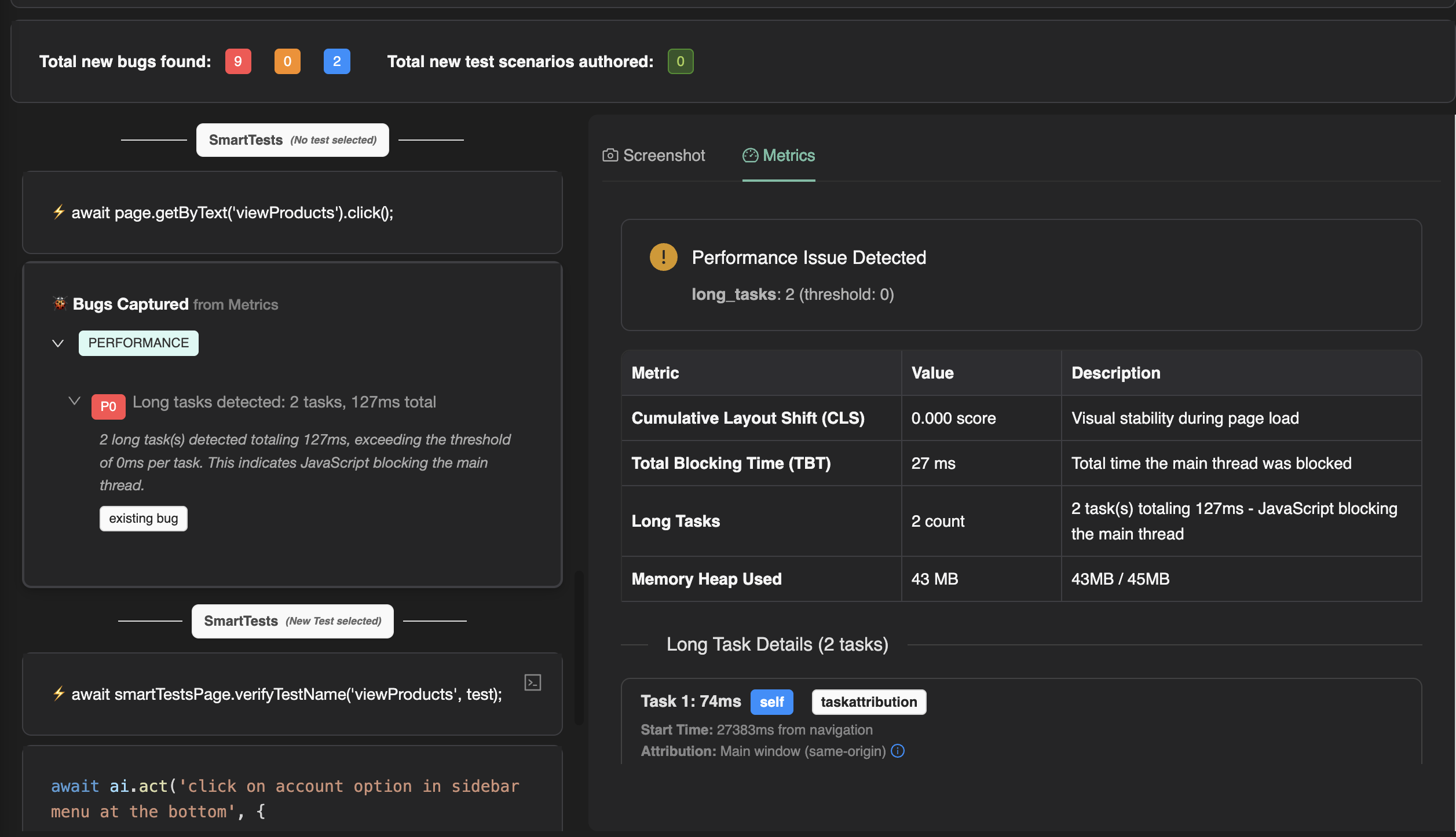
Performance Bug Detection in TestChimp’s Exploratory Agent​

To fix this blind spot, TestChimp’s exploratory agent now automatically flags performance and memory issues – alongside the other usability bugs it catches.

And just like other bugs it finds, every performance issue is tied to the exact screen/state it appeared in.

You get a clear map of where your app slows down, why, and by how much.

No more vague complaints.

No more guessing.

Performance bugs, accurately tracked, and backed by hard evidence.

Performance bugs in TestChimp exploratory agent

What the Agent Analyzes​

The agent captures and analyzes deep browser performance metrics such as:

  • CLS (Cumulative Layout Shift) – where janky content shifts occur
  • INP (Interaction to Next Paint) – slow button responses, input lag
  • Long Tasks – heavy JS blocking the main thread
  • Large or unoptimized resource loads
  • TBT (Total Blocking Time)
  • Memory heap usage and leaks
  • Network timing and caching misses And more…

Combines this with Screenshot data to highlight:

  • Which screens are causing frustration
  • Which buttons are slow to respond
  • Where layout instability is happening
  • Which resources are dragging down load times
  • Where caching is failing

Essentially:

The stuff that actually impacts user experience – and revenue – but never gets caught in ordinary test suites.

Why This Matters​

Performance isn’t a “nice-to-have.”

It’s a direct business driver:

  1. Higher conversions
  2. Lower bounce rates
  3. Higher user trust
  4. Better retention
  5. Cleaner UX
  6. Higher SEO ranking
  7. Less app fatigue and frustration

By treating performance issues as first-class bugs, you’re not just “optimizing”, You’re making your product feel premium and effortless, the way users expect modern webapps to be.

Tests as a Map of App Pathways

· 4 min read
Nuwan Samarasekera
Founder & CEO, TestChimp

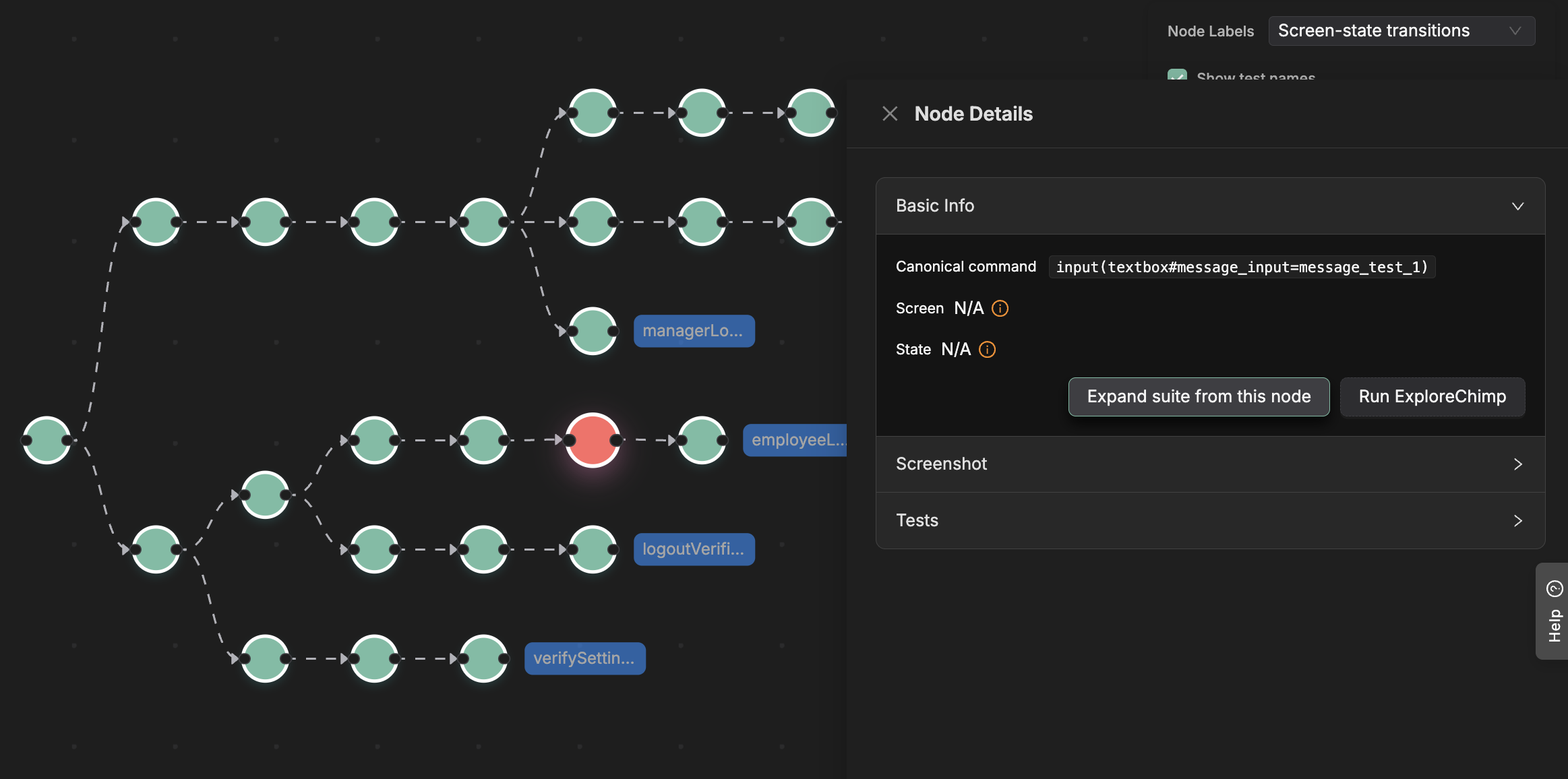
End-to-end tests are ultimately just a sequence of user actions and expectation checks. Conceptually, each test is a walk through your app

Goto url -> Login -> Go to Settings Page -> Update role -> Verify role is updated

You can represent this as a path: every step is a node, and the edges show how the user moves from one step to the next.

Now imagine aggregating all the paths from all the tests in your suite. You end up with a tree-like structure—essentially a map of every known pathway through your product.

Behaviour Map

This isn’t just a “cool visualization.”

It unlocks powerful, practical applications – especially when using AI agents for testing.

Better RAG for Testing Agents​

This tree acts as a graph index over your product’s behavioural pathways.Just like a database index accelerates queries, this structure enables an agent to answer deeper questions about your app’s behaviour – making retrieval-augmented reasoning much more effective.With it, an agent doesn’t have to hallucinate how the app works.It can look up structure, pathways, and reachable states deterministically.

Automatically Expanding Your Test Suite​

Once you have this_“pathway map,”_ an agent can intelligently expand your test suite by targeting untested branches. To do this well, the agent needs two answers:

  • How do I reach the required state?
  • Which branches from that state are already covered?

In TestChimp (under Atlas → Behaviour Tree), selecting any node shows:

the exact path from the root to that node (how to get there), and

all outgoing edges (which branches are already explored by existing tests).

From there, the agent simply:

  1. Navigates to the node by following the script steps.

  2. Look at the UI state.

  3. Brainstorms unexplored actions (new branches).

  4. Converts each unexplored branch into a new test.

In other words, the map gives the agent the same advantage a human has when using Google Maps – it can get anywhere, deliberately.

Controlled Agentic Exploration​

Agent-led exploratory testing can be powerful: the agent can analyze DOM, screenshots, network logs, and console output while walking through your app.

But in practice, fully-agentic exploration has challenges:

  • Slow – inference happens at every step
  • Easily distracted – coarse objectives lead to wandering
  • Unfocused – without context, exploration becomes random

It’s like asking a human to explore an unfamiliar city with no map:

slow progress, random detours, and little sense of the big picture.

Your behavioural pathway graph is the map.

With it, the agent can:

  • reason about where it is,
  • figure out where to go next,
  • and explore far more methodically.

You can even focus exploration narrowly – for example:

“Analyze the Settings page as an admin user.”

Because each step in the graph is annotated with the screen and state (from previous explorations), the agent can determine:

  • how to reach that precise screen state, and
  • how to explore meaningfully once there.
  • To try variations (e.g., test different scenarios in Settings), the agent simply follows the shared trunk of paths that lead to that screen – much like several routes through a city share the same highway.

Bridging Pathways With App Structure: Screens & States​

Throughout this post we’ve mentioned “screens” and “states.”

Here’s how they fit in.

A human knows, while navigating:

  • “I’m on the login page”
  • “Now I’m on the home page”
  • “Now I’m in the settings page as an admin”

Traditional Playwright scripts do not carry that semantic information.

But an agent can.

As it walks through a test step-by-step, it can look at the UI and infer:

  • Which screen am I on?
  • What state am I in? (logged in, admin, item added, etc.) This is exactly what ExploreChimp does.

During guided exploration, it maps each step to the screen and state the UI is currently in.

That enriched context enables the agent to answer questions like:

“How do I get to the Settings page as an admin user?” “What screens does this test touch?” “Which parts of the product lack coverage?”

By connecting behavioural paths with semantic screen/state understanding, TestChimp gains a rich structural model of your app – fueling downstream capabilities like:

  • generating user stories,
  • planning test strategies,
  • writing new tests,
  • and performing targeted exploratory analysis.

Screen-State markers in SmartTests

· 3 min read
Nuwan Samarasekera
Founder & CEO, TestChimp

Ok, first a quick recap on SmartTests:

SmartTests are plain playwright scripts, with intent comments before steps, that enables hybrid execution (fallback to agent mode execution when needed).

SmartTests are used by ExploreChimp to guide its explorations in pre-defined pathways, along which it identifies UX issues of the webapp such as performance, visual glitches, usability, content and more.

The Challenge: Context for Bugs​

When ExploreChimp finds bugs, it tags them with the “Screen” and “State” where they were captured. This context helps with troubleshooting and understanding when issues occur.

  • A Screen is a conceptual view of your application: Dashboard, Homepage, Shopping Cart, etc.
  • A State represents a specific situation within that screen: Empty Cart vs Cart with Items, Logged In vs Logged Out, etc.

ExploreChimp autonomously determines current screen and state based on the steps taken and the current screenshot. While this makes getting started easier, it may not always align with your mental model / the granularity you want things tracked at.

The Solution: Screen-State Annotations​

Now you can add explicit screen-state markers directly in your SmartTest scripts. These annotations tell ExploreChimp exactly which screen and state the app is at at a given point in the test, ensuring bugs are tagged with the context you care about.

How It Works​

After ExploreChimp runs, if the script didn’t contain screen-state markers, it updates the script with screen-state annotations it determined during the walk.

If you don’t want agent to update the script, you can turn it off by unchecking “Update script with screen-state annotations” under Advanced Settings (in the Exploration config wizard).

You can edit these annotations to match your conceptual model. For example, you may want to track UX bugs for “Cart with out-of-stock items” vs “Cart with in-stock items.” instead of the agent suggested states.

On the next run, ExploreChimp uses your annotations instead of guessing, so bugs are tagged consistently with your terminology.

Here is an example of a SmartTest with screen-state annotations:

test('Shopping Cart Flow', async ({ page }) => {
// Navigate to homepage
await page.goto('https://example.com');
// @Screen: Homepage @State: Default

// Search for a product
await page.getByPlaceholder('Search products').fill('laptop');
await page.getByRole('button', { name: 'Search' }).click();
// @Screen: Search Results @State: With Results

// Add item to cart
await page.getByRole('link', { name: /laptop/i }).first().click();
await page.getByRole('button', { name: 'Add to Cart' }).click();
// @Screen: Shopping Cart @State: Cart with Items

// Proceed to checkout
await page.getByRole('button', { name: 'Proceed to Checkout' }).click();
// @Screen: Checkout @State: Payment Step
});

Benefits​

  • Consistent bug tagging: Bugs are tagged consistantly using your terminology, not AI-generated labels.

  • Better organization: View bugs by screen-state in Atlas → SiteMap with your own categories.

  • Easy refinement: Edit annotations to match your mental model easily – no need to retrain or reconfigure.

Getting Started​

  • Run ExploreChimp on your SmartTest (annotations are added automatically).

  • Review and edit the annotations in your script to match your terminology.

  • The next time ExploreChimp is run on that test, it will use your annotations for consistent bug tagging.

The annotations are simple comments, so they don’t affect test execution – they’re purely for ExploreChimp’s context understanding.