Published Updated
What is TestChimp?
In brief: TestChimp is a QA workflow layer that connects test plans, Playwright SmartTests, CI, and TrueCoverage so AI agents and teams ship the right tests and keep them aligned with product reality.
TestChimp is a QA workflow layer for agents. It orchestrates a tight feedback loop so tools like Claude continuously understand product risk, coverage gaps, and where users actually spend time—then act. It supports web (Playwright) and native mobile (iOS and Android via Mobilewright); see Mobile testing for platform-specific capabilities.
- Update test suite to cover under-tested areas of the app, informed by real user behaviour and requirement documentations
- Handle QA infra updates necessary (seed / probe endpoints, authoring fixtures that emulate real world scenarios)
- Run exploratory tests on high impact areas
- Instrument code to understand real user behaviour - to help inform future QA infra updates
Humans stay in control of intent (what the product should do). Agents do the heavy lifting of execution and upkeep against that intent and real user behaviour - continuously learning, identifying gaps and addressing them.
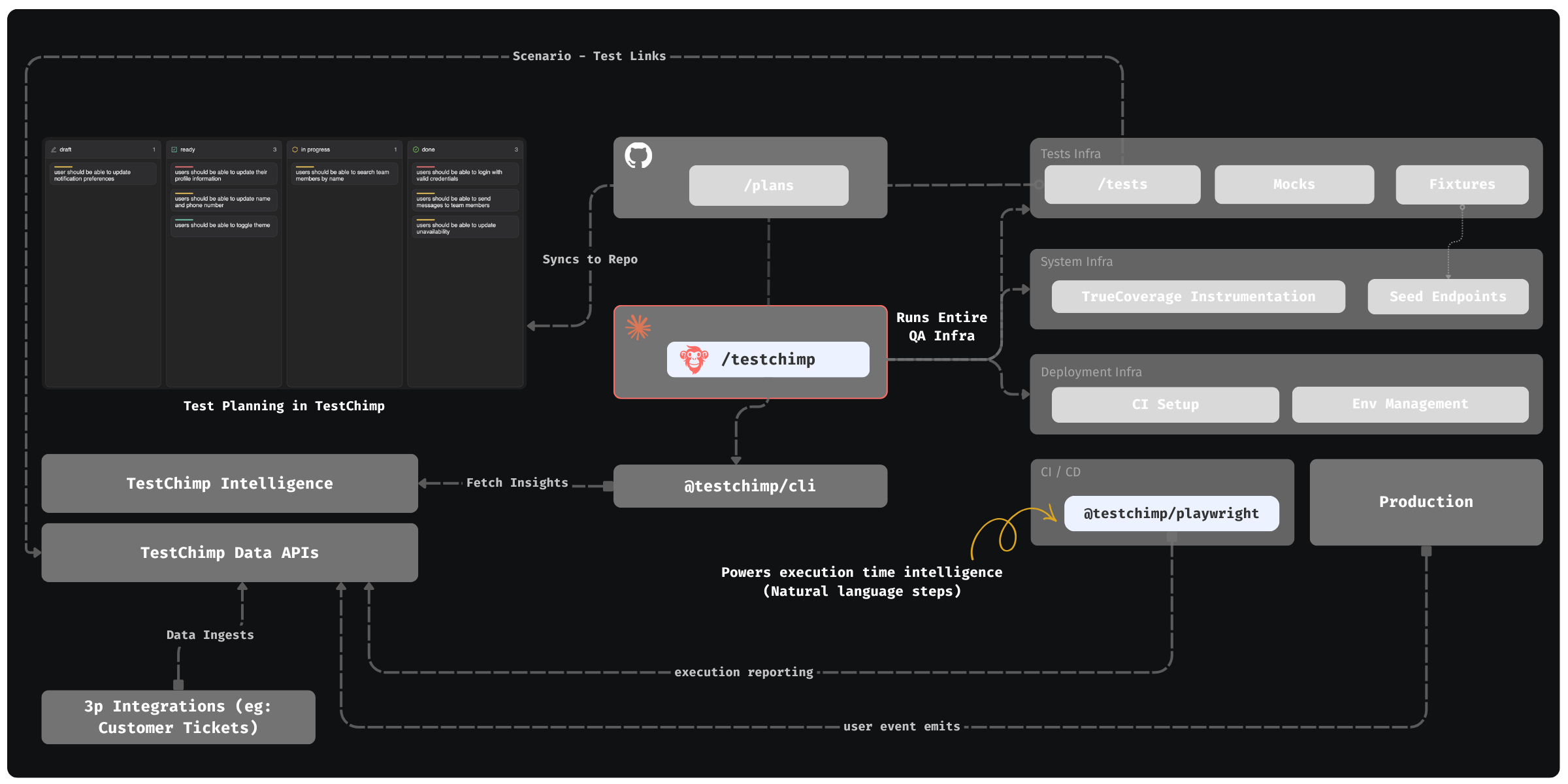
How the loop fits together
- Planned reality — Teams maintain test plans in the TestChimp web app (kanban, forms, priorities). Plans are stored as Markdown in a mapped
plans/folder and synced to your Git repo, so agents read the same source of truth as the platform. - One-time setup — Install the TestChimp skill on Claude (or Cursor, and other hosts that load skills). Run
/testchimp initto wire MCP (@testchimp/cli), SmartTests layout, CI, seed / teardown / read endpoints, fixtures, mocking strategy, TrueCoverage instrumentation, environment strategy, and default workflow policies—see Workflows. - Per PR — Run QA — After development, run
/testchimp run QA(synonym/testchimp test). This composite workflow chains modular subflows (plans, env, SmartTests, smart smoke, optional ExploreChimp / TrueCoverage) under one policy and scope. If you are not on a PR, pass a focus area (story, folder, or scenario scope). Details: Run QA. - In CI — Run tests using standard playwright runner (with the
@testchimp/playwrightruntime plugin installed - this is done by the skill automatically for you) : it reports runs and traces, tags user events with test identity for TrueCoverage, and loops in AI during runtime to execute natural-language steps enabling more resilient scripts—see Playwright runtime plugin. - Periodically — Upkeep — Run
/testchimp upkeep(synonym/testchimp evolve) on a cadence or after deploys: close coverage gaps from requirements and TrueCoverage, explore high-signal UX paths, cleanup, and keep instrumentation current—see Upkeep. Atomic workflows (create tests, fix gaps, explore alone, …) are available when you need a single job.
The TestChimp web app is the control plane: test planning, bugs found from explorations, test coverage gaps aligned with requirements, TrueCoverage drill-downs, and Workflows execution visibility—while Plans → Git → Claude + MCP → CI stays the operational spine. TestChimp Studio is that same control plane as a desktop app, with a local OpenCode agent so you can plan, run QA, and govern the release from one workspace. Download: Download TestChimp Studio.
Quick start (recommended)
- Connect your Git repo in TestChimp and map two folders: one for tests (SmartTests root) and one for plans (markdown test plans).
- Install the TestChimp skill on your agent host (e.g. Claude Code / Cursor) and register MCP.
- Run
/testchimp initonce per repository to establish QA infra, integration, and default policies. - Run
/testchimp run QAwhen a PR is ready; run/testchimp upkeepon a cadence.
Then follow the Quick Start for step-by-step setup and Onboarding to TestChimp for org and project admin. For composites, atomic workflows, and policies, see Workflows.
Why not "just use Claude"?
Claude writes tests. TestChimp tells it which ones matter.
You should let Claude (or Cursor, or Codex) write your tests. It is fast and it is good at it. But writing tests is not the same as knowing you are covered. Once an agent is producing tests at speed, a different set of problems shows up, and none of them are solved by writing more tests.
TestChimp is the QA layer above test writing. It measures your QA posture in detail, so your coding agents know exactly where the gaps are and can close them. What you can measure, you can improve.
The problems teams hit after the agent writes the tests
| What happens | Why the agent can't fix it alone | What TestChimp adds |
|---|---|---|
| "Are our requirements actually tested?" Nobody can answer without reading every spec file. | The agent only knows what is in its prompt. Decisions made in meetings and earlier chats never reach it. | Requirement coverage. Stories and scenarios live as markdown in your repo, tests link to them with a #TS- annotation, and coverage rolls up per folder, release and environment. MeetBots and AgentWatch keep the plans current from meetings and coding-agent sessions, so tests are aimed at what the product should do now. |
| "How much of our API surface is tested?" The suite is green, but whole endpoints and response codes were never exercised. | The agent sees the code it touched, not the whole contract. | API contract coverage. Per-operation, field and response-code coverage from your OpenAPI specs and captured test traffic, with gaps you can hand straight to an agent. |
| "Are the flows our users actually use tested?" Tests cluster around whatever was built last. | The agent has no view of production behaviour. | TrueCoverage. The same user events are captured in production and in test runs (web, iOS and Android), so you see which real user pathways have no tests, ranked by demand and drop-off. |
| "What should we test next?" | Without signals, every gap looks equally important. | The measures above feed /testchimp run QA and /testchimp upkeep, so agents work through the highest-value gaps first instead of adding more tests in already-covered areas. |
| Tests nobody reviewed. The agent wrote the code and the test, and grades its own work. | An agent can't independently confirm its own reading of the requirement. | Verified Tests. A person on the team inspects the run and marks the test verified. When an agent later patches that test, it is flagged for human re-verification by default. How-to: How do I get humans to review tests my coding agent wrote?. |
| The suite gets big and slow. Every PR runs everything, or someone hand-picks a subset. | The agent has no record of which tests relate to which change. | Smart-Smoke. Impact analysis picks the related tests and an optimal subset of a large suite for each PR. |
| Suites drift and go flaky. Tests were right at the first green run and decay after that. | Upkeep is nobody's job until something breaks. | Upkeep fixes recently failing tests and closes new gaps on a cadence. Optional natural-language steps (ai.act, ai.verify, ai.extract, web today) resolve intent at run time, so small UI changes don't break scripts. |
| "Are we ready to ship?" The answer comes from a release meeting or a slide. | A green CI run doesn't say what is uncovered or unverified. | Release readiness. Each release gets one picture: test runs, requirement coverage, and verification status (verified tests show a verified badge; unverified tests are visible), and a gate you can query from CI. |
It works where your agent already works
- Your files, your repo. Tests are standard Playwright (web) or Mobilewright (native iOS and Android) specs. Plans are markdown. Run evidence such as screenshots, traces and video follows your Playwright config.
- Your agent does the work. Install the TestChimp skill in Claude Code, Cursor or another host, run
/testchimp initonce, then/testchimp run QAper PR. TestChimp supplies the signals and the workflows, and your agent writes and fixes the tests. - People stay in charge of intent. Agents propose plan and test changes, and the team reviews them as normal pull requests.
In short: Claude writes the tests. TestChimp measures what they cover, against your requirements, your API contract and your real users, and points Claude at the gaps that matter. Then it tells you whether the release is ready.
Deep dive
- Workflows — Autonomous QA workflow, commands, and how the web app fits in.
- Requirement Planning — Markdown plans, quality governance, traceability, and Git sync.
- SmartTests — Functional testing: Playwright on web; natural language steps
ai.act/ai.verify/ai.extract(web today). - Performance Testing — k6 load and volume journeys, related PR/release runs, and comparable Executions.
- Mobile testing — Native iOS/Android with Mobilewright, CI, and traceability.
- TrueCoverage — Behaviour-aligned coverage from user events in prod and tests (web, iOS, Android — instrumentation guide).
Compare, alternatives, and guides
- Vendor comparisons — TestChimp vs Selenium, Cypress, Playwright, and more.
- Alternatives hub — Switching from legacy QA tools.
- Testing guides — Industry and built-with (Cursor, Lovable, Claude Code) QA workflows.
- QA in the Age of AI — How AI changes test creation and maintenance.
Get started
- Quick Start — Get running in a few steps.
- Onboarding to TestChimp — Team and project setup.
- TestChimp Studio — Desktop IDE for software delivery; download for macOS, Windows, Linux, or
npx @testchimp/studio.
FAQ
What does TestChimp do that Claude alone cannot?
TestChimp tells agents which tests to write and why—using requirement traceability, TrueCoverage gaps, and orchestrated /testchimp init, test, evolve, and explore commands—not just script generation.
Our team doesn't have QA — can we use TestChimp?
Yes—that is a core use case. TestChimp is a dev-friendly QA platform for lean teams: install the TestChimp skill, run `/testchimp init`, and use `/testchimp test` on every PR so agents write and repair Playwright SmartTests against markdown scenarios. Requirement coverage rolls up from scenario annotations, and `/testchimp evolve` expands coverage after deploy using TrueCoverage—so you ship reliable software without building a large QA org first.
What platforms does TestChimp support?
Web via Playwright SmartTests and native iOS/Android via Mobilewright, with TrueCoverage on web, iOS, and Android when instrumented.
How do I get started quickly?
Connect Git, map plans/ and tests/ folders, install the TestChimp skill, then run /testchimp init once and /testchimp test on each PR.