Published Updated
Test Plan Template (Markdown) and Test Planning as Code
A test plan template gives every release the same skeleton: scope, approach, environments, entry and exit criteria, risks, and the scenarios to run. The Markdown template below covers those sections and can live in your repo next to the code it tests, which is what test planning as code means.
Test plan template
Save it as plans/test-plan-<release>.md (or any path your team prefers):
---
release: 2026.11
owner: qa@yourcompany.com
status: draft
---

# Test plan: <release or feature>

## Scope
- In scope: <features, flows, platforms>
- Out of scope: <what you will not test this cycle, and why>

## Approach
- Automated: Playwright E2E on every PR, smoke on deploy
- Manual / exploratory: <areas and time box>
- Non-functional: <performance, accessibility, security checks>

## Environments and test data
- <staging URL, browsers, devices>
- <seed data, test accounts, feature flags>

## Entry and exit criteria
- Entry: build deployed to staging, smoke suite green
- Exit: all high-priority scenarios pass, no open P1 defects

## Risks
- <risk>: <mitigation>

## Scenarios
- [ ] TS-1 <scenario title> (priority: high)
- [ ] TS-2 <scenario title> (priority: medium)
In TestChimp, each scenario line becomes its own Markdown scenario file that Playwright SmartTests link to, so the plan, the tests and the coverage report stay in sync.
In brief: Test planning as code means your user stories and scenarios are Markdown files in git, not records locked in a test management database. Startups using AI coding agents replace TestRail-style TMS libraries this way: agents and humans read the same plans, link Playwright SmartTests with scenario annotations, and review changes in pull requests. TestChimp syncs those files two-way and layers coverage and Verified Tests on top.
What is test planning as code?
Test planning as code is the practice of keeping test intent (stories and scenarios) as plain files in your repository, version-controlled and reviewed like product code. In TestChimp, those files are Markdown with YAML frontmatter in a mapped plans/ folder. Coding agents (Cursor, Claude Code, and others) can read them directly. Pull requests show diffs. Leaving the platform does not strand your plans in a vendor database.
For a startup replacing TestRail while adopting AI coding agents, the loop looks like this: import or author scenarios as Markdown, sync to git, let agents write Playwright SmartTests linked with #TS-n, run /testchimp run QA on each PR, and have a person stamp Verified Tests. See also the git-native TestRail alternative, How do I get humans to review tests my coding agent wrote?, and human review of agent-written tests.
Designed for the Agentic Era
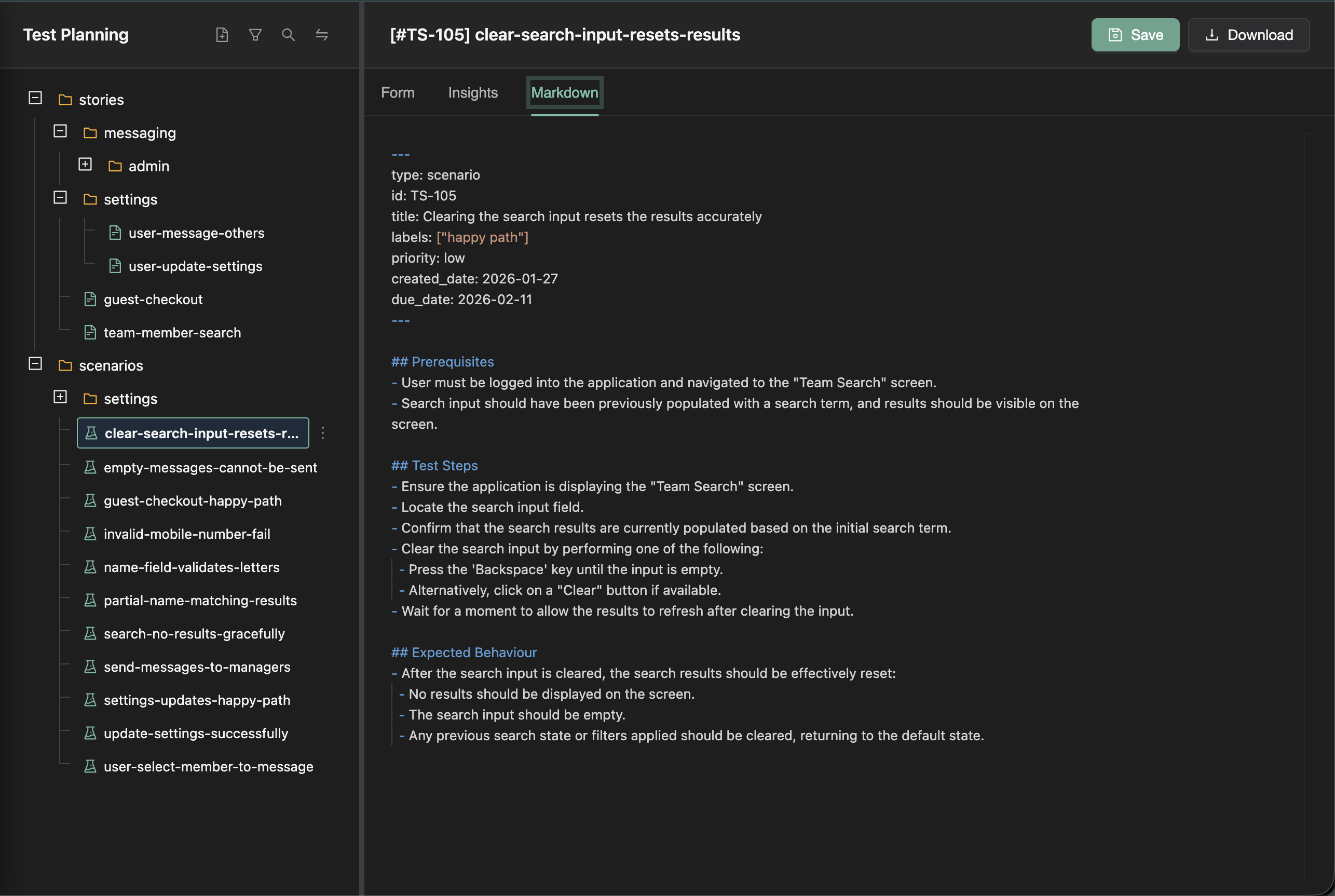
TestChimp takes a fundamentally different approach to test planning. Instead of treating test artifacts as database records locked inside a proprietary system, we treat them as code: plain markdown files organized in folders, version-controlled alongside your codebase.
This file-first approach is purpose-built for the agentic era, where AI coding assistants and testing agents need direct access to your test planning artifacts to work effectively.
The Philosophy: Files Over Database Records
Traditional test management tools store your user stories and test scenarios as database records, accessible only through their UI or proprietary APIs. This creates several problems:
- Siloed knowledge: Test plans live separately from your codebase
- Limited tooling: You can only interact with artifacts through the vendor's interface
- Agent-unfriendly: AI tools can't easily read or understand your test strategy
- Vendor lock-in: Migrating to another tool means complex data exports
TestChimp inverts this model. Your user stories and test scenarios are markdown files with frontmatter — human-readable, version-controllable, and instantly accessible to any tool that can read files.
Why Markdown Files with Frontmatter?
Human-Readable, Machine-Parseable
Each test artifact is a .md file with YAML frontmatter for structured metadata:
---
title: User Login with Email
priority: high
status: draft
labels:
  - authentication
  - core-flow
---

## Description

As a registered user, I want to log in with my email and password...

## Acceptance Criteria

- User can enter email and password
- Invalid credentials show clear error message
- Successful login redirects to dashboard
This format is:
- Readable by humans: Open in any text editor or IDE
- Parseable by machines: Structured frontmatter enables automated processing
- Diffable: Standard git diffs show exactly what changed
- Searchable: grep, ripgrep, or any code search tool works perfectly
Folder Organization Provides Context
Stories and scenarios are organized in a folder hierarchy that mirrors your application's structure:
stories/
├── authentication/
│   ├── login.md
│   ├── registration.md
│   └── password-reset.md
├── checkout/
│   ├── cart-management.md
│   └── payment-processing.md
└── user-profile/
    ├── settings.md
    └── preferences.md

scenarios/
├── authentication/
│   ├── login-happy-path.md
│   ├── login-invalid-credentials.md
│   └── registration-validation.md
└── checkout/
    ├── add-to-cart.md
    └── complete-purchase.md
This structure:
- Groups related artifacts: Authentication stories and scenarios live together
- Enables scoped analysis: Get insights for just the checkout module
- Provides AI context: Agents understand relationships through folder proximity
- Scales naturally: Add new folders as your application grows
Perfect for AI Coding and Testing Agents
The file-first approach unlocks powerful capabilities for AI agents:
Direct Repository Access
AI coding assistants like Cursor, GitHub Copilot, and others can directly read your test planning files because they're in your repository. When an agent is working on the login feature, it can:
- Read
stories/authentication/login.mdto understand requirements - Browse related scenarios in
scenarios/authentication/ - Understand the broader context from sibling stories
- Generate code that aligns with your documented expectations
Folder Context for Better Understanding
When an AI agent reads a scenario file, the folder structure provides implicit context:
- Parent folder: What feature area is this scenario in?
- Sibling files: What related scenarios exist?
- Story references: Which user stories does this scenario validate?
This contextual information helps agents make better decisions without explicit prompting.
Plain Text for Universal Compatibility
Markdown is the lingua franca of developer tools. Your test artifacts work with:
- IDEs: VSCode, IntelliJ, Cursor all render markdown beautifully
- Git platforms: GitHub, GitLab render markdown with full formatting
- Documentation tools: Docusaurus, MkDocs can include your test plans
- AI tools: Any LLM can read and understand markdown
Workflow Management Layered on Top
While the files are the source of truth, TestChimp layers enterprise-grade workflow capabilities on top:
Collaborative Editing
The TestChimp platform provides:
- Rich form-based editing: Edit with structured forms, not just raw markdown
- Real-time collaboration: Multiple team members can work simultaneously
- AI-assisted authoring: Generate stories and scenarios with context-aware AI
- Status tracking: Manage workflow states (draft, in-review, approved)
Insights at Any Granularity
Because artifacts are organized in folders, TestChimp can roll up insights at any level:
- Folder-level metrics: Coverage gaps for the entire authentication module
- Filtered views: High-priority stories due next sprint
- Cross-cutting analysis: All failing scenarios across the application
Workflow Without Lock-in
The platform enhances your workflow without trapping your data:
- Files remain readable outside TestChimp
- Export to Git keeps everything in your repository
- No proprietary formats to decode
Key Benefits Summary
| Benefit | Description |
|---|---|
| Version Controllable | Sync to your Git repo so test plans live alongside your codebase, with full history and branching support |
| Agent-Ready | Plain markdown files with folder organization provide perfect context for AI coding and testing agents |
| Workflow Management | Full enterprise workflow capabilities layered on top via the TestChimp platform |
| Granular Insights | Coverage gaps, failing scenarios, and metrics rolled up to any folder level for actionable reporting |
| No Lock-in | Standard markdown files mean you're never trapped in a proprietary format |
| Universal Tooling | Works with any text editor, IDE, git tool, or AI assistant |
Test planning and the default branch
Test planning in TestChimp is intentionally kept in sync with the default branch of the connected repository (e.g. main or master), and is not branch-specific. User stories, scenarios, and the test plan structure represent product-level scope and are shared across the team. Keeping the plan on the default branch ensures a single source of truth for what the product is expected to do, while SmartTests and exploratory runs can still be branch-aware for authoring and running tests on feature branches. So: test planning = product scope (default branch); test execution and exploration = can be branch-specific (feature branches, PR previews).
Getting Started
Ready to embrace requirement planning as code?
- Author User Stories — Learn how to create detailed user stories with AI assistance
- Author Test Scenarios — Create and link test scenarios (platform, coding agent, or direct create)
- Requirement Quality Governance — Harden specs with DeFOSPAM scores, findings, and suggested fixes
- Export to Git — Sync your test plan to your repository
- Requirement Traceability — Track coverage at any folder level
- Test Runs — Plan scoped validation cycles and track progress across manual and automation executions
- Release Management — Group test runs on a version, link CI and manual evidence, and use release intelligence before deploy
Requirement planning as code is the natural evolution for teams working with AI-assisted development. Your requirement artifacts become first-class citizens of your codebase, accessible to both humans and agents.
Related QA guides
- Playwright alternatives compared
- Cypress vs Playwright
- Smoke vs regression testing
- Stripe test cards for Playwright E2E
- Requirements traceability matrix (RTM) template
Frequently asked questions
What is test planning as code?
Keeping stories and scenarios as Markdown (or similar) files in git so humans, CI and AI coding agents share one reviewable source of truth, instead of a proprietary TMS database.
How does a startup using AI coding agents replace TestRail with it?
Import TestRail cases as scenarios (or author Markdown plans), sync them to your repo, link Playwright SmartTests to those scenarios, run /testchimp run QA on PRs, and verify the tests that matter. Keep TestRail for history until coverage overlaps. Guides: Migrate TestRail to git and How do I get humans to review tests my coding agent wrote?.
Do plans stay readable if we leave TestChimp?
Yes. Plans are standard Markdown in your repo. Only Verified Tests status lives solely in TestChimp; other non-git data is covered by a full download.
How do plans connect to SmartTests?
SmartTests use scenario annotations (#TS-n) that point at scenario Markdown files. Coverage rolls up by folder, environment and release.
Who edits plans: the web app or the IDE?
Both. Teams use TestChimp kanban and forms; agents and developers edit the same Markdown in git. Changes sync both ways as pull requests.
FAQ
What is test planning as code?
Keeping stories and scenarios as Markdown files in git so humans, CI and AI coding agents share one reviewable source of truth, instead of a proprietary TMS database.
How does a startup using AI coding agents replace TestRail with it?
Import TestRail cases as scenarios (or author Markdown plans), sync them to your repo, link Playwright SmartTests to those scenarios, run /testchimp run QA on PRs, and verify the tests that matter.
Do plans stay readable if we leave TestChimp?
Yes. Plans are standard Markdown in your repo. Only Verified Tests status lives solely in TestChimp; other non-git data is covered by a full download.
How do plans connect to SmartTests?
SmartTests use scenario annotations (#TS-n) that point at scenario Markdown files. Coverage rolls up by folder, environment and release.
Who edits plans: the web app or the IDE?
Both. Teams use TestChimp kanban and forms; agents and developers edit the same Markdown in git. Changes sync both ways as pull requests.