
The Agentic
UX Tester for Modern Dev Teams.
Stop shipping apps that pass tests but fail humans. Uncover the UX problems hurting your engagement.
30-day free trial - No credit card required
Why Test UX?
88%
of users say they’re less likely to return after a bad user experience.
75%
of judgments on website credibility are based on overall aesthetics.
15%
reduction in churn is associated with improving usability and UX.
Test UX Agentically
Scripts are
Blind

Traditional automation checks functionality, not experience. It can click a button, but it can’t tell you if that button looks broken, feels slow, or violates accessibility standards.
Humans are
Slow

Manual testing is high-quality but low-velocity. Relying on humans for regression checks creates a bottleneck that slows down your entire release cycle.
Agents solve the problem

TestChimp combines the visual judgment of a human with the infinite scale of the cloud. Catch critical UX, UI, and Performance bugs without the manual slog.
Find bugs that matter
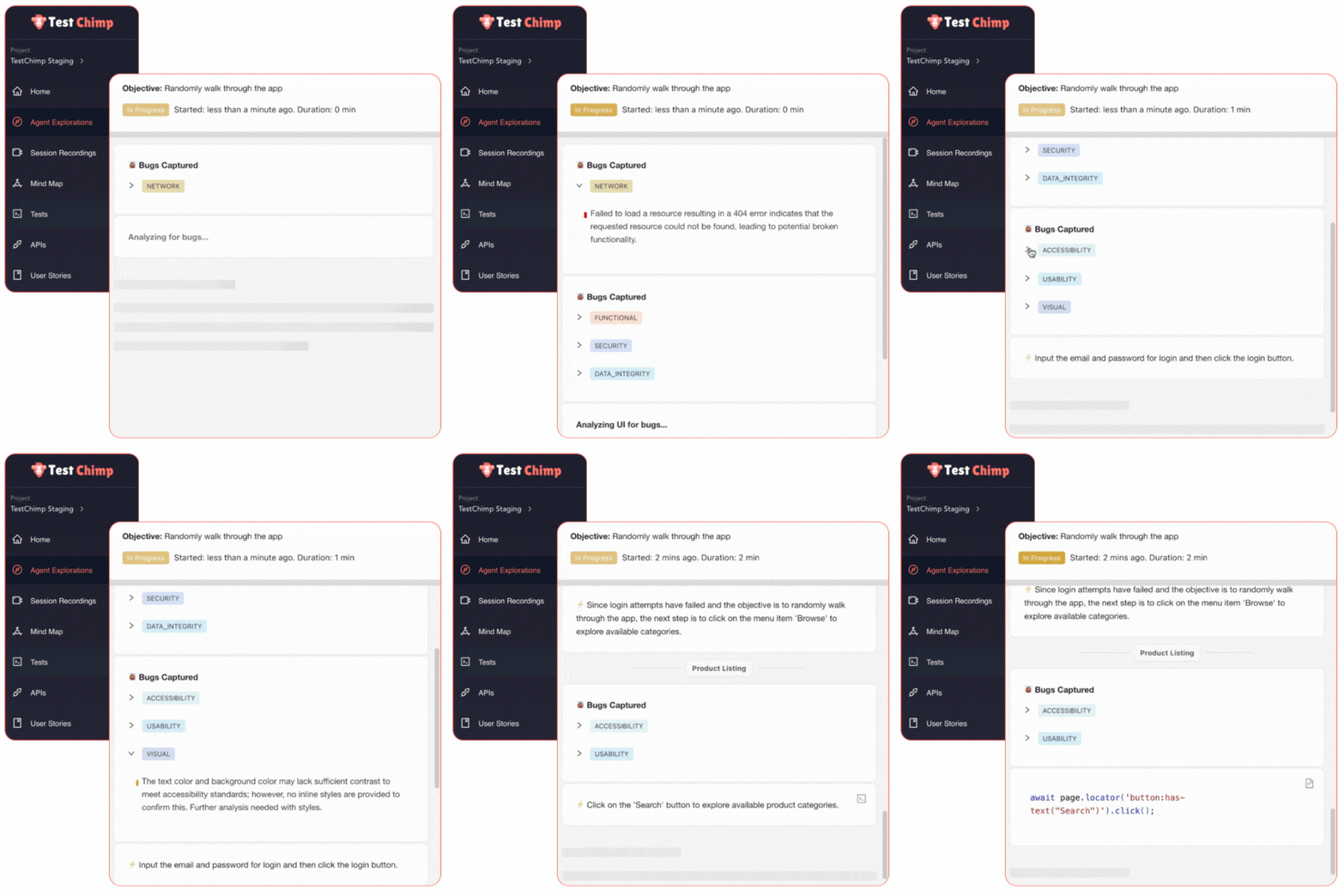
Our Agent walks through your app like a critical user, flagging the usability and performance issues that kill retention. Issues like...
Visual Instability
Elements that jump, overlap, or shift unexpectedly while loading (CLS). It frustrates clicks and makes your app feel cheap.
Perceived Performance
Interactions that lag or unoptimized assets that bloat load times. Every 100ms of latency costs you 1% in revenue.
Accessibility Barriers
Low contrast text, missing labels, or keyboard traps. We audit against WCAG standards automatically to ensure inclusivity.
Obscured Content
Popups that can't be closed or sticky headers covering buttons. A script clicks via code; a user sees it's physically impossible.
Dead Ends
Broken links, 404s, or console errors that silently break downstream features. The Agent logs it all.
Responsive Breaks
Text that overflows on mobile, menus that don't open on tablets, or layouts that break on small screens.
Hours saved per month
TestChimp replaces 120 hours of testing time each month
Faster Authoring
Converting manual tests into scripts
More Coverage
Test more of your site, more often with our directed AI Agents
Annual savings
Production bugs cost money. We save the average team +$450k each year.
Guided by SmartTests
Atlas
Atlas is your site's living blueprint. It's a single, dynamic map of your entire application built automatically. Atlas ensures every test plan, user story, and bug report is 100% specific to your app, not a generic guess.
Structural Map
Automated Site Map
Maps every screen and state (like 'Empty Cart') into an auto-updating hierarchy.
Context-Aware Bugs
Pins bugs directly to the screen/state where found, capturing complete context.
Smart Visual Regression
Compares screenshots against approved baselines to ignore noise and spot real issues.
Integrated Knowledge
Attach PRDs and user stories to specific screens so AI understands your business logic.
Behaviour Map
User Journey Maps
Visualizes your entire test suite as an interactive flowchart of user pathways.
Expand Test Coverage
Identify "unhappy paths" and ask AI to automatically generate new tests for edge cases.
Surgical Explorations
Run hyper-focused explorations on specific areas of your app without running the full suite.
Cursor for QA
Our Chrome extension puts context-aware assistance into the browser.
Bugs
View and fix bugs directly from your browser. Click “Fix in IDE” and the extension will collect all necessary context, prompting your IDE for a precise fix.
Scenarios
Maintain test scenarios or generate new scripts on the fly. The extension works with your IDE to create scripts that match your project's code structure and style.
Dev
Select UI elements and describe your changes. The extension communicates all visual and code context to your IDE, enabling seamless, one-shot fixes.
Record
Generate SmartTests from manual test steps.
Bugs
View, edit, and fix bugs directly within your browser. Click “Fix in IDE”. The extension will collect all the necessary context for the bug, and prompt your IDE to fix the issue.
Scenarios
Maintain test scenarios or drill down to scripts. The extension will also work with your IDE to generate test scripts matching your projects’ code structure and style.
Dev
Select elements / areas and type your changes. The extension communicates related files, screens, and elements to your IDE, which makes the changes. Seamless vibe coding.
Record
Capture DOM recordings of your screen, including the UI and the complete API request / response payloads. Permalinks make it easy to share with your team.
Works Where you work
Don't change your workflow. TestChimp bridges the gap between your existing tools, creating a seamless loop from design to deployment.
FAQs
Think of it like this: automated scripts are the diligent security guards who stick to their assigned routes. Exploratory testing is the clever spy who tries to sneak in through the air vents.
Traditionally this has been a manual process of investigating your app to find the nuanced, “feel-bad” bugs that rigid scripts miss. Your automation might confirm a button works, but exploratory testing asks, “Can a user even see the button?”.
Our Agent can take on a large portion of this work, exploring, analysing screens, and ensuring that you’re not shipping a functionally perfect app with a terrible user experience. We specialise in finding issues like visual glitches, overlapping content, dead clicks, hard to understand error messages etc.
In other words, we’ll free up your team to focus on testing other areas and shipping more code.
TestChimp complements your scripted tests by autonomously exploring your webapp to identify various visual glitches, usability bugs, and visual regressions which, until now, required manual labour. Yeah, our Agent does write scripts too, but the difference is we’re really good at pressure testing your webapp to make sure your application is working as expected!
Agentic testing is fantastic for discovery, exploring your app to find new bugs and uncover test scenarios you never thought of. But for checking your critical login flow 100 times a day, the creativity of an AI Agent can be slow, costly, and less predictable.
That’s where scripts are the perfect tool. They provide deterministic speed and reliability you need for those essential, repeatable checks.
At TestChimp, we give you the best of both worlds: we use our agent to discover what needs to be tested, and then help you generate rock-solid scripts to verify it, every single time.
Absolutely! Our local agent access is built for exactly that. We’d never leave your staging and local environments hanging.
Here’s a resource doc that explains how to set it up.
Nope! TestChimp plays well with others.
Our exploratory testing agent is the perfect compliment to any automation you’re already running.
And for scripts, we can export to frameworks you already use, like Playwright, Cypress, and Selenium. No vendor lock-in, ever.
Absolutely. Kick the tires for 30 days on us and get access to the full platform.
Just know you won’t get access to our most powerful AI model until you go pro.
Teams of up to 20 can collaborate and use the platform for $500 a month, with features tailored for collaboration such as Jira & Figma integration.
If it’s just you, we also have a $50 plan for individuals. You’ll get less of the good stuff, but it’s still a powerful way to unlock access to TestChimp.
You can find the full breakdown of our pricing and what’s included here.
It’s simple: Sign up, give our AI agent a URL, and let it go. You’ll get your first insights in minutes. Go on, unleash the chimp!