Catch UX Bugs with Exploratory Agents.
Scripts don't see your screen. Manual testing doesn't scale. Exploratory agents walk through your app to highlight critical UX issues.


88%
of users say they’re less likely to return after a bad user experience
75%
of judgments on website credibility are based on overall aesthetics
15%
reduction in churn is associated with improving usability and UX
88%
of users say they’re less likely to return after a bad user experience
75%
of judgments on website credibility are based on overall aesthetics
15%
reduction in churn is associated with improving usability and UX
88%
of users say they’re less likely to return after a bad user experience
75%
of judgments on website credibility are based on overall aesthetics
15%
reduction in churn is associated with improving usability and UX
Guided by SmartTests
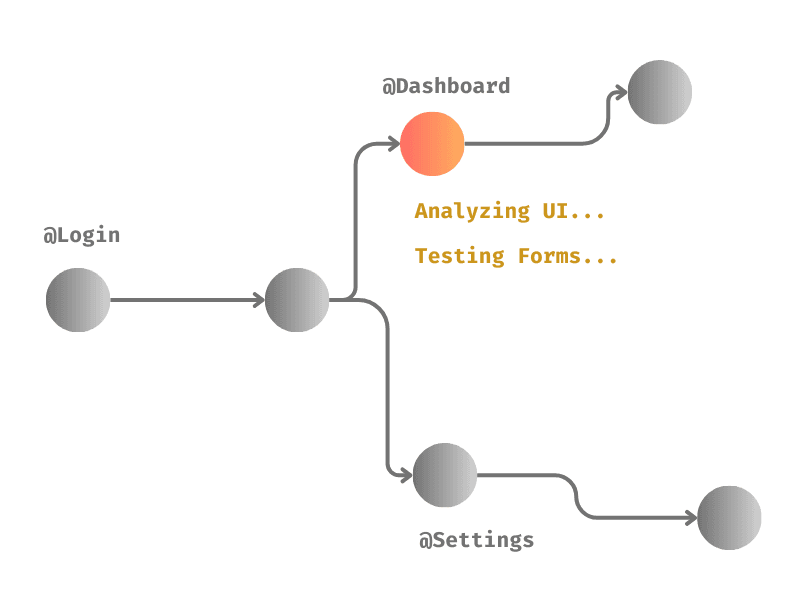
Our exploratory agents use SmartTests as a GPS to navigate the app, and catch UX bugs along the way
Controlled exploration resulting in measurable coverage
Trace UX issues back to the specific scenarios and stories they affect
Consistent screen and state naming for precise bug attribution


Meet the Troop of Explorers…
Meet the Troop…
Meet the Troop of Explorers…
Bug Source Analytics Agent
Analyzes DOM, UI, Network traffic, Console logs and Browser metrics to catch multiple categories of issues spanning visual, security, performance, layout, accessibility and more
Localization Checker
Loops through the supported locales to identify mistranslations, untranslated strings, RTL issues, layout breakages in specific locales and more...
Theme Checker
Switches themes to identify colour contrast issues, text blending in to background, Aesthetically unpleasing color combinations
Form Tester
Checks for invalid input scenarios to ensure proper validations, test edge case values (names with hyphens, emails with special characters etc.) to validate they don’t break the app.
Bug Source Analytics Agent
Analyzes DOM, UI, Network traffic, Console logs and Browser metrics to catch multiple categories of issues spanning visual, security, performance, layout, accessibility and more
Localization Checker
Loops through the supported locales to identify mistranslations, untranslated strings, RTL issues, layout breakages in specific locales and more...
Theme Checker
Switches themes to identify colour contrast issues, text blending in to background, Aesthetically unpleasing color combinations
Form Tester
Checks for invalid input scenarios to ensure proper validations, test edge case values (names with hyphens, emails with special characters etc.) to validate they don’t break the app.
Bug Source Analytics Agent
Analyzes DOM, UI, Network traffic, Console logs and Browser metrics to catch multiple categories of issues spanning visual, security, performance, layout, accessibility and more
Localization Checker
Loops through the supported locales to identify mistranslations, untranslated strings, RTL issues, layout breakages in specific locales and more...
Theme Checker
Switches themes to identify colour contrast issues, text blending in to background, Aesthetically unpleasing color combinations
Form Tester
Checks for invalid input scenarios to ensure proper validations, test edge case values (names with hyphens, emails with special characters etc.) to validate they don’t break the app.
Bug Source Analytics Agent
Analyzes DOM, UI, Network traffic, Console logs and Browser metrics to catch multiple categories of issues spanning visual, security, performance, layout, accessibility and more
Localization Checker
Loops through the supported locales to identify mistranslations, untranslated strings, RTL issues, layout breakages in specific locales and more...
Theme Checker
Switches themes to identify colour contrast issues, text blending in to background, Aesthetically unpleasing color combinations
Form Tester
Checks for invalid input scenarios to ensure proper validations, test edge case values (names with hyphens, emails with special characters etc.) to validate they don’t break the app.
Frequently Asked Questions
Why do exploratory testing if we have automation scripts?
Automation scripts confirm expected behavior, but they do not proactively detect visual, performance, or usability issues outside predefined assertions — which is why structured exploratory testing remains critical.
Why not rely solely on manual exploratory testing?
Manual testing is valuable but labor-intensive, inconsistent, and difficult to repeat at scale, while ExploreChimp provides controllable, repeatable exploration - enabling capturing of many critical bugs cutting manual QA toll significantly.
What kinds of bugs do Explorations catch?
ExploreChimp identifies visual defects, layout inconsistencies, usability issues, performance bottlenecks, console errors, API interaction issues, invalid form behavior, theme contrast issues, and localization breakages that traditional scripted tests do not capture.
What are the different exploratory agents available?
ExploreChimp includes specialized agents for bug source analytics (UI, DOM, metrics, network, and console analysis), form validation checking (invalid inputs and edge cases), theme testing (cross-theme visual consistency), and localization testing (i18n and locale-specific rendering).
Why is automated exploratory testing important?
Poor performance, broken layouts, and usability defects directly impact user trust and retention, and structured exploratory runs help detect experience-level issues before they reach production.
How does exploration stay aligned with test plans?
Explorations are guided by SmartTests to ensure exploration remains deterministic, measurable, and traceable back to planned scenarios instead of becoming random crawling.
Frequently Asked Questions
Why do exploratory testing if we have automation?
Automation scripts confirm expected behavior, but they do not proactively detect visual, performance, or usability issues outside predefined assertions — which is why structured exploratory testing remains critical.
Why not rely solely on manual exploratory testing?
Manual testing is valuable but labor-intensive, inconsistent, and difficult to repeat at scale, while ExploreChimp provides controllable, repeatable exploration - enabling capturing of many critical bugs cutting manual QA toll significantly.
What kinds of bugs do Explorations catch?
ExploreChimp identifies visual defects, layout inconsistencies, usability issues, performance bottlenecks, console errors, API interaction issues, invalid form behavior, theme contrast issues, and localization breakages that traditional scripted tests do not capture.
What are the different exploratory agents available?
ExploreChimp includes specialized agents for bug source analytics (UI, DOM, metrics, network, and console analysis), form validation checking (invalid inputs and edge cases), theme testing (cross-theme visual consistency), and localization testing (i18n and locale-specific rendering).
Why is automated exploratory testing important?
Poor performance, broken layouts, and usability defects directly impact user trust and retention, and structured exploratory runs help detect experience-level issues before they reach production.
How does exploration stay aligned with test plans?
Explorations are guided by SmartTests to ensure exploration remains deterministic, measurable, and traceable back to planned scenarios instead of becoming random crawling.
Frequently Asked Questions
Why do exploratory testing if we have automation scripts?
Automation scripts confirm expected behavior, but they do not proactively detect visual, performance, or usability issues outside predefined assertions — which is why structured exploratory testing remains critical.
Why not rely solely on manual exploratory testing?
Manual testing is valuable but labor-intensive, inconsistent, and difficult to repeat at scale, while ExploreChimp provides controllable, repeatable exploration - enabling capturing of many critical bugs cutting manual QA toll significantly.
What kinds of bugs do Explorations catch?
ExploreChimp identifies visual defects, layout inconsistencies, usability issues, performance bottlenecks, console errors, API interaction issues, invalid form behavior, theme contrast issues, and localization breakages that traditional scripted tests do not capture.
What are the different exploratory agents available?
ExploreChimp includes specialized agents for bug source analytics (UI, DOM, metrics, network, and console analysis), form validation checking (invalid inputs and edge cases), theme testing (cross-theme visual consistency), and localization testing (i18n and locale-specific rendering).
Why is automated exploratory testing important?
Poor performance, broken layouts, and usability defects directly impact user trust and retention, and structured exploratory runs help detect experience-level issues before they reach production.
How does exploration stay aligned with test plans?
Explorations are guided by SmartTests to ensure exploration remains deterministic, measurable, and traceable back to planned scenarios instead of becoming random crawling.
Upgrade Your QA Platform Today.
Get In Touch
Email:
contact@testchimp.io
Phone:
+61 434 336 795
Address:
8a Sinfield Street, Ermington, NSW, AU

TestChimp
QA Platform Purpose Built for Humans and AI Agents
Get In Touch
Email:
contact@testchimp.io
Phone:
+61 434 336 795
Address:
8a Sinfield Street, Ermington, NSW, AU
Get In Touch
Email:
contact@testchimp.io
Phone:
+61 434 336 795
Address:
8a Sinfield Street, Ermington, NSW, AU