Test Planning - Built For the Agentic Era
Test Planning Built For
the Agentic Era
If you’re building with agents, your planning workflow shouldn’t fight them.


Test Plans
as Docs in Code
Agents work best with plain text files in source control; not DB-centric, form-driven tools.
Test Plans
as Docs in Code
Agents work best with plain text files in source control; not DB-centric, form-driven tools.
Test Plans
as Docs in Code
Agents work best with plain text files in source control; not DB-centric, form-driven tools.
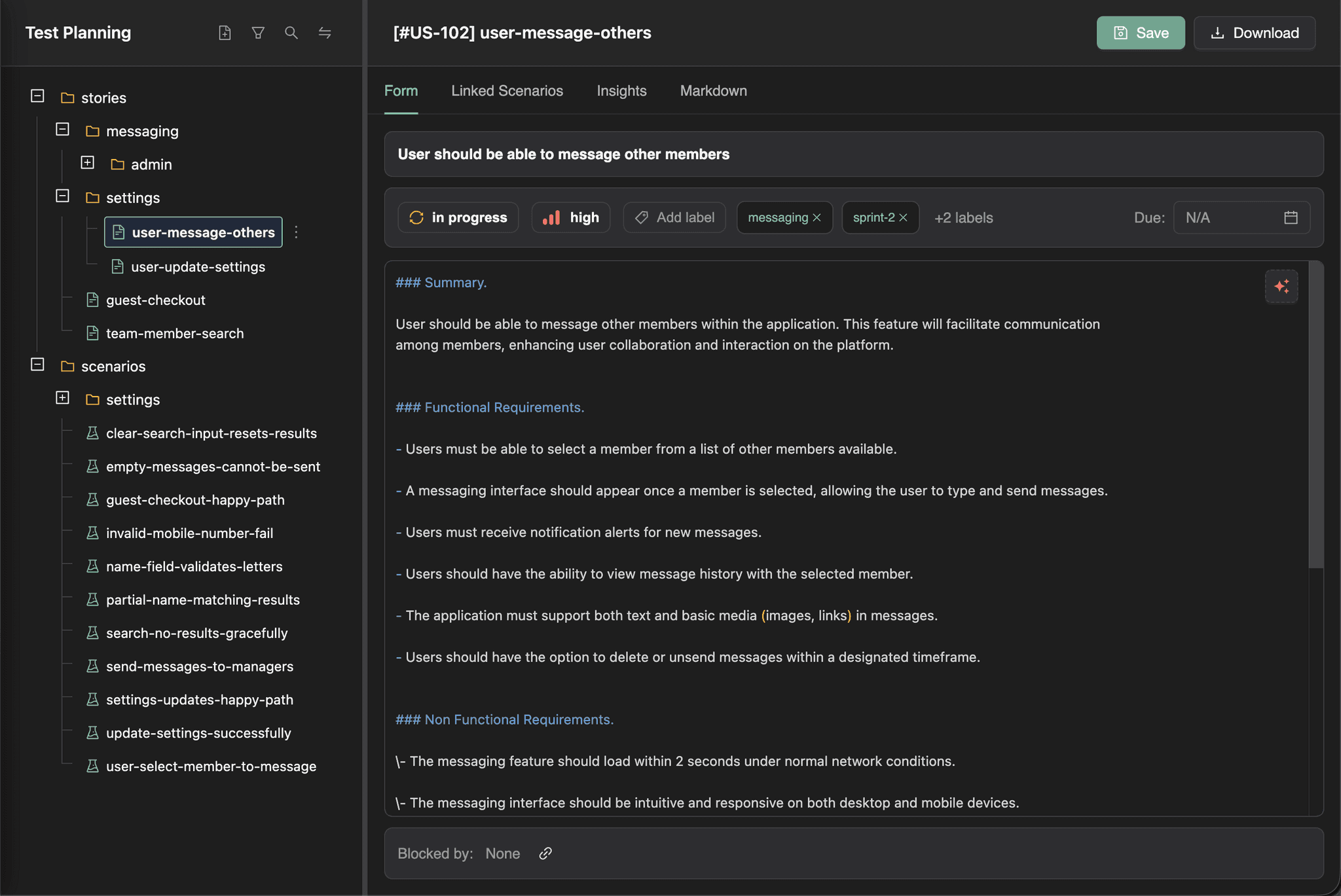
In TestChimp, user stories and test scenarios live as structured .md files, making them:
Agents work best with plain text files in source control; not DB-centric, form-driven tools. In TestChimp, user stories and test scenarios live as structured .md files, making them:
Version-controlled alongside your code
Readable and editable by humans
Directly consumable by AI Agents


Organised Like Code, Not Tickets
Stories and scenarios live in folders, just like source code - giving teams and agents shared structure, scalable organisation, and contextual insights at every level of the product.
stories
auth
purchase flows
pay-with-credit
add-to-cart
scenarios
happy path
payment-success
stories
auth
purchase flows
pay-with-credit
add-to-cart
scenarios
happy path
payment-success
Author Stories and Scenarios with AI
Using your existing plans, structure, and scripts as context, TestChimp helps draft stories, expand scenarios, and explore what to test - turning intent into executable plans faster.
Generating…
Write For Me
Generating…
Write For Me
Generating…
Write For Me
Human-Friendly Workflows on Top
While test plans live as files and power agents behind the scenes, TestChimp layers intuitive workflows for day-to-day collaboration - so teams get structure without sacrificing usability.


Frequently Asked Questions
How does TestChimp compare with Jira / Linear for test planning?
TestChimp is not a general issue tracker like Jira or Linear; It is a "Docs as Code" approach for test planning that is more agent-friendly as plans become available in your repo, organized in folders. TestChimp natively consolidates test authoring, execution, exploratory testing and ties them back to your plans, enabling deeper QA intelligence.
What makes this different from Xray or Zephyr?
Tools like Xray and Zephyr require form-based issue linking, whereas TestChimp uses annotation comments directly in test code that is agent friendly, and unifies planning with real execution data - including attributing exploratory bugs back to scenarios.
How does TestChimp connect plans to tests?
Scenarios are linked in test code using annotation comments (// @scenario), allowing executions, and regressions to map automatically back to the original plan. Since linking is done directly on code, coding agents can easily do the linking. This removes the need for manually maintained spreadsheets and disconnected systems.
How are UX bugs traced back to test scenarios?
Yes — in TestChimp, exploratory agents run based on existing functional tests (where the agent walks through the path and captures UX bugs). Since test to scenario mappings already exist, the bugs found by the exploratory agents are mapped to the scenarios they affect, enabling non-functional bug attribution back to your plans.
Can I import my existing stories and scenarios from Jira?
Yes — user stories and test scenarios in Jira can be imported to bootstrap your planning layer without recreating everything.
How do test plans get synced to the code repo?
You can map an existing folder in your repo for stories and scenarios. Once mapped, you can click on "Export to Git" in test planning screen, and the stories and scenarios will be mirrored in your repo as markdown files.
Frequently Asked Questions
How does TestChimp compare with Jira?
TestChimp is not a general issue tracker like Jira or Linear; It is a "Docs as Code" approach for test planning that is more agent-friendly as plans become available in your repo, organized in folders. TestChimp natively consolidates test authoring, execution, exploratory testing and ties them back to your plans, enabling deeper QA intelligence.
What makes this different from Xray or Zephyr?
Tools like Xray and Zephyr require form-based issue linking, whereas TestChimp uses annotation comments directly in test code that is agent friendly, and unifies planning with real execution data - including attributing exploratory bugs back to scenarios.
How does TestChimp connect plans to tests?
Scenarios are linked in test code using annotation comments (// @scenario), allowing executions, and regressions to map automatically back to the original plan. Since linking is done directly on code, coding agents can easily do the linking. This removes the need for manually maintained spreadsheets and disconnected systems.
How are UX bugs traced back to test scenarios?
Yes — in TestChimp, exploratory agents run based on existing functional tests (where the agent walks through the path and captures UX bugs). Since test to scenario mappings already exist, the bugs found by the exploratory agents are mapped to the scenarios they affect, enabling non-functional bug attribution back to your plans.
Can I import my existing stories from Jira?
Yes — user stories and test scenarios in Jira can be imported to bootstrap your planning layer without recreating everything.
How do test plans get synced to the code repo?
You can map an existing folder in your repo for stories and scenarios. Once mapped, you can click on "Export to Git" in test planning screen, and the stories and scenarios will be mirrored in your repo as markdown files.
Frequently Asked Questions
How does TestChimp compare with Jira / Linear for test planning?
TestChimp is not a general issue tracker like Jira or Linear; It is a "Docs as Code" approach for test planning that is more agent-friendly as plans become available in your repo, organized in folders. TestChimp natively consolidates test authoring, execution, exploratory testing and ties them back to your plans, enabling deeper QA intelligence.
What makes this different from Xray or Zephyr?
Tools like Xray and Zephyr require form-based issue linking, whereas TestChimp uses annotation comments directly in test code that is agent friendly, and unifies planning with real execution data - including attributing exploratory bugs back to scenarios.
How does TestChimp connect plans to tests?
Scenarios are linked in test code using annotation comments (// @scenario), allowing executions, and regressions to map automatically back to the original plan. Since linking is done directly on code, coding agents can easily do the linking. This removes the need for manually maintained spreadsheets and disconnected systems.
How are UX bugs traced back to test scenarios?
Yes — in TestChimp, exploratory agents run based on existing functional tests (where the agent walks through the path and captures UX bugs). Since test to scenario mappings already exist, the bugs found by the exploratory agents are mapped to the scenarios they affect, enabling non-functional bug attribution back to your plans.
Can I import my existing stories and scenarios from Jira?
Yes — user stories and test scenarios in Jira can be imported to bootstrap your planning layer without recreating everything.
How do test plans get synced to the code repo?
You can map an existing folder in your repo for stories and scenarios. Once mapped, you can click on "Export to Git" in test planning screen, and the stories and scenarios will be mirrored in your repo as markdown files.
Upgrade Your QA Platform Today.

TestChimp
QA Platform Purpose Built for Humans and AI Agents
Get In Touch
Email:
contact@testchimp.io
Phone:
+61 434 336 795
Address:
8a Sinfield Street, Ermington, NSW, AU

TestChimp
QA Platform Purpose Built for Humans and AI Agents
Get In Touch
Email:
contact@testchimp.io
Phone:
+61 434 336 795
Address:
8a Sinfield Street, Ermington, NSW, AU

TestChimp
QA Platform Purpose Built for Humans and AI Agents
Get In Touch
Email:
contact@testchimp.io
Phone:
+61 434 336 795
Address:
8a Sinfield Street, Ermington, NSW, AU