
Coverage that means something.
Line coverage says code ran. TestChimp measures whether your tests cover what was intended, what your API promises and what your users actually do, and counts manual testing in the same view.
14 days, no credit card. Works with any coding agent.
Problem
More tests.Still no idea what they cover.
Agents can add a hundred tests before lunch. The test count climbs and line coverage looks healthy, but neither tells you whether the refund edge case is tested, whether the API’s error responses ever ran, or whether the flows your users rely on most are protected. Coverage has to be measured against what matters, not against lines of code.
Three questions coverage should answer.
TestChimp measures your QA posture through three lenses. Each starts from a different source of truth, so a gap one lens misses, another catches.
Requirement coverage
Cover what was intended.
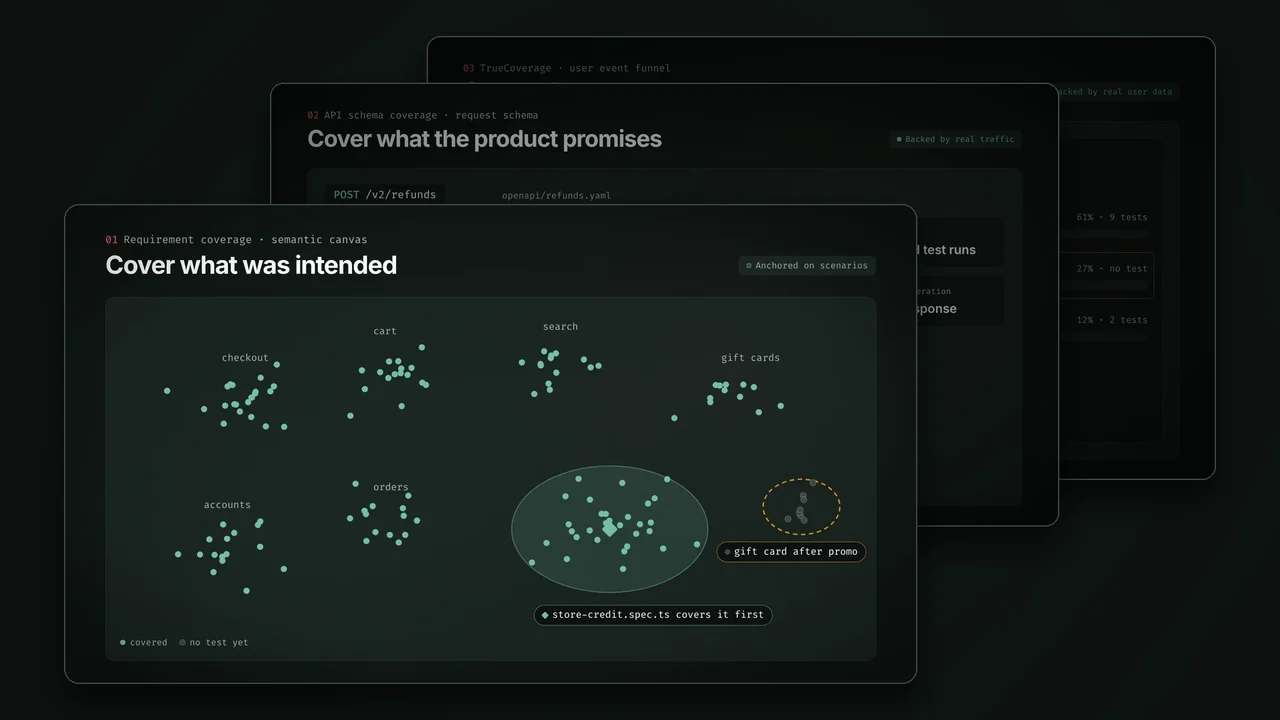
Every test links to a scenario with one annotation. Coverage rolls up through your story folders, and the semantic canvas maps stories, scenarios and tests by meaning, so weakly covered areas stand out even where nobody drew a link.
Anchored on scenario annotations
API schema coverage
Cover what the product promises.
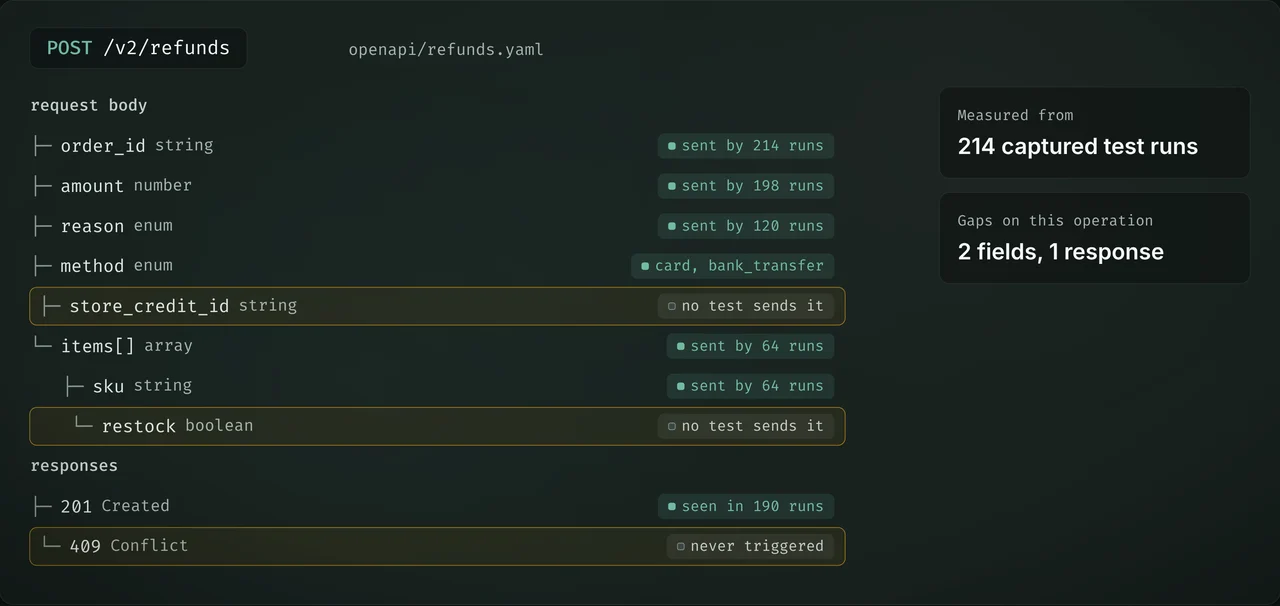
Point TestChimp at your OpenAPI specs. The TestChimp fixture records the requests and responses your tests produce, so coverage is measured operation by operation, field by field and response code by response code.
Backed by real traffic
TrueCoverage
Cover what matters to users.
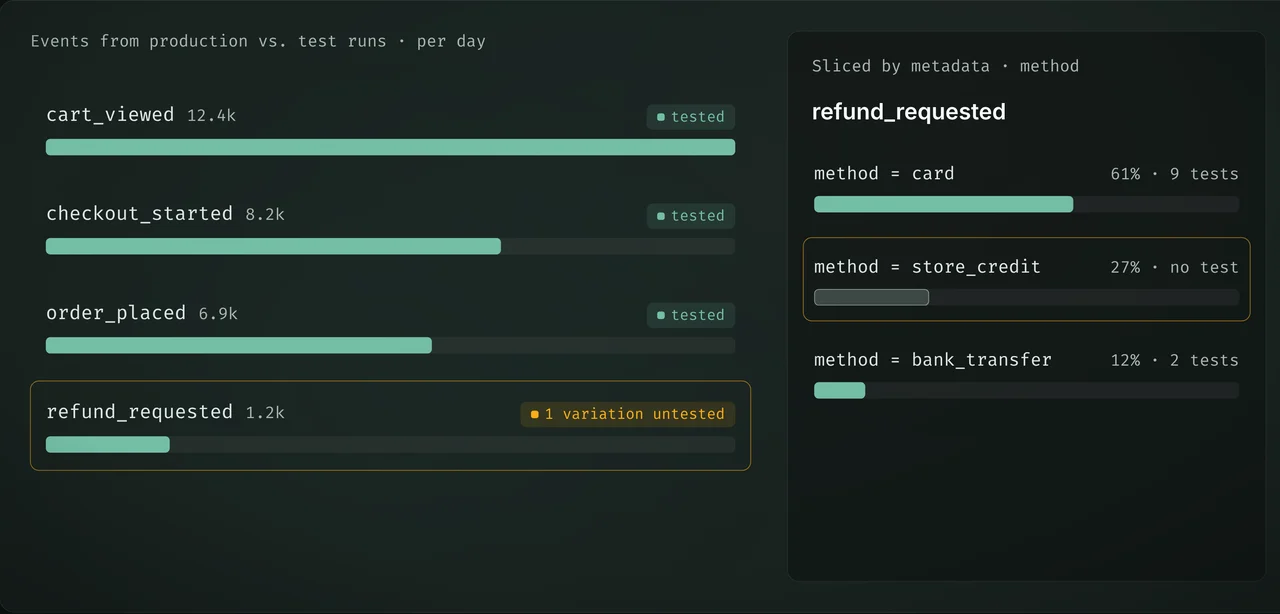
Compare the events your users emit in production with the events your tests produce. Untested behaviour is ranked by Demand, Depth, Duration and Drop-off, down to the metadata values that make each variation.
Backed by real user data
Cover the most ground first.
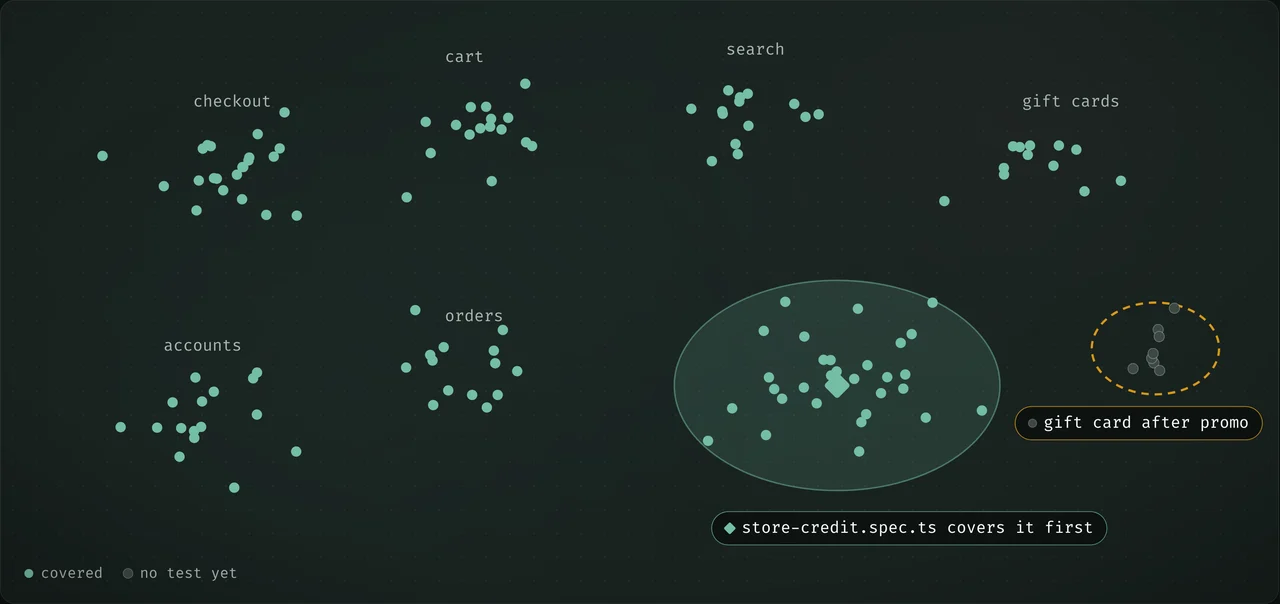
TestChimp places every story, scenario and test in one embedding space, so the semantic canvas maps your product surface by meaning. Uncovered areas show up as gaps on the map, and the largest gaps are the most exposed parts of the product. Testing there first gets the most coverage out of every test.
The largest gaps first
Scenarios cluster by what they mean, not by which folder they sit in, so an uncovered area stands out even where nobody drew a link. Your agent reads the same map and writes the test that covers the most ground next, weighed against each scenario’s priority.
- Gaps found by meaning, not only by missing links.
- The highest-value test written first.
- Lookalike scenarios and duplicate tests surface on the same map.
Measured from what happened, not from labels.
An annotation says a test is meant to cover a scenario. Two of the three lenses check what the test actually did. If no test ever sends a field, triggers a response code or takes a path your users take, it shows up as a gap, whatever the annotations say.
Every field the API promises
Coverage is computed from the payloads your tests send and receive. A request field no test populates, or an error response no test triggers, is an open gap on the operation it belongs to.
Every path your users take
TrueCoverage reads the same events from production and from test runs. A variation users hit every day, such as a refund paid out as store credit, stays flagged until a test exercises it.
Manual testing counts too.
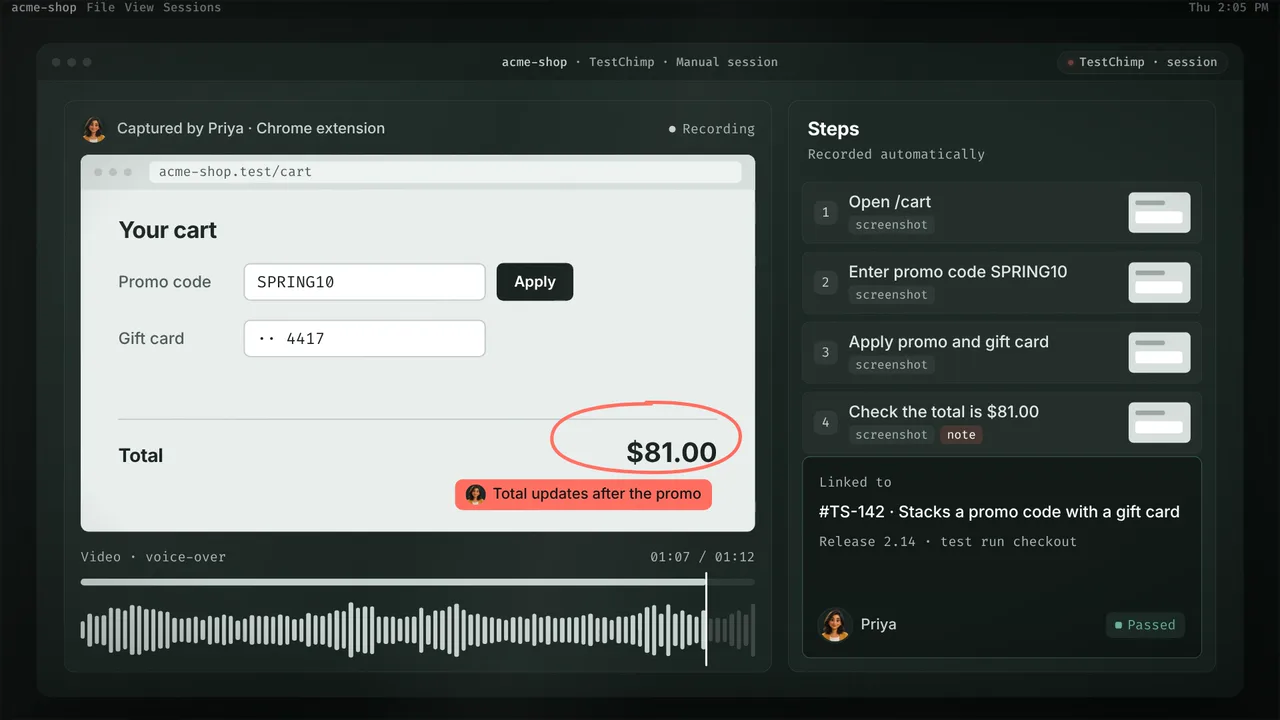
Some checks need a person. Their sessions should count toward coverage as much as an automated run does, and carry as much evidence.
Sessions with full evidence
Testers capture manual sessions in the Chrome extension or TestChimp Studio: every step, screenshots, a video with voice-over, and notes drawn on the screen. Nobody writes the report afterwards.
- Link a session to a scenario in a release’s test run.
- It counts toward coverage beside the automated results.
- Reviewers see what was checked, not just a pass.
One fixture makes it measurable.
Tests stay plain Playwright in your repo. When your agent writes them with the TestChimp skill, it adds a scenario annotation, the TestChimp fixture and screen-state markers, which is all the three lenses need.
tests/checkout/promo-stacking.spec.tswritten by your agent with the TestChimp skillimport { test, expect } from '@testchimp/playwright';test('stacks a promo code with a gift card', {annotation: [{ type: 'scenario', description: '#TS-142' }],}, async ({ page, markScreenState }) => {await page.goto('/cart');await page.getByLabel('Promo code').fill('SPRING10');await page.getByRole('button', { name: 'Apply' }).click();await markScreenState('Cart', 'Promo applied');await expect(page.getByTestId('total')).toHaveText('$81.00');});
- Line 1The TestChimp fixtureCaptures API payloads and tags user events around the test: API schema coverage and TrueCoverage
- Line 4A scenario annotationLinks the test to scenario #TS-142 for requirement coverage
- Line 9markScreenStateMarks the screen for ExploreChimp and Atlas
Works with any coding agent that takes a skill and MCP, including Claude Code, Cursor, Codex, Kiro and GitHub Copilot.
Built for agents to act on.
Your coding agents read the posture through the TestChimp MCP, so they close the gaps that matter first instead of writing more of the same.
Gaps ranked by what matters
Agents see which areas are weakly covered, which events your users depend on most and which endpoints are erroring in production, then write tests for the highest-value gaps first. Measuring that much was too slow for people to act on. For agents it is the starting point.
How the loop worksHow coverage is usually measured.
| Line coverage | Test count and pass rate | Test case managers | TestChimp | |
|---|---|---|---|---|
| Shows whether intended scenarios are tested | No | No | Partly | Yes |
| Finds API fields and response codes no test exercises | No | No | No | Yes |
| Weighs gaps by real user behaviour | No | No | No | Yes |
| Measured from what tests actually did | Yes | Partly | No | Yes |
| Counts manual sessions, with evidence | No | No | Pass or fail only | Yes |
| Works on agent-written Playwright in your repo | Needs a coverage build | Yes | No | Yes |
Test case managers: TestRail, Qase, PractiTest and similar tools.
Questions about coverage.
How is this different from code coverage?
Do I need OpenAPI specs?
Where does TrueCoverage get production data?
Can manual testing count toward coverage?
Do my tests have to change?

Know what your tests cover, not just how many there are.
Connect your repo and your agent. Your posture across all three lenses builds from the next test run.
14 days, no credit card.